Contents
Introduction....................................................................................................................1
System Requirements .................................................................................................... 1
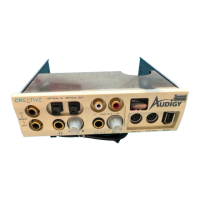
Your Live! Drive ............................................................................................................2
Switching Audio Input Sources..........................................................................3
Connecting Headphones.....................................................................................4
Connecting Microphone.....................................................................................4
Adjusting Headphones Volume and Microphone Gain......................................5
Installing Hardware........................................................................................................6
Step 1: Prepare the System for Hardware Installation........................................6
Step 2: Insert the Live! Drive into the System....................................................7
Step 3: Connect to the SB Live! Card ................................................................9
Step 4: (Optional) Install the Digital DIN Metal Bracket
(To connect to FPS2000 or DTT2500 speakers)............................................10
Step 5: (Optional) Connect to the Digital I/O Card (Only if you have one) ....10
Step 6: Complete the Installation .....................................................................10
Using Your Live! Drive................................................................................................ 10
Playing Games and Music................................................................................ 11
Watching DVD Movies Using SoftPC-DVD ...................................................11
Recording and Content Authoring....................................................................11
Installing Software....................................................................................................... 14
Additional Features in Device Controls ...........................................................14
General Specifications .................................................................................................15
Troubleshooting ...........................................................................................................15








 To Next Page