Overview
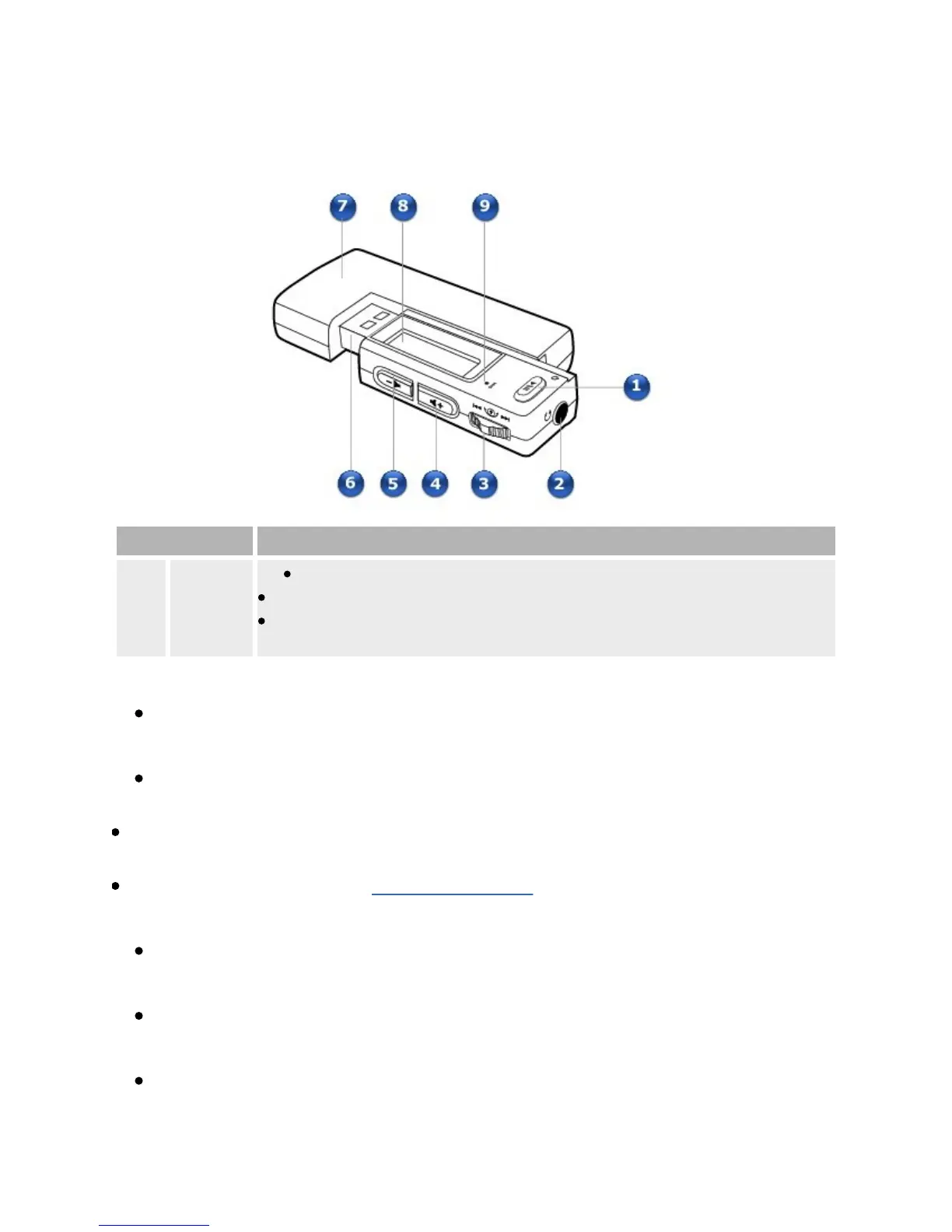
Component Usage
1
Play/Pause
button
Pressandholdtoturntheplayeronandoff.
Pressoncetostartplayingtracks,andpressagaintopauseplayback.
Whenyourplayerislocked,presstoturnontheLiquidCrystal
Display(LCD)backlight.
2
Headphonejack
Connectearphonestothisjack.
3
Scroller
TurntheScrollertoscrollthroughmenuoptionsandpresstheScrollerto
selectthem.Thisactionisalsoreferredtoas"ScrollSelect".
Duringplayback,turntheScrollertomovebetweentracks,orturnandhold
theScrollertomovewithinatrack.
Formoreinformation,seeUsingtheScroller.
4
VolumeIncreasebutton
Presstoincreasethevolume.
5
VolumeDecreasebutton
Presstodecreasethevolume.
6
USBconnector
Connectthisconnectortoyourcomputer'sUSBport.
7













 To Next Page