Note:
When devices are connected to mobile-in and line-in simultaneously, the device connected to the
mobile-in has higher priority.
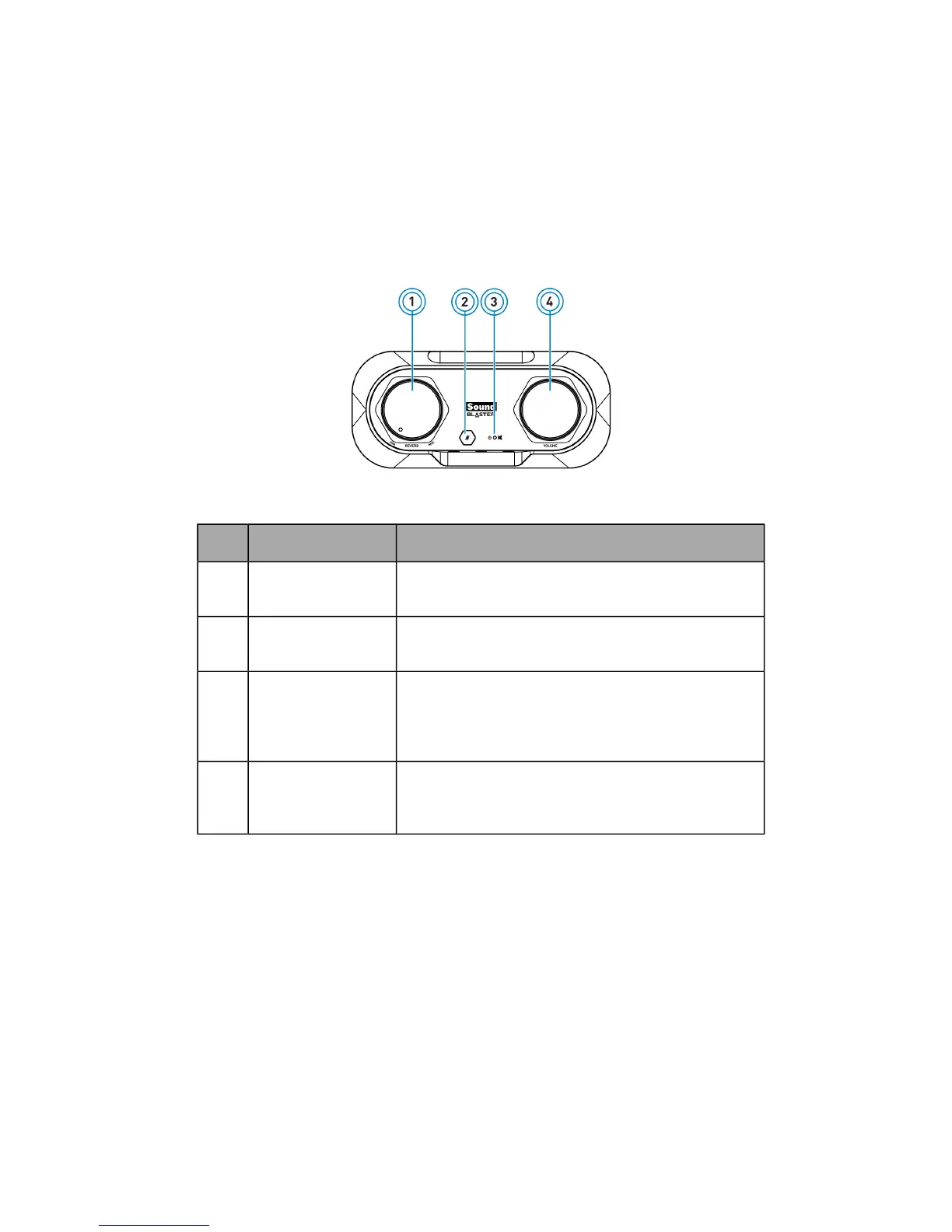
Using display indicators and control dials
Your USB audio device has the following indicators and control dials to adjust and monitor operational
status.
Control or Button Description
1 Reverb amount
knob
Turn clockwise or counterclockwise to increase or
decrease the reverb effect.
2 Microphone mute
button/indicator
Push to mute/unmute microphone volume.
Lights up in red when microphone is muted.
3 Power/playback
volume indicator
Lights up in red when USB power is detected.
Pulse in red when volume is muted.
Blinks rapidly in red 3 times when playback volume
knob is at maximum volume.
4 Playback volume/
mute knob
Turn clockwise or counterclockwise to increase or
decrease the playback volume. Push down to
mute/unmute.
About Your Hardware - 4 -


 To Next Page