1-6 Knowing and Installing Your Cards
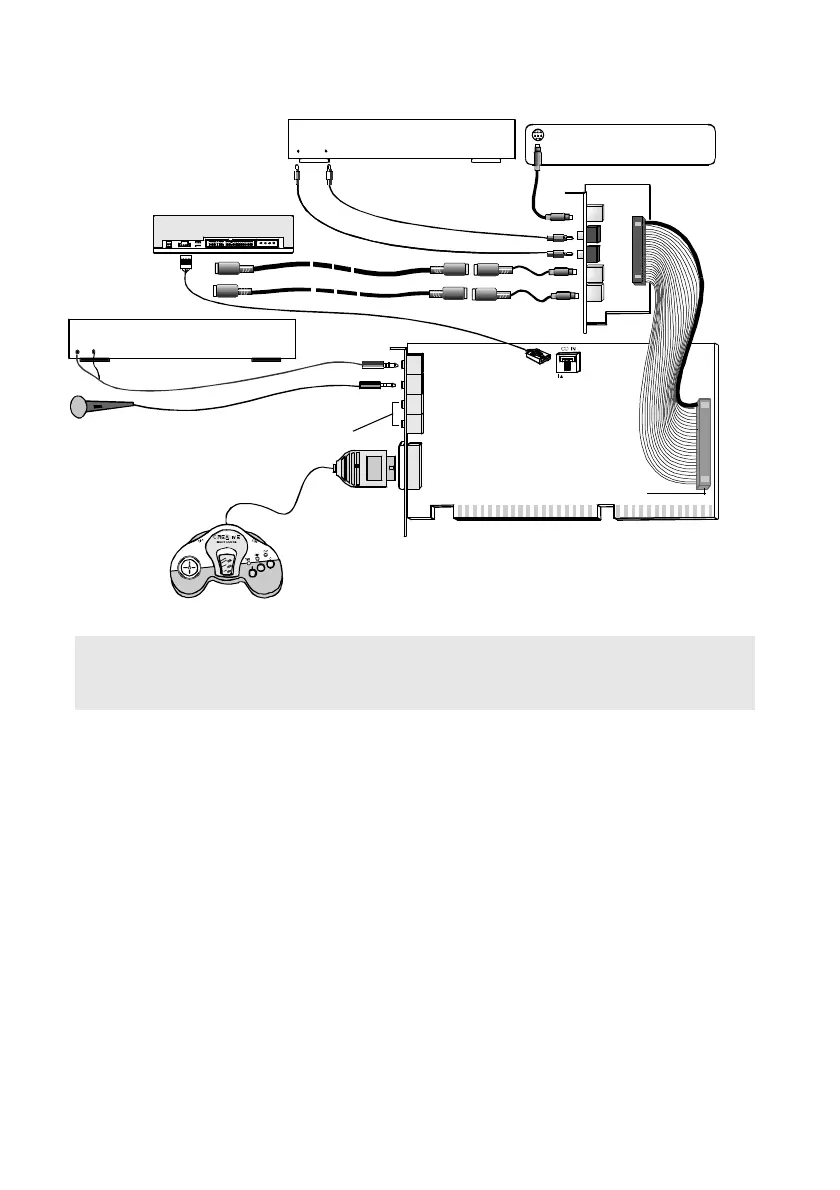
Figure 1-6: Connecting other devices.
CD-ROM drive
Line In
Mic In
Rear Out
Joystick/MIDI
GamePad
Line-out
Cassette and CD player,
Synthesizer, etc.
Microphone
CD Audio cable
CD Audio
connector
Line Out
External digital device
Digital
In Out
Digital I/O card
Digital I/O
cablek
RCA cables
SPDIF
Out
SPDIF
In
Audio Extension
connector
Desktop Theater 7.1
Digital
DIN
Digital
DIN
Main card
MIDI cable adapter
MIDI cable
See Figure 1-4 for connection
to PCWorks FourPointSurround or
Table 1-1 for other recommended
speaker connections.
MIDI
In
MIDI Out
Note: The SPDIF In jack on the Digital I/O card is not meant to receive Dolby Digital or
AC-3 compressed SPDIF signal. Therefore, do not connect it to your AC-3 SPDIF Output of
your Encore Dxr2 card or consumer DVD player or else you might not get any sound.













 To Next Page