Knowing and Installing Your Cards 1-5
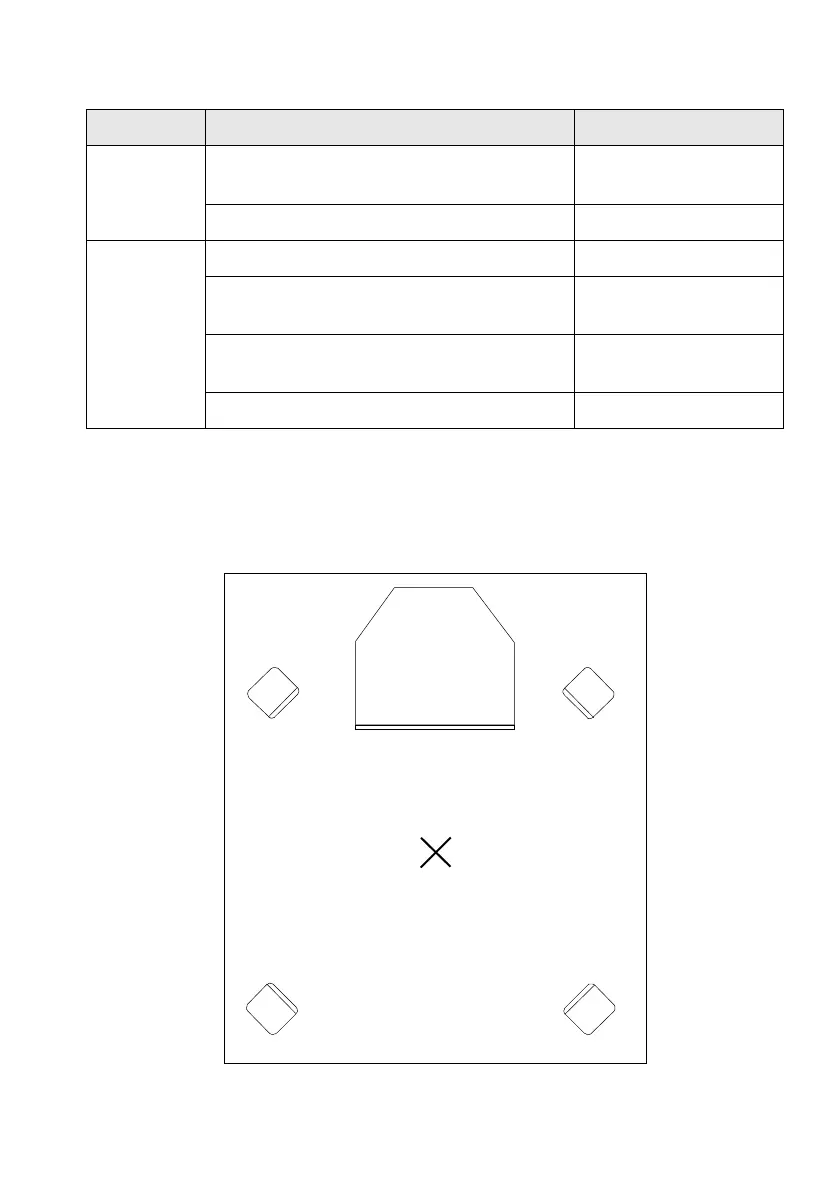
If you are using four speakers, place them such that they form the corners of a square with you are
exactly in the centre (as in Figure 1-5) and they are angled toward you. Make sure the computer
monitor is not blocking the path of your front speakers. You may want to adjust the relative
positions of the speakers until you get the best audio experience. If you have a subwoofer, place
the unit in a corner of the room for the optimum bass response.
Table 1-1: Recommended connection to Line Out and Rear Out jacks.
For Configuration Connect To
Surround
Sound and
3D Audio
4.1 powered speakers (for example, PCWorks
FourPointSurround)
Line Out and Rear Out
2 pairs of powered speakers Line Out and Rear Out
Stereo 1 pair of powered speakers Line Out
1 pair of non-powered speakers and a stereo
amplifier
Line Out
2.1 powered speakers (for example, PCWorks or
MicroWorks)
Line Out
headphones Line Out
Figure 1-5: Recommended speaker positions for the 4-speaker configuration.
Computer monitor
Front left speaker
Front right speaker
Rear left speaker
Rear right speaker
Yo u













 To Next Page