SPEAKER CONFIGURATION GUIDE
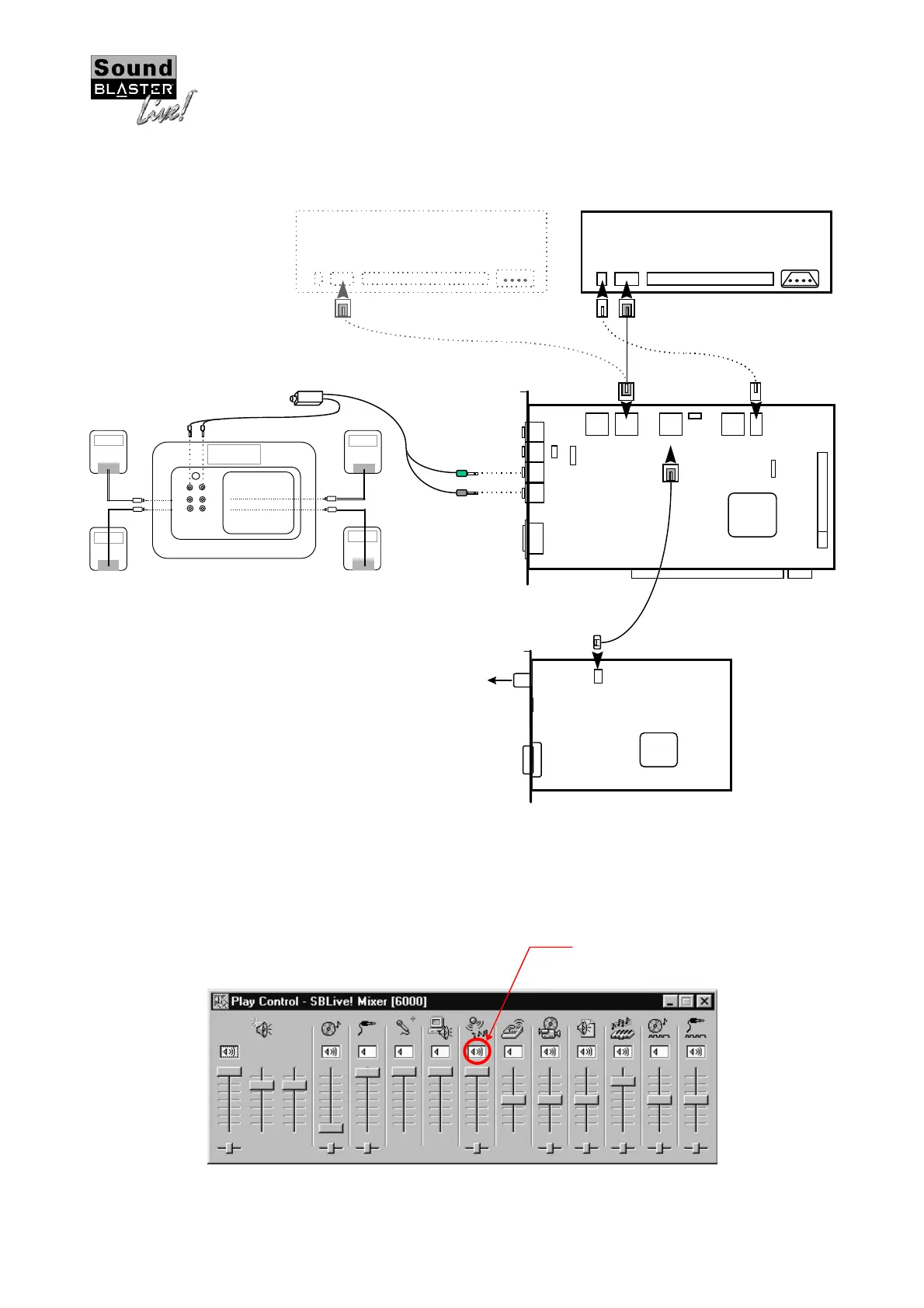
Recommended connection guide for Sound Blaster Live! with PC-DVD Encore
DXR2
F
R
F
R
PCW
ORKS
B Y H E N R Y K L O S S
CAMBRIDGE
SOUNDWORKS
BASS
LEVEL
AUDIO
INPUT
SPEAKER
OUT
12-14V DC IN
PO WE R
ON/O FF
REAR
REAR
LEFT
REAR
RIG H T
FRONT
FRONT
LEFT
FRONT
RIG H T
CAMBRIDGE
SOUNDWORKS
CAMBRIDGE
SOUNDWORKS
CAMBRIDGE
SOUNDWORKS
CAMBRIDGE
SOUNDWORKS
12VDC IN
PCWorks FourPointSurround
LINE IN
MIC IN
LINE OUT
REAR OUT
Mic_Conn
TAD CD_IN
AUX_IN
Pc-Spk
I2S_IN CD_SPDIF
VOL_CTLMB-Pro
EMU10K1
AUD_EXT
JOYSTICK/
MIDI
SB LIVE!
MAIN BOARD
CT4620
PC-DVD
MPC
Analo
Out
CD-ROM (Optional)
MPC
Analo
Out
DXR2
CD_OUT
Dolb
Di
ital
(AC-3) SPDIF
Out
VGA-Out
MPC-to-JST Audio Cable
To Dolby Di
ital
(AC-3) Decoder
(e.
.DeskTop Theater 5.1)
ENCORE DXR2
MPC
Di
ital
Out
MPC
Di
ital
Out
MPC-to-MPC (2-pin) Audio Cable
MPC-to-MPC (4-pin) Audio Cable
F
OUR
P
OIN T
S
UR RO U ND
Figure 4 : Connection guide for SB Live! with PC-DVD Encore DXR2
It is recommended to connect the CD_OUT connector of your Encore DXR2 card to the AUX_IN connector
of Sound Blaster Live!. In this case, when you are playing your DVD movies or games, make sure you turn
on/enable the AUX Input in the SB Live! Mixer application within the AudioHQ program folder, as illustrated
below.
Figure 5 : Enable AUX Input for playing DVD movies or games
‘Left-click’ your
mouse cursor here to
enable the AUX Input
AUX_IN













 To Previous Page