THE SOUND BLASTER ROAR 2 PRODUCT GUIDE 18
EXPERIENCING THE SOUND BLASTER ROAR 2
PLUS A WHOLE ARRAY OF MIND-SHATTERING FEATURES! (cont.)
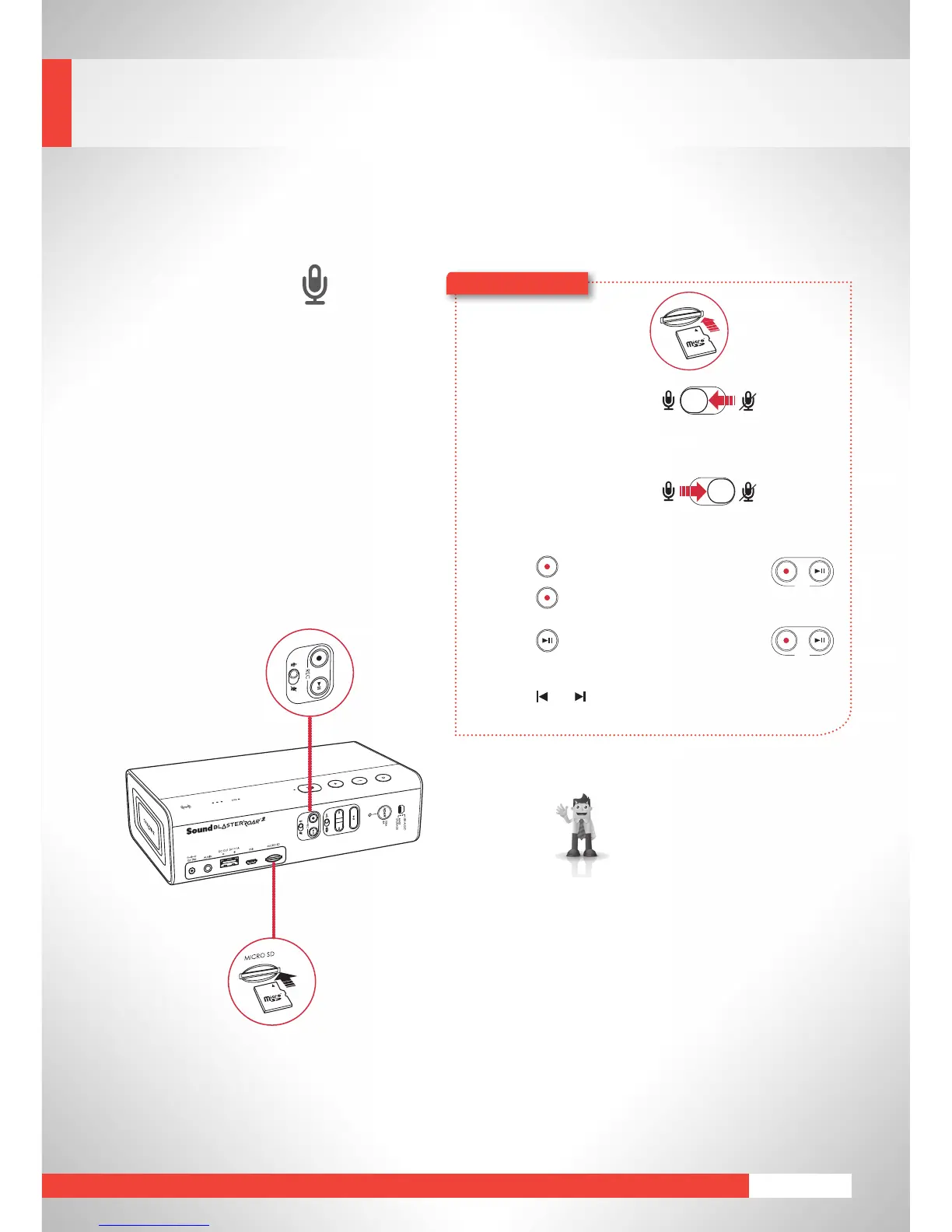
Audio Recorder
You can use the Sound Blaster Roar
2 to record a phone conversation, a
discussion, or even a song playing via
Bluetooth
. A folder labeled “VOICE”
will be automatically created on your
microSD card by the Sound Blaster Roar
2 to store all your audio recordings.
To skip recorded tracks:
Press or during playback.
microSD
Card
1 Insert a microSD card.
2 Select source.
From built-in microphone
Switch on the microphone.
– Records voice and sounds
picked up by the microphone.
From Aux-in /
Bluetooth
source
Mutethemicrophone.
–RecordsAux-inaudio
directly from your media
player or
Bluetooth
device.
3 Press (REC)tostartrecording.
Press (REC)againtostoprecording.
4 Press (REC)toplaybackrecordings.
Here’showyoudoit!
Recording specifications
●
Audiorecordingissaved in WAV
format in the VOICE folder.
●
For recording, a Class 4 microSD
card is recommended.
●
The default recording sampling
rateisat16kHz.Thisisdesigned
to record longer voice recording
sessions (e.g. meetings) and avoid
large file sizes.
●
Recording from microphone also
records the audio coming out
from
Bluetooth
andAux-inaudio
sources.
●
SimultaneousWMA/MP3audio
playback using microSD card and
audio recording is not supported.










 To Next Page