THE SOUND BLASTER ROAR 2 PRODUCT GUIDE 19
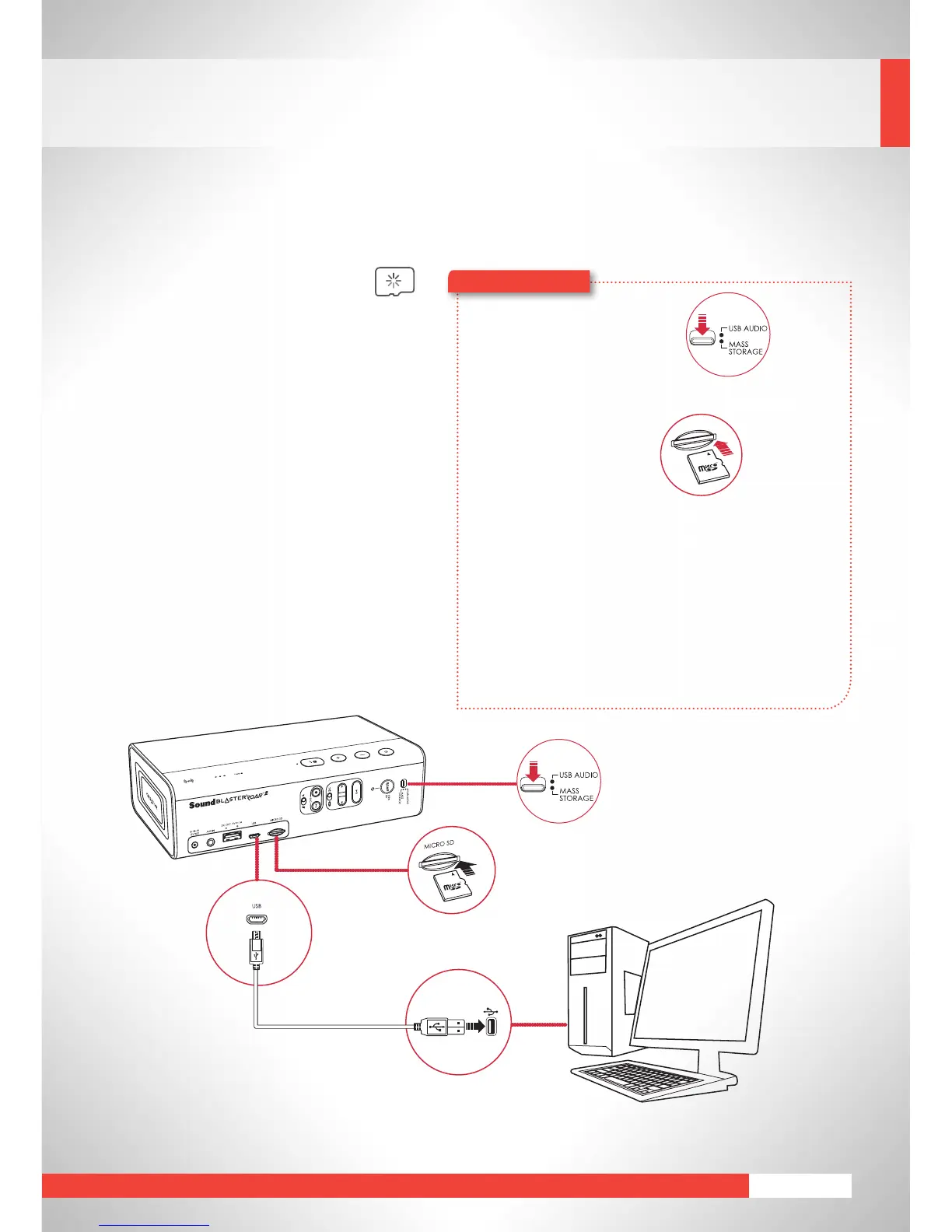
MicroSD Card Reader
Easilymodify contentsof your microSD^^
card on your computer via the Sound
Blaster Roar 2. It functions as a microSD
card reader whenever you connect it to a
computer.
^^MicroSDorMicroSDHCcardsupto32GB.
1 Slide the slider switch to
MassStorage.
2 ConnectthespeakertoacomputerviaUSBcable.
3 Insert a microSD card.
4 Browse or modify the microSD card contents on
your computer.
Here’showyoudoit!
Note:
•
ToswitchbacktoUSBAudiomode,slidetheslider
switchtoUSBAudio.
• Dependingonyouroperatingsystem,apop-up
messagemayappearinformingyouthattheMass
StorageDevicehasnotbeenejectedproperly.This
is normal and not disruptive to your microSD card.
microSD
Card










 To Next Page