THE SOUND BLASTER ROAR REVIEWERS’ GUIDE 15
EXPERIENCING THE SOUND BLASTER ROAR
THE SOUND BLASTER ROAR REVIEWERS’ GUIDE 14
PLUS A WHOLE ARRAY OF MIND-SHATTERING FEATURES!
Performanceaside,theSoundBlasterRoaralsohasmanyaddedfeatures.
Bedtime Mode*
In Bedtime Mode, the Sound Blaster
RoarplaysaudiolesfromthemicroSD
card and gradually reduces its volume
before automatically shutting down.
Thisisausefulfeatureforyoutorecord
yourself reading a bedtime story and
play it back to your children as they are
about to sleep.
*Patentpending
One-Touch Siren
If you think the Sound Blaster Roar is
loud, you haven’t heard it at its loudest
yet!TheSoundBlasterRoarcomeswith
a built-in one-touch siren that lets you
instantly grab attention when you need
to–likeatacamporinanemergency.
Thesirenfeaturewasnotdesigned,
manufactured,orsoldforusein
emergencies.Creativeisnotliableforany
lossofordamagetolife,healthorproperty
as a result of the use of this product feature.
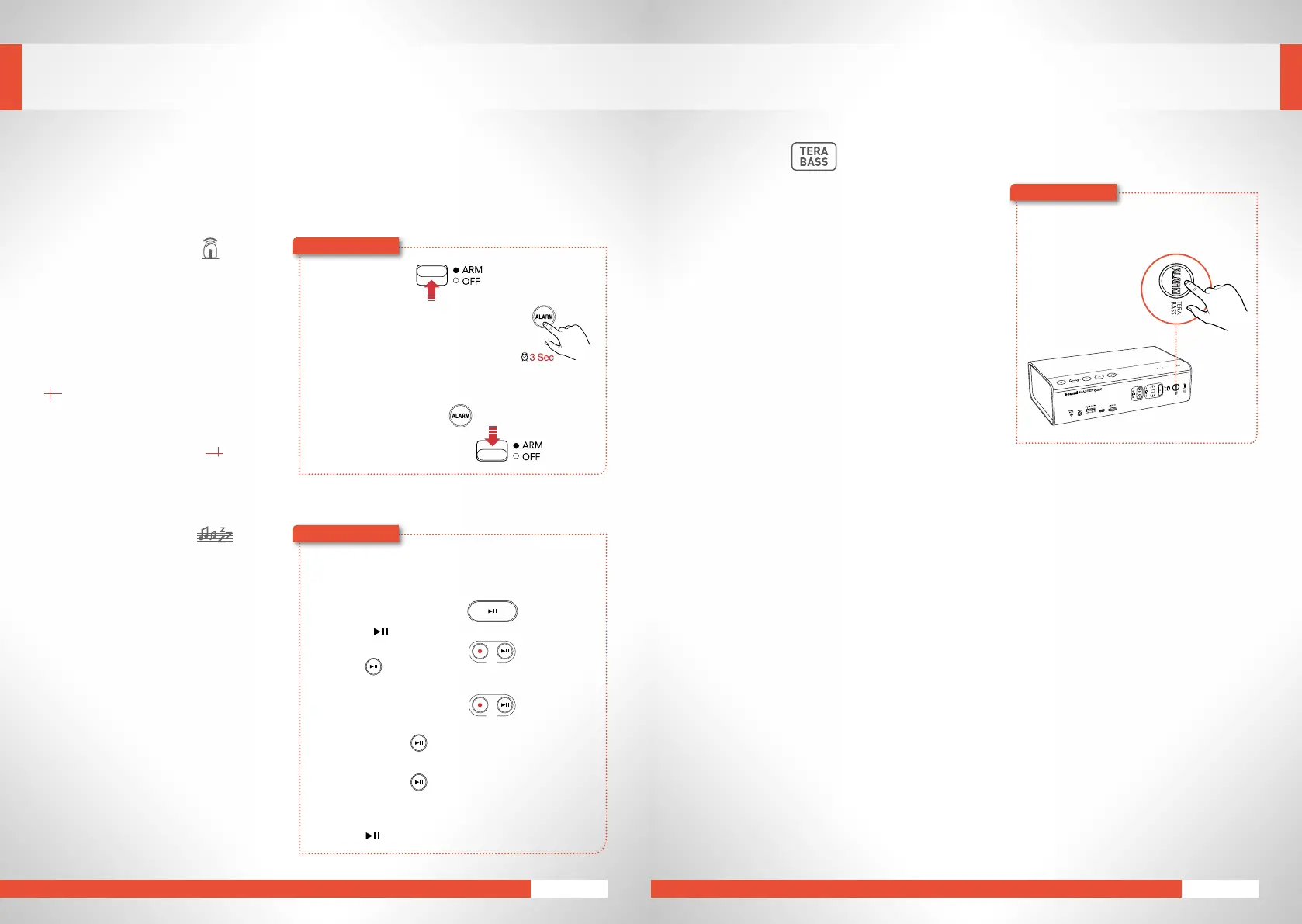
1 Armthesiren.
2 Press and hold ALARMfor3seconds
totriggerthesiren*.
3 Switch off the siren.
Press ALARM again.
Slide the switch to OFF.
*Thesirencanbetriggeredevenwhen
the speaker is switched off.
Here’showyoudoit!
OR
1 InsertamicroSDcard.
2 Start audio playback.
To play music files:
Press .
To play voice recordings:
Press(REC).
3 ActivateBedtimeMode.
For 15 minutes:
Press and hold (REC)untilyouhear a beep.
For 30 minutes:
Press and hold (REC)untilyouhear two beeps.
OR
To deactivate Bedtime Mode:
Press .
REC
REC
Here’showyoudoit!
TeraBass
Like a professional loudspeaker, Sound Blaster Roar
is designed to reproduce low frequencies accurately.
Mostspeakersinthis classtendtoarticiallyboostlow
frequencies, making the playback ‘boomy’, and lacking
midrange. Bass from the Sound Blaster Roar on the
other hand, is tight, deep and uncolored, and the
midrangeisneutralandfull-bodied.
However,whenSoundBlasterRoarisplayedbackatlow
tomediumvolumelevels–forexampleduringlatenight
listening–listenersmaynotperceivebassthatwell,and
maydesiremorepronouncedbasslevelsatlowvolume.
TeraBasscaterstothissubjectivemusicality.
TeraBass will help add excitement to the playback
and also compensate for the loss in bass when the
loudspeaker is placed in less than ideal acoustical
environments.
PresstheAlarm/TeraBassbuttonwhileyour
musicisplayingandhearthedifference!
1
2
L
S
Here’showyoudoit!
When do I use TeraBass?
TeraBass is best used when:
• The Sound Blaster Roar is listened to at low
to medium volume levels – for example
near-elduse.
• The Sound Blaster Roar is placed in an
environment where there is an absence of
boundarywallsforbassre-enforcement–for
exampleyou’reoutdoors.
•TheSoundBlasterRoarisplacedonverydense
material like marble or granite or in mid-far
eld listening conditions – for example in a
dance hall or at indoor gatherings.
When do I turn off TeraBass?
Sound Blaster Roar allows you to turn on and off
thisbassenahncementfeature.Manycompeting
designs in the portable segment on the other
hand feature bass “enhance” processing
withoutanoptiontoturnitoff–thisoftenleads
to playback where the loudspeaker sounding
‘boomy’, and tiring to listen to when placed in
a corner.
Do not use TeraBass when:
• Theunitisplacedinanenclosedenvironment
where there is sufcient bass reecting
off surfaces like from boundary walls – for
example on bathroom counter tops, in small
bedroomsordorms.










 To Next Page