THE SOUND BLASTER ROAR REVIEWERS’ GUIDE 19THE SOUND BLASTER ROAR REVIEWERS’ GUIDE 18
PLUS A WHOLE ARRAY OF MIND-SHATTERING FEATURES! (cont.)
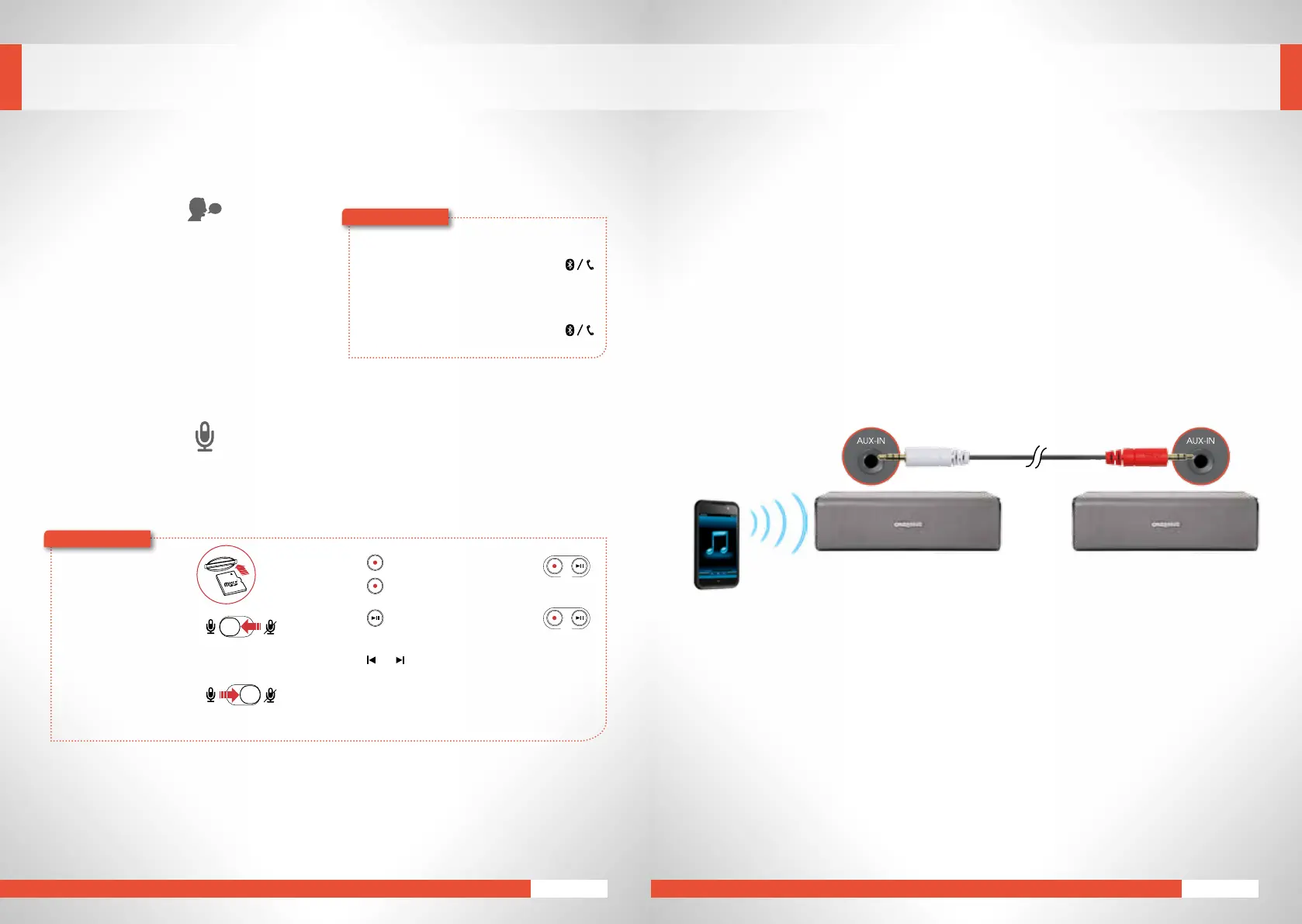
Voice Prompts
The Sound Blaster Roar features an intuitive
voice prompt system that helps you set up a
Bluetooth
connection with your device. Once
you’re familiar enough with the speaker, you
havetheoptiontodisablethevoiceprompts.
To disable voice prompts:
When the speaker is powered on, press
and
– together.
To enable voice prompts:
When the speaker is powered on, press
and
+ together.
Audio Recorder
You can use the Sound Blaster Roar to record a phone conversation, a discussion, or even a song playing
via
Bluetooth
.Afolderlabeled“VOICE”willbeautomaticallycreatedonyourmicroSDcardbytheSound
Blaster Roar to store all your audio recordings.
To skip recorded tracks:
Press or during playback.
microSD
Card
1 InsertamicroSDcard.
2 Select source.
From built-in microphone
Switchonthemicrophone.
–Recordsvoiceandsounds
pickedupbythemicrophone.
From Aux-in /
Bluetooth
source
Mutethemicrophone.
–RecordsAux-inaudio
directlyfromyourmedia
player or
Bluetooth
device.
3 Press (REC)tostartrecording.
Press (REC)againtostoprecording.
4 Press (REC)toplaybackrecordings.
REC
REC
Here’showyoudoit!
Here’showyoudoit!
EXPERIENCING THE SOUND BLASTER ROAR
MegaStereo Feature
EnjoythefullMegaStereoexperiencewithanotherSoundBlasterRoar!
The MegaStereo technology is a unique feature built into the Sound Blaster Roar to give you a
wider soundstage anddouble the punch when 2Sound BlasterRoar are connected together with a
MegaStereocable.
1. MegaStereo mode *
AnoptionisprovidedfordualSoundBlasterRoar(s)tobeconnectedtogetherwiththeMegaStereocable
todeliver“MegaStereo”wheretheleftRoar’shighfrequencydriversbothdelivertheleftchanneland
therightRoar’shighfrequencydriversbothdelivertherightchannel.Thisenablesforamuchwider
stereosoundstageonewouldnormallyassociatewithinatypicalhomestereosystem.
MASTER(LEFT) SLAVE(RIGHT)
SimplyconnectthewhitepartofthecabletotheAux-inoftheleftspeaker,redparttotheaux-inofthe
rightspeakerandcrankupthevolumetoenjoy!










 To Next Page