THE SOUND BLASTER ROAR REVIEWERS’ GUIDE 21THE SOUND BLASTER ROAR REVIEWERS’ GUIDE 20
PLUS A WHOLE ARRAY OF MIND-SHATTERING FEATURES! (cont.)
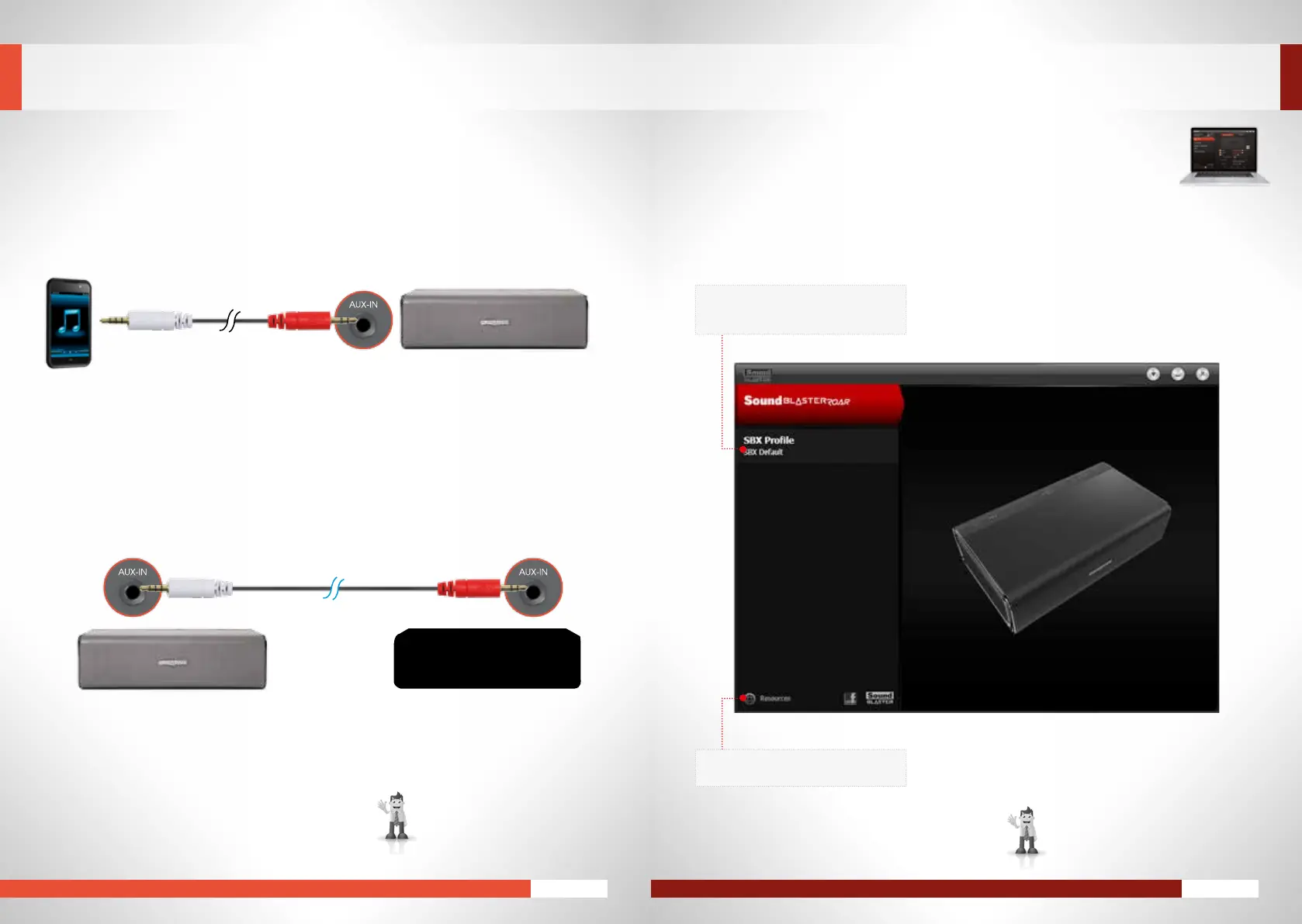
Youcanalsouseitinthefollowingwaystoo!
SimplyconnecttheredendtotheRoarandthewhiteendtoyoursourcedeviceandyouaredone!
3. Have fun enslaving other speakers * ^
Havefunhijackinganotherspeakerandenslaveittoplayyourmusic!Simplyconnectthewhitepartof
thecabletotheAux-inoftheRoarandtheredparttotheotherspeakerandplayyourmusic!
?
*Aux-inforbothspeakersaredisabled
whentheMegaStereocableis
connected.
EXPERIENCING THE SOUND BLASTER ROAR
^Audiomaysoundunbalanceddueto
differenceinspeakermatching.
MaynotworkwithaudiodevicesusingtheOMTPstandard.
2. Connecting the Roar to other audio devices
APPENDIX: ENHANCING AUDIO PLAYBACK
SOUND BLASTER CONTROL PANEL FOR PC/MAC
TheSoundBlasterControlPanelsoftwareworksintandemwiththeSoundBlasterRoartogiveyou
real-timeenhancedcontroloveryourPC/Macaudio.Visithttp://www.soundblaster.com/downloads/
SBCP to download the Sound Blaster Control Panel.
SwitchtheSoundBlastertoUSBAudiomode
before you install and run the Sound Blaster
Control Panel.
SBX audio settings
• Showsthecurrentaudioproleloaded
• Selectanotherproleormodifysettings
Resources link
• TolearnmoreaboutCreativeproducts
MASTER(LEFT) SLAVE(RIGHT)










 To Next Page