Using Sound Blaster Live! 11
"
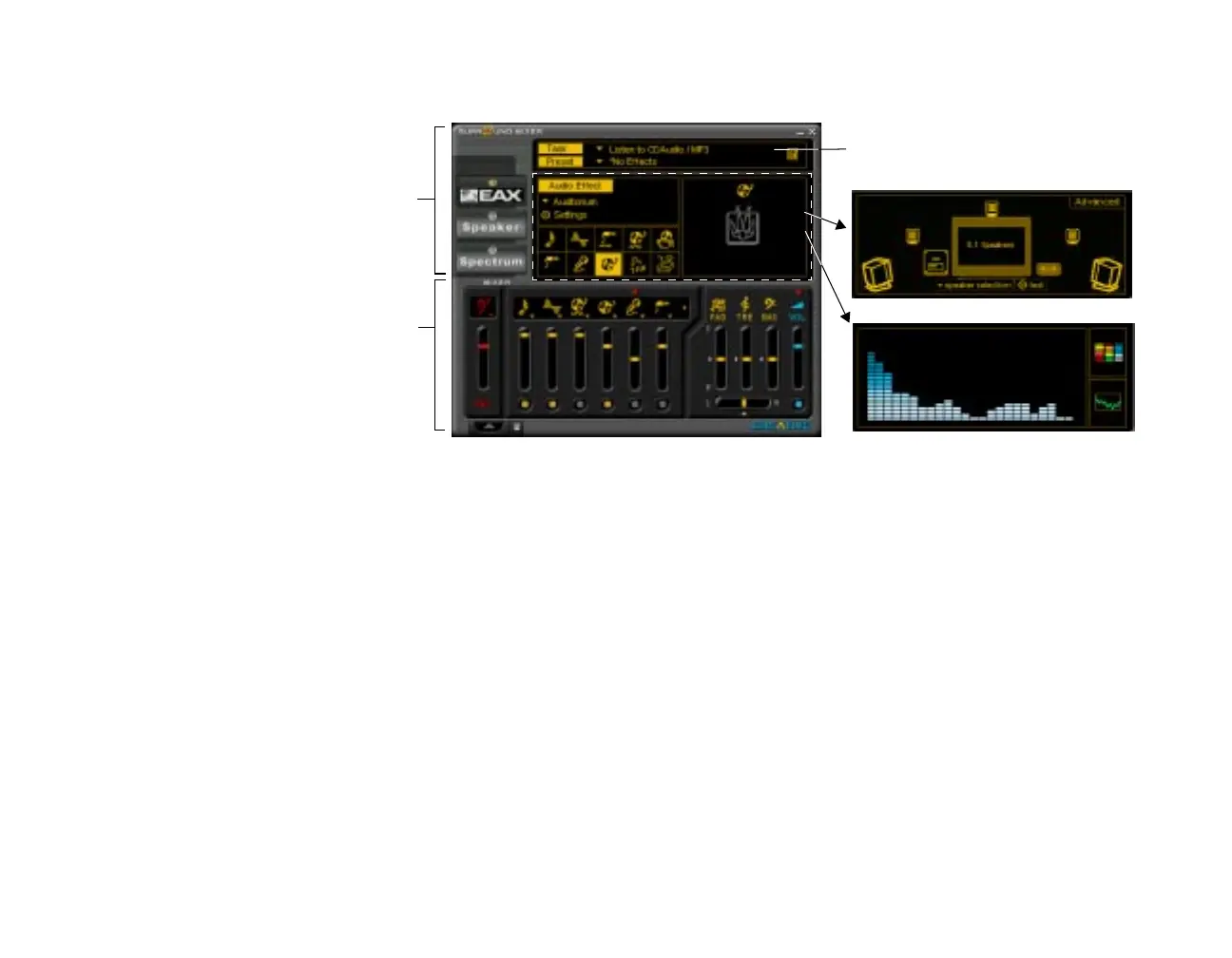
Creative Surround Mixer is an application for setting and controlling the various aspects of your audio
card. It consists of two sections: Main and Mixer
" The top area of the Main section allows you to:
❑
Select tasks or save, delete, import, and export Super-Environment presets. You can save the
settings as Super-Environment presets for the selected speaker output. A selected preset is an
automatic configuration of speakers, mixer, and effects.
The three buttons on the left side of the Main section allow you to switch between three different views:
❑
EAX: Select and create environments; position audio sources within the configuration space.
❑
Speaker: Set up speakers and perform a speaker output test.
❑
Spectrum: Select and display the spectrum analyzer during playback or recording.
" The Mixer section allows you to:
❑
Mix sounds from various audio input sources when playing or recording.
❑
Adjust the volume level for the audio input sources.
❑
Adjust the treble and bass level, front/rear or left/right balance.
To identify the icons on the Surround Mixer, place the pointer over any icon or area to display a label.
For details on what you can do in Surround Mixer, explore its online help.
Mixer
Main
Speaker view
Spectrum view
Set Super-Environment presets








 To Next Page