3
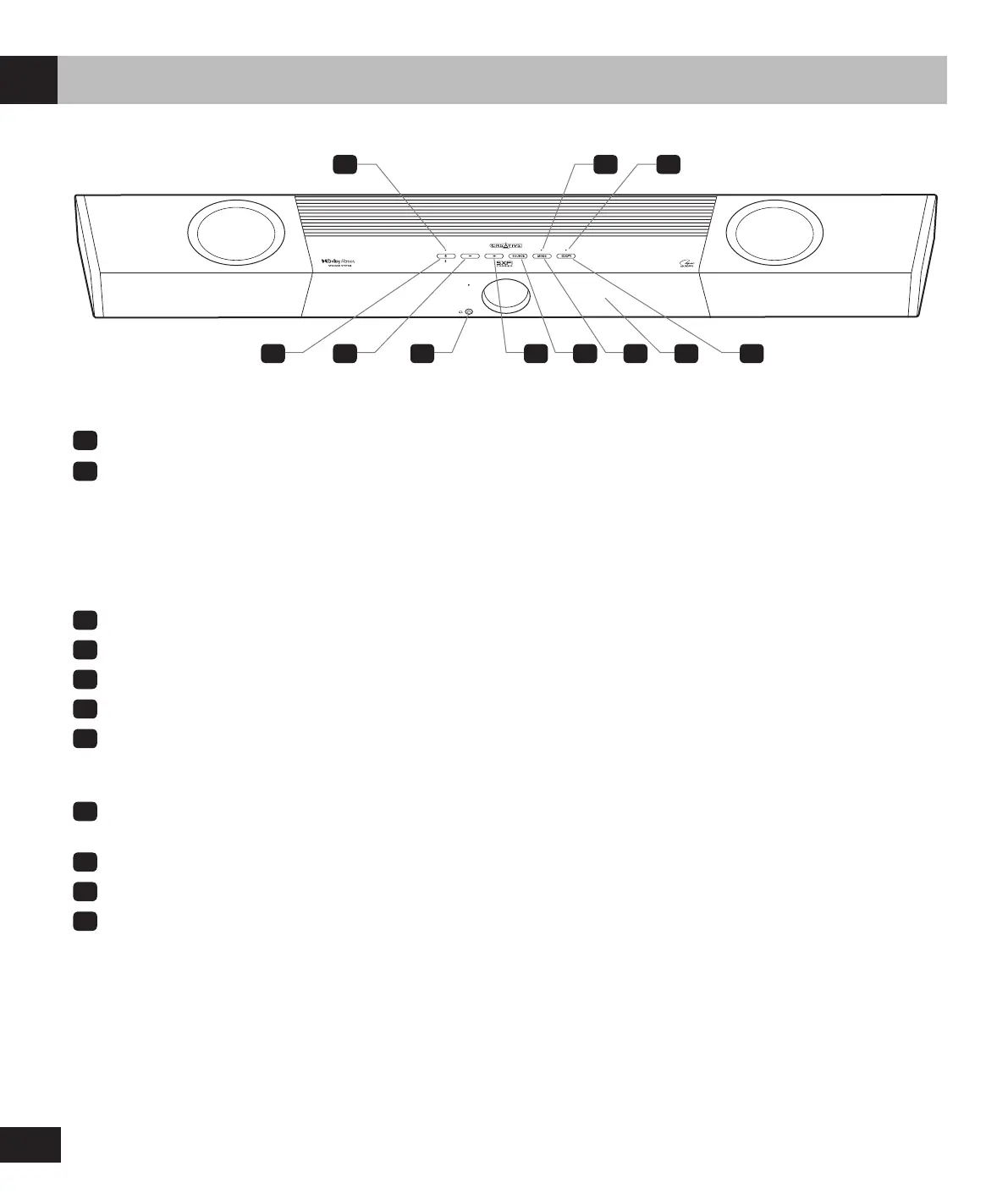
Overview – Creative SXFI CARRIER
Power Button / Bluetooth
®
Pairing
Power Button LED
• Solid Red: Standby Mode
• Solid Yellow: Network Standby
• Solid White: Power On
• Solid Blue: Bluetooth Connected
• Flashing Blue: Bluetooth Pairing
• Flashing White: User Acknowledgment Required for Mobile App Pairing
Volume –
3.5 mm Headphone-out
Volume +
Input Sources
Mode Selection
Press once to cycle through available Sound modes (Movie > Music > Night > Neutral > SuperWide).
Press and hold for 5s to enter subwoofer’s Pairing mode
Mode Selection LED
• Flashing Green: Subwoofer Pairing
Built-in LED Display
Super X-Fi
®
Super X-Fi LED
Headphone Mode:
• Solid Green: Super X-Fi Headphone Holography Enabled
• Solid Amber: Super X-Fi Headphone Holography Disabled
• Flashing Red: Super X-Fi Prole Transfer in Progress
Speaker Mode:
• OFF
1
4
3
2
5
6
7
9
8
10
11
2 118
1 3 4 5 6 7 9 10
EN






 To Next Page