5.3
LINK Tips and Tricks
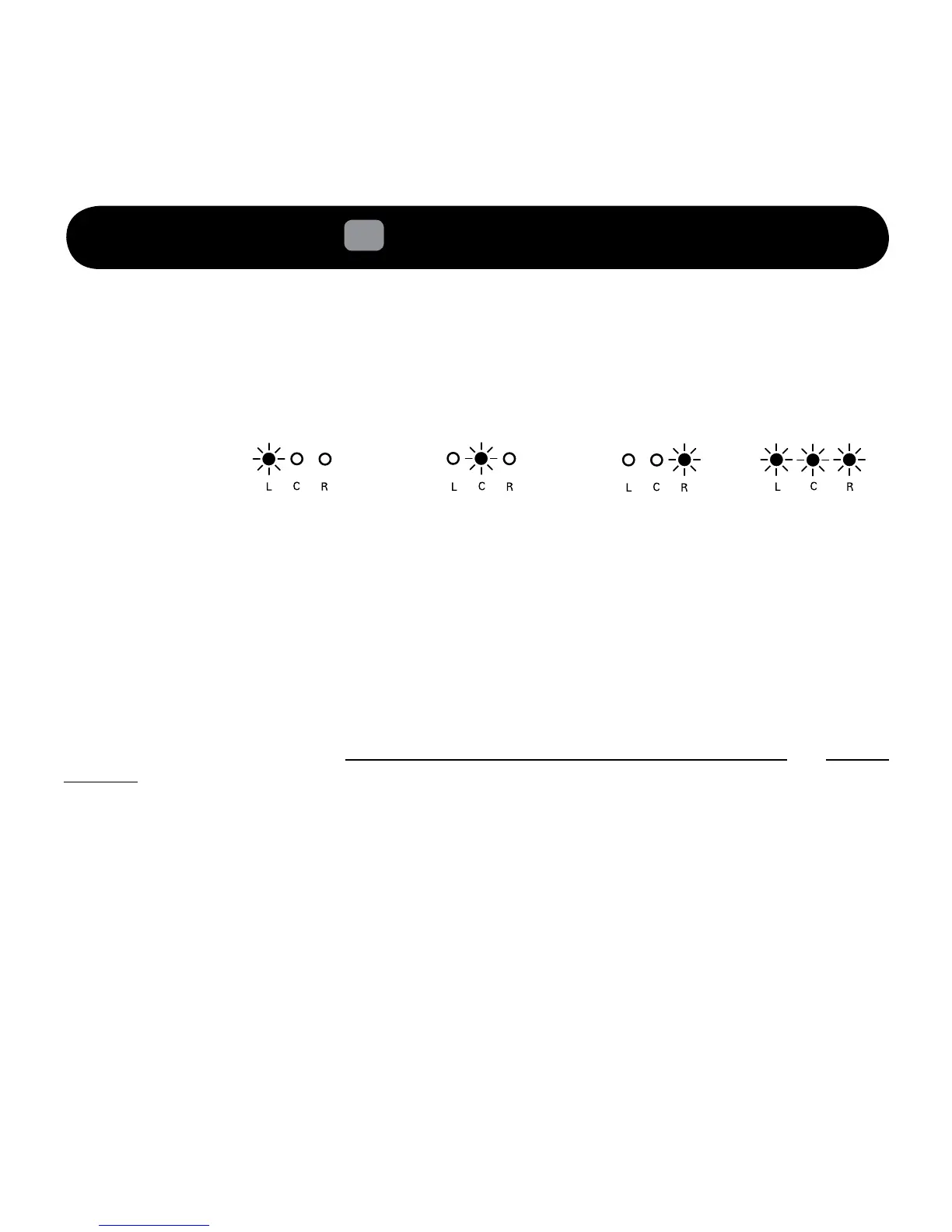
How to identify which speaker is the LEFT, CENTER, RIGHT speaker.
• PressandholdthePowerON/Standbybuttonlocatedattherearofthespeaker.
TheLinkLEDindicatorwilllightitsrespectiveLEDChannelitwasconguredfor.
My LEFT and CENTER Channel D3x does not respond to my actions on either buttons or
Bluetooth
connections when they are in LINK mode.
• Thisisnormal.TheD3xinslavemodedoesnotrespondtoanybutton(exceptthePower
ON/StandbytoindicatetheidentityofthespeakerviaLEDindication)astheyarereceiving
cuesfromtheRIGHTMasterspeaker.Thisincludes
Bluetooth
connection,AUX-INinputand
Volume control.
Can I add more speakers or remove speakers from a 2.1 Setup?
Yesyoucan.HoweveryouwouldneedtocleartheLINKsystemonallthespeakersandsubwooferand
re-linkthemagain.Pleaserefertosection4.3Resettofactorysetting/clearLINKSystem and section
2.1or2.2torecongureyoursystemagain.ForoperationsontheZiiSoundDSxwirelesssubwoofer,
please refer to its user manual for more information.
I cannot re-connect my speakers together. All that is shown is all the LEDs blinking in unison and
going off after 1 minute. What should I do?
Thisisanerrorindicatortoindicatethatoneofthelinksarenotpresentinthedenedprevioussetup.
Thereare2waystotroubleshoot.
a)PowerONallyourspeakersandpresstheLINKButtonagaintoattempttolinkthespeakers
together.EnsurethattheSubwooferhavetheirmainsPoweredON.
b)ReturntofactorydefaultsettingstoclearLINKsystemcongurationforallyourspeakers
andsubwooferinvolvedandre-linkthemagain.
(Slave/Master*)
Center Speaker
(Master)
Right Speaker
(Slave)
Left Speaker
Not Configured
LinkLEDStatus
Indicator






 To Next Page