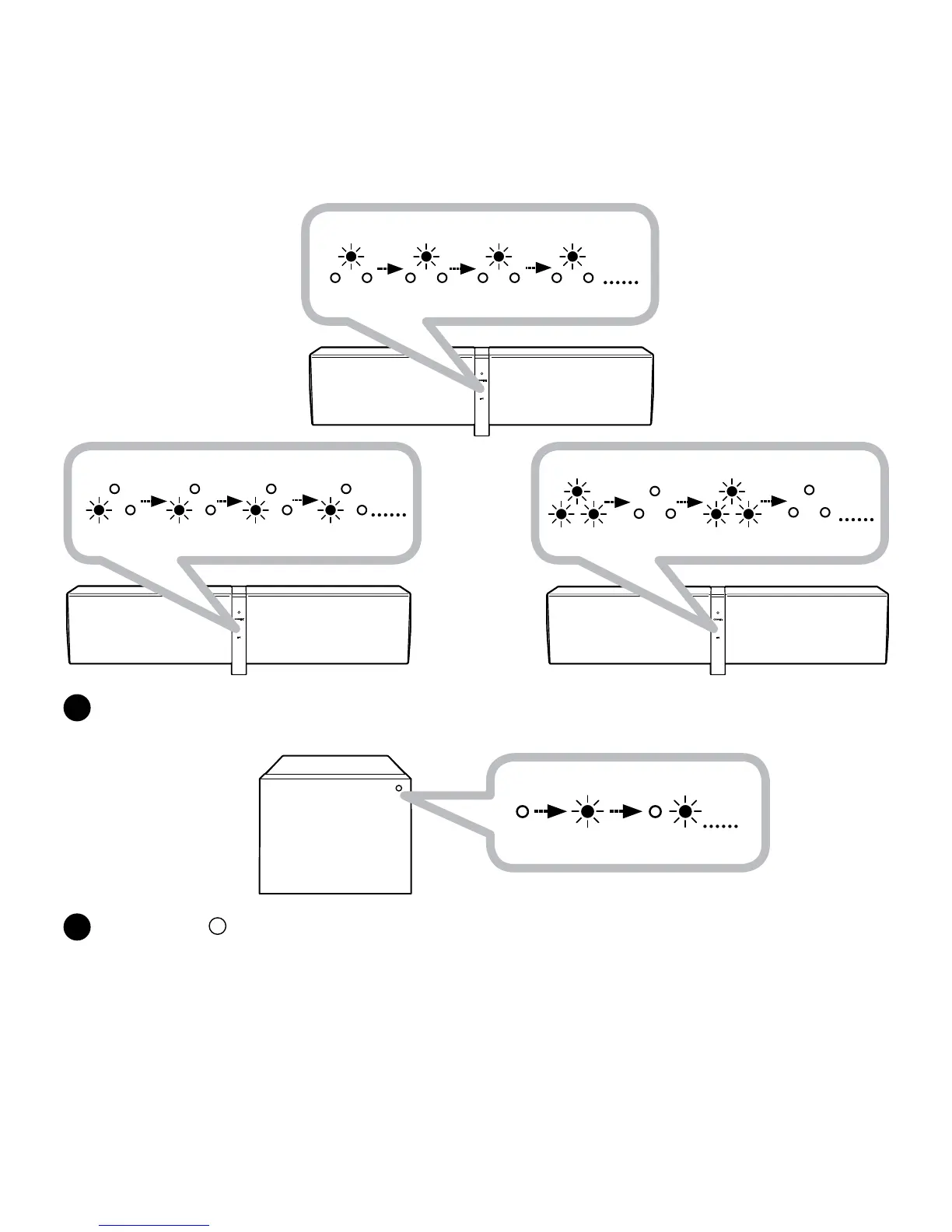
Link Connected (Center Channel)
LED Steady
Link Connected (LEFT Channel)
LED Steady
Link discoverable mode
Rapid blinking LED
D5x RIGHT
Master speaker
Link discoverable mode
Rapid blinking LED
D5x LEFT
allocated speaker
D5x CENTER
allocated speaker
D
E
LEFTandCENTERspeakersareLinkedwhentheLINKLEDStatusindicatoroftheLEFTand
CENTERchannelspeakersshowstheirrespectiveLEFTandCENTERLEDLitonitsLINKLED.
Jump to step
Gshouldnowirelesssubwooferarerequiredtobelinked.
SettheZiiSoundDSxwirelesssubwoofertoLINKDiscoverablemodebyholdingtheLinkbuttonfor5
secondsandreleasingwhentheLinkLEDblinksonce.Fordetailedinstructions,refertotheZiiSound
DSxUsermanual.TheMasterD5xspeakerwillautomaticallyconnecttheDSxwirelesssubwoofer
whiletheD5xLINKLEDisstillrapidlyblinking.





 To Next Page