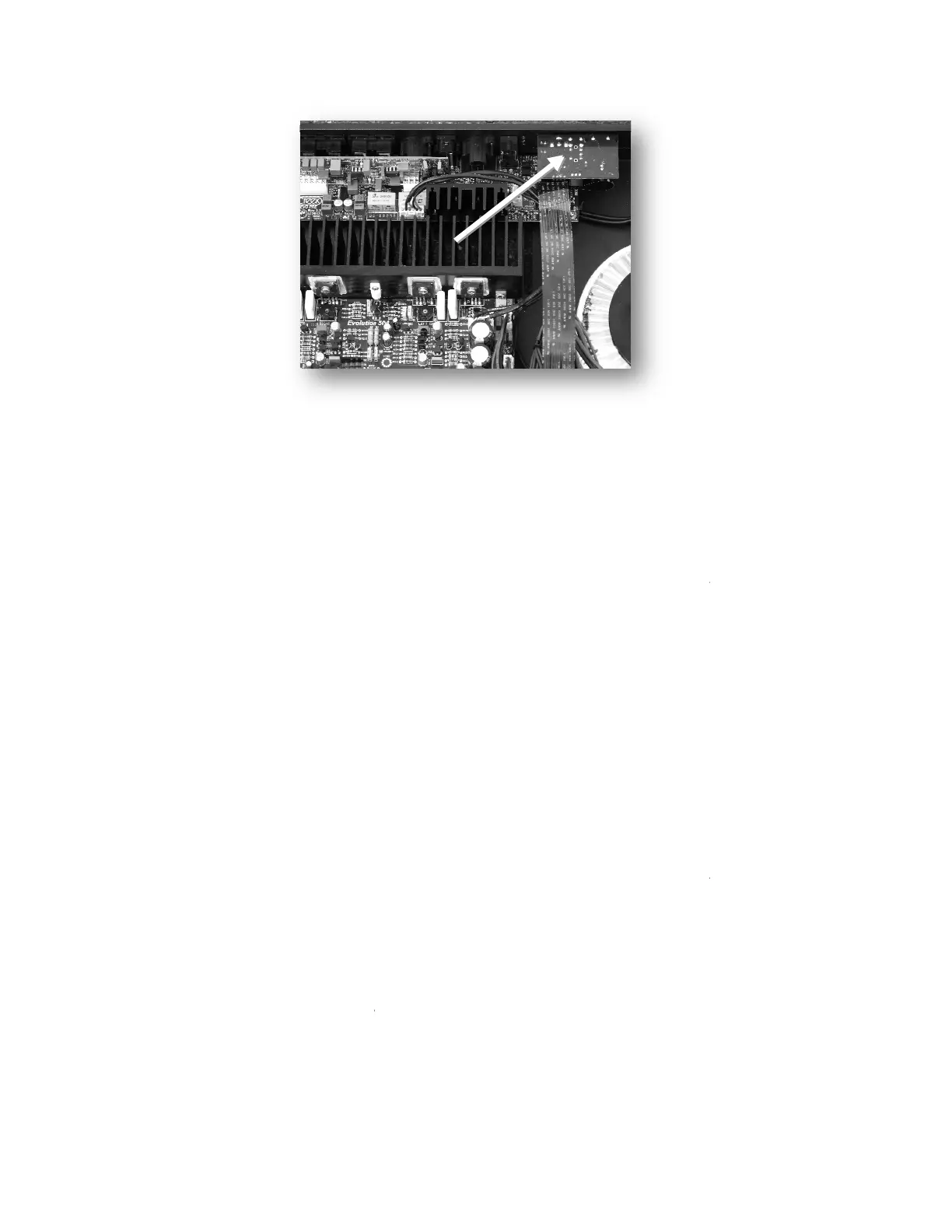
Line the plate up with the
the RUBY
module firmly onto the rear panel, using the Torx
Replace the cover as before, making sure to put the cutting washer
position on the rear.
Digital inputs.
The RUBY module contains a very high
digital signals
digital signals from various
sources into an analogue format that the amplifier can handle. i.e.
INPUTS: #8 and #10, are co-
axial RCA sockets for connecting from a suitable SPDIF digital source,
with a maximum resolution of 24 bit 192 kHz, i.e. CD player, Satellite receiver, etc.
2 TORX sockets, #7 and #9,
resolution of 24 bit 192 kHz.
Optical connections are effective in isolating ground paths between the
source and amplifier that could possibly create interference
USB type B socket #5,
(printer type) enables the amplifier to be connected to a computer and used
as an external sound card. The USB input will be powered by the computer, so care should be taken
to avoid using non-
computer which must at first be connected to the internet. The USB circuit will search for a suitable
driver, to enable your computer to communicate with the RUBY. After a short time, your computer
should report that it has paired with the EVOLUTION device.
iOS devices have the potential to play high
drivers. Creek Audio cannot accept responsibility for stability or optimisation of external
such as computers or operating systems.
PC
computers or laptops running WIN 10 should also allow high
natively. Please consult
your dealer or supplying vendor for more information
in the rear panel. Using the screw
module firmly onto the rear panel, using the Torx
T
7 screw driver, supplied in the pack.
Replace the cover as before, making sure to put the cutting washer
s
The RUBY module contains a very high
-quality
digital to analogue converter capable of
24 bit and a maximum sample rate of 192
sources into an analogue format that the amplifier can handle. i.e.
axial RCA sockets for connecting from a suitable SPDIF digital source,
with a maximum resolution of 24 bit 192 kHz, i.e. CD player, Satellite receiver, etc.
optical inputs
for SPDIF digital signals with a maximum
Optical connections are effective in isolating ground paths between the
source and amplifier that could possibly create interference
or reduce performance.
(printer type) enables the amplifier to be connected to a computer and used
as an external sound card. The USB input will be powered by the computer, so care should be taken
or cables longer than
3m (10 feet). Once connected to a
computer which must at first be connected to the internet. The USB circuit will search for a suitable
driver, to enable your computer to communicate with the RUBY. After a short time, your computer
should report that it has paired with the EVOLUTION device.
iOS devices have the potential to play high
-resolution (24/192)
signals natively, without specialist
drivers. Creek Audio cannot accept responsibility for stability or optimisation of external
such as computers or operating systems.
computers or laptops running WIN 10 should also allow high
-
resolution (24/192) signal replay
your dealer or supplying vendor for more information
, fix
7 screw driver, supplied in the pack.
digital to analogue converter capable of
accepting
sources into an analogue format that the amplifier can handle. i.e.
axial RCA sockets for connecting from a suitable SPDIF digital source,
for SPDIF digital signals with a maximum
Optical connections are effective in isolating ground paths between the
(printer type) enables the amplifier to be connected to a computer and used
as an external sound card. The USB input will be powered by the computer, so care should be taken
3m (10 feet). Once connected to a
computer which must at first be connected to the internet. The USB circuit will search for a suitable
driver, to enable your computer to communicate with the RUBY. After a short time, your computer
signals natively, without specialist
drivers. Creek Audio cannot accept responsibility for stability or optimisation of external
devices,
resolution (24/192) signal replay


 To Next Page
 Loading...