Cameo
™
Keypads Crestron C2N/C2NI-CB Series
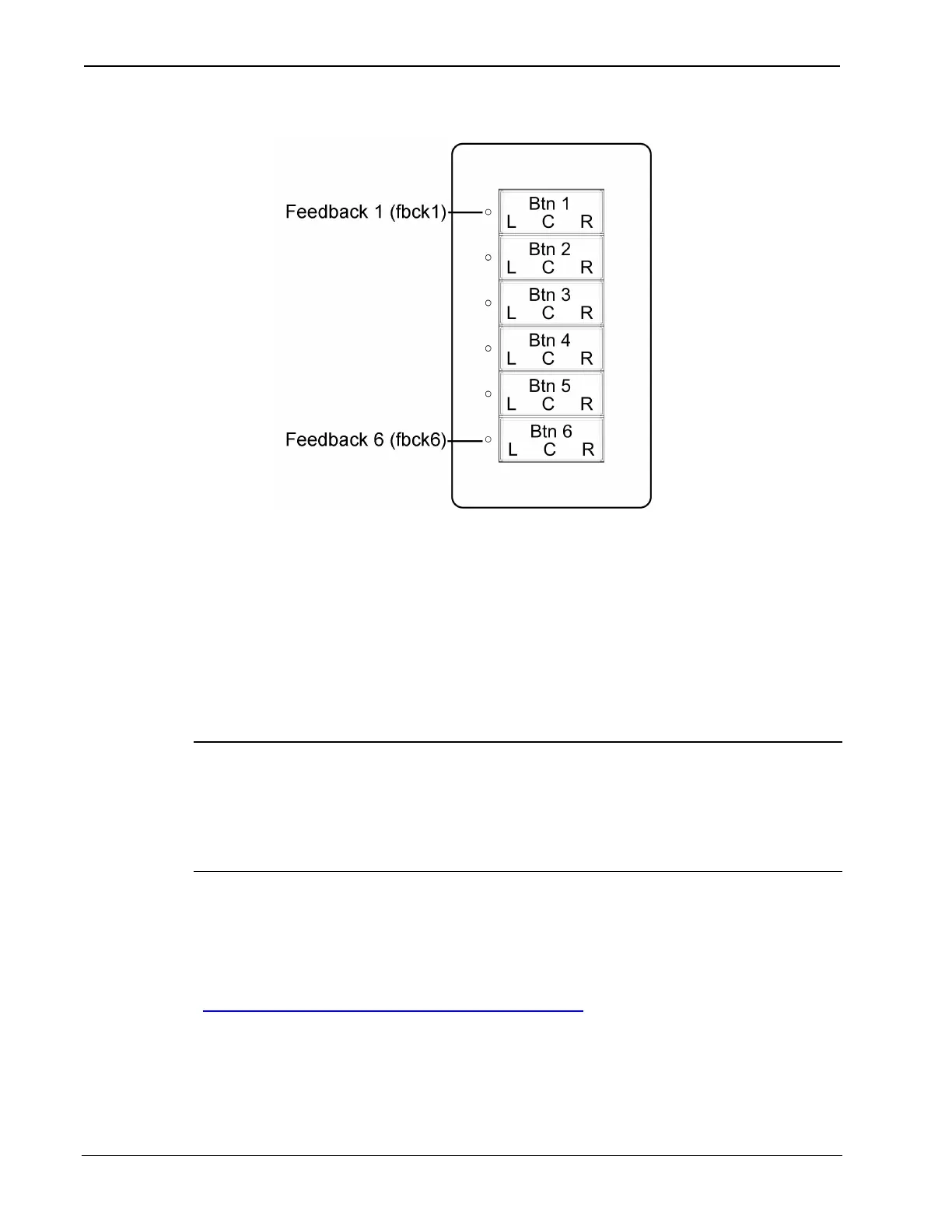
Cameo Keypad Button and Feedback LED Arrangement
In cases where it is desirable to mount the keypad with the feedback
LEDs on the right, programmers will have to take into account that
physically, button 6 is now at the top, button 1 is at the bottom, and that
the right and left switch positions are reversed. Bear in mind, however,
that when combining buttons in this orientation, the usual programming
constraints still apply. For example, if merging buttons 4, 5, and 6, even
though button 6 is now physically at the top of the keypad, button 4 still
controls the mode of the merged buttons.
NOTE: A Crestron module in Crestron Database version 17.1.0, the
C2N-Cameo Bargraph Feedback v1.0, makes it possible to use the
feedback LEDs like a bargraph, so that for a function like volume
control, as the switches are used to control the volume, the LEDs display
its approximate level.
Example Program
An example program for the Cameo keypad is available from the
“Example Program” section of the Crestron website
(http://www.crestron.com/exampleprograms
). Search for C2N-CB
Example Program (ZIP).
28 • Cameo™ Keypads: C2N/C2NI-CB Series Operations & Installation Guide - DOC. 6346A


 To Next Page