EasyManua.ls Logo

Crestron HD-TX-USB-2000-C - User Manual

Crestron HD-TX-USB-2000-C
2 pages
Print Icon
To Next Page IconTo Next Page
Loading...
DO GUIDE
HD-EXT-USB-2000-C
4K HDMI
®
and USB over HDBaseT
®
Extender 2000
DO Connect the Devices
Make connections to the transmitter and receiver as required.
Connecting the Transmitter
Make connections to the front and rear panels of the transmitter.
Front Panel Connections
Rear Panel Connections
DO Install the Devices
The Crestron
®
HD-EXT-USB-2000-C consists of the HD-TX-USB-2000-C transmitter and the
HD-RX-USB-2000-C receiver. The transmitter and receiver can be mounted on a at surface or onto
a rack rail.
Mounting onto a Flat Surface
Using four mounting screws (not included), mount the transmitter and receiver onto a at surface
such as a wall.
Mounting onto a Wall
Mounting onto a Rack Rail
The transmitter and receiver can be mounted onto the front or rear rail of a rack. Position either the
left or the right mounting ange of the device so that the holes align with the holes in the rack. Then,
secure the device to the rack using two mounting screws (not included).
Mounting onto a Rack Rail
DO Check the Box
QTY PRODUCT PART NUM.
HD-TX-USB-2000-C
2 Connector, 2-Pin 2049091
1 Connector, 3-Pin 2049092
1 Connector, 5-Pin 2049093
HD-RX-USB-2000-C
2 Connector, 2-Pin 2049091
1 Connector, 3-Pin 2049092
1 Connector, 5-Pin 2049093
1 Power Pack, 24 Vdc, 1.25 A, 100-240 Vac 2045870
HDMI IN:
From HDMI
®
audio/video
source
AUDIO IN:
From balanced/
unbalanced
analog audio
source
1
AUDIO IN:
From balanced/
unbalanced
analog audio
source
1
(Host):
To USB
device
(Device):
To USB
host
HDBT OUT:
To HDBT IN port
on receiver
IR IN:
From
Crestron
®
IR
control port
or other IR
signal source
3
IR IN:
From
Crestron IR
control port
or other IR
signal source
3
IR OUT:
To IR
emitter
4
IR OUT:
To IR
emitter
4
COM:
To
RS-232
device
2
COM:
To
RS-232
device
2
:
Passive pass-through
to Ethernet port on
receiver
Question and Answer IconNeed help?

Do you have a question about the Crestron HD-TX-USB-2000-C and is the answer not in the manual?

Overview

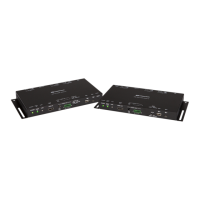
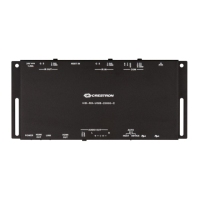
The Crestron® HD-EXT-USB-2000-C is an extender system designed to transmit 4K HDMI® and USB signals over HDBaseT®. It comprises two main components: the HD-TX-USB-2000-C transmitter and the HD-RX-USB-2000-C receiver. This system facilitates the extension of high-resolution video and USB data over long distances, making it suitable for various professional AV installations.

Function Description:

The HD-EXT-USB-2000-C system acts as a bridge for HDMI and USB signals. The transmitter (HD-TX-USB-2000-C) takes HDMI audio/video input and USB data, along with optional analog audio and IR control signals, and converts them for transmission over a single HDBaseT cable. The receiver (HD-RX-USB-2000-C) then receives these signals from the HDBaseT cable and converts them back to HDMI output, USB data, and optional analog audio output, as well as IR control signals. This allows for the placement of source devices and displays/USB peripherals at significant distances from each other without compromising signal quality. The system supports 4K HDMI® video, ensuring high-fidelity visual experiences.
Important Technical Specifications:

HD-TX-USB-2000-C Transmitter:

  • Connectors:
    • 2 x 2-Pin Connectors (Part Num. 2049091)
    • 1 x 3-Pin Connector (Part Num. 2049092)
    • 1 x 5-Pin Connector (Part Num. 2049093)
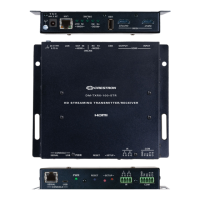
  • Front Panel Connections:
    • POWER: For power input.
    • HDMI IN: Accepts HDMI® audio/video source.
    • LINK: Status indicator.
    • AUDIO IN (TRS): Accepts balanced/unbalanced analog audio source. Only one AUDIO IN port can be used at a time.
    • AUDIO SEL: A two-position switch (HDMI/ANALOG) to select the audio source.
    • USB (HOST/DEVICE): USB Type micro-B port.
  • Rear Panel Connections:
    • COM (RS-232): For RS-232 device control. Only one COM port can be used at a time.
    • IR IN: For Crestron® IR control port or other IR signal source. Supports up to 60 kHz. Only one IR IN port can be used at a time.
    • HDBT OUT: Connects to the HDBT IN port on the receiver, facilitating passive pass-through to the Ethernet port on the receiver.
    • IR OUT: For IR emitter. Supports up to 60 kHz. Only one IR OUT port can be used at a time.

HD-RX-USB-2000-C Receiver:

  • Connectors:
    • 2 x 2-Pin Connectors (Part Num. 2049091)
    • 1 x 3-Pin Connector (Part Num. 2049092)
    • 1 x 5-Pin Connector (Part Num. 2049093)
  • Power Pack: 24 Vdc, 1.25 A, 100-240 Vac (Part Num. 2045870). The included power pack connects to the receiver, which then powers both the receiver and transmitter via the HDBaseT cable.
  • Front Panel Connections:
    • POWER: For power input.
    • HDMI OUT: Connects to an HDMI display.
    • LINK: Status indicator.
    • AUDIO OUT (TRS): Provides analog audio output. Only one AUDIO OUT port can be used at a time.
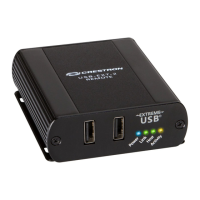
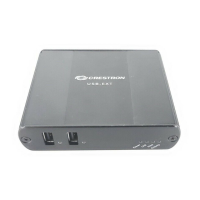
    • USB (HOST/DEVICE): USB Type A host port and USB Type micro-B device port. A three-position USB switch (AUTO/HOST/DEVICE) controls the USB mode.
  • Rear Panel Connections:
    • COM (RS-232): For RS-232 device control. Only one COM port can be used at a time.
    • IR IN: For Crestron® IR control port or other IR signal source. Supports up to 60 kHz. Only one IR IN port can be used at a time.
    • HDBT IN: Receives signals from the HDBT OUT port on the transmitter, facilitating passive pass-through to the Ethernet port on the transmitter.
    • IR OUT: For IR emitter. Supports up to 60 kHz. Only one IR OUT port can be used at a time.

Usage Features:

  • Mounting Options: Both the transmitter and receiver can be mounted onto a flat surface (such as a wall) using four screws (not included) or onto a rack rail using two screws (not included). For rack mounting, either the left or right mounting flange can be used to align with rack holes.
  • USB Mode Selection: The receiver features a three-position USB switch (AUTO, HOST, DEVICE) to configure how USB data is handled.
    • AUTO (Default): Automatically sets the USB mode to HOST or DEVICE based on the last connected device.
    • HOST: Allows data to pass between the USB Type A host port on the receiver and the USB Type micro-B device port on the transmitter. The receiver's USB Type micro-B port is ignored.
    • DEVICE: Allows data to pass between the USB Type micro-B device port on the receiver and the USB Type A host port on the transmitter. The receiver's USB Type A host port is ignored.
    • The transmitter's USB mode is automatically configured to match the receiver's USB mode.
  • Audio Mode Selection: The transmitter provides a two-position audio selection switch (HDMI, ANALOG) on its front panel.
    • HDMI (Default): Uses audio embedded in the HDMI stream.
    • ANALOG: Inserts analog audio into the video stream.
  • Single Port Usage: It's important to note that for AUDIO IN, COM, IR IN, AUDIO OUT, and IR OUT ports, only one port of each type on a device can be used at a time. Simultaneous use of both ports of the same type is not supported.
  • Power over HDBaseT (PoH): The system utilizes Power over HDBaseT. The power pack connects to the receiver, and power is then transmitted to the transmitter over the HDBaseT cable, simplifying wiring.
  • Ethernet Pass-through: The HDBaseT connection also supports passive Ethernet pass-through between the transmitter and receiver.

Maintenance Features:

  • Firmware Updates: Users are encouraged to visit the Crestron website for the latest firmware updates to ensure optimal performance and access to new features. A QR code is provided in the manual for easy access to product information.
  • Compliance: The product is CE marked and UL® Listed, indicating compliance with European safety, health, and environmental protection standards, as well as safety standards from Underwriters Laboratories Inc. It also complies with FCC Part 15 rules for Class B digital devices and Industry Canada (IC) CAN ICES-3(B)/NMB-3(B) standards.
  • Indoor Use Only: The device is designed for indoor use only and is not intended for outdoor applications.
  • Troubleshooting: In case of interference (radio or television reception), users are advised to reorient/relocate the receiving antenna, increase separation between equipment and receiver, connect equipment to a different circuit, or consult a dealer/experienced radio/TV technician.
  • Warranty and Legal Information: Information regarding product warranty, open-source software, patents, trademarks, and other legal notices can be found on the Crestron website.

Crestron HD-TX-USB-2000-C Specifications

General IconGeneral
BrandCrestron
ModelHD-TX-USB-2000-C
CategoryExtender
LanguageEnglish

Related product manuals