
 Need help?
Do you have a question about the Cricut EasyPress 2 and is the answer not in the manual?
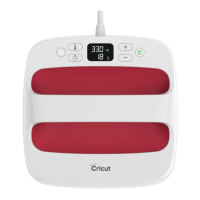
Lists the items included with the Cricut EasyPress 2, such as the machine, safety base, and accessories.
Details key features like precise temperature control, fast heat-up, comfortable handle, advanced heat plate, safety base, and auto shutoff.
Explains how to set temperature, time, start the timer, and interpret indicator lights on the EasyPress.
Guides on finding a firm surface and prepping the material by setting time and temperature.
Covers preheating the fabric, positioning the design, and pressing with the EasyPress.
Details flipping the material for a second press and removing the liner for a completed iron-on transfer.
For optimal results, pre-wash and dry fabrics, and avoid fabric softener before applying iron-on.
Avoid seams and bumps; use a Cricut EasyPress Mat for flawless results.
Wait 24 hours before washing, wash inside-out in cool water, tumble dry low or lay flat.
Emphasizes a firm surface and the correct pressing sequence: preheat, press, flip, and press again for durable results.
Focuses on placement around seams and choosing the correct liner peel method (warm or cool) for optimal adhesion.
Introduces layering iron-on designs and applying them to non-fabric materials like wood and paper.
Details the available sizes: 6"x7", 9"x9", and 12"x10", with their typical project applications.
Explains the benefits of the mat for protecting surfaces and ensuring flawless iron-on applications.
Highlights using Cricut EasyPress with Cricut iron-on products for precise, tested settings and optimal results.
Explains how Cricut machines and software enhance the iron-on process for perfect cuts and presses.
 General
| Type | Home |
|---|---|
| Working area | 300 x 250 mm |
| Product color | Red |
| Variable steam | No |
| AC input voltage | 120 V |
| Built-in display | Yes |

 To Next Page