4 5
EN
Included
• Cricut Joy Xtra Smart Cutting Machine
• Blade + Housing
• Cricut Joy Fine Point Pen (0.4 mm)
• Welcome Card
• Power Adapter & Cord
• Free Trial Membership to Cricut Access
™
(New Subscribers Only)
• 50 Ready-To-Make Projects Online
• Materials For Practice Cut
• Bonus Materials
How to power on
Before operating machine, read enclosed
Important Safety Instructions.
• Connect included power adapter to machine
• Plug other end only into a compatible wall outlet
• Connect machine to compatible device
via Bluetooth
®
• Activate machine at cricut.com/setup
Use caution, and follow instructions when
replacing blade. For instructions, see blade
packaging or help.cricut.com/blades
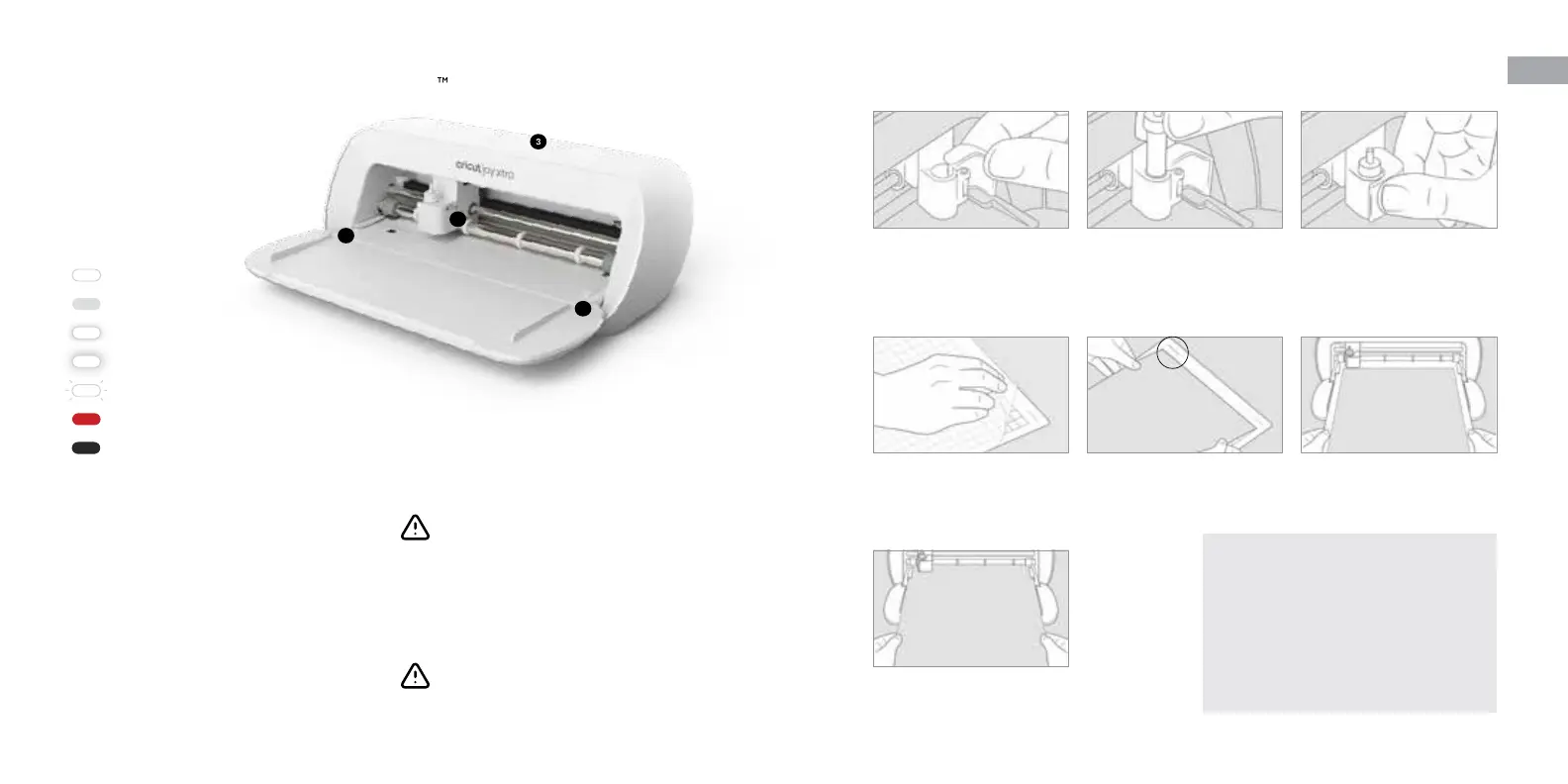
Get to know your Cricut Joy Xtra
™
1 Tool Clamp
2 Material Guides
3 Indicator Light
2
1
2
Change tool
1. Open Tool Clamp (1),
and remove tool.
2. Firmly seat new tool. 3. Close clamp.
Load Smart Materials
™
When prompted, position Smart
Material between Material Guides (2).
Load machine mat with material
1. Remove protective clear cover.
2. From top le corner, align
material onto mat.
3. When prompted, insert mat
between Material Guides (2).
Solid Ready to use
50% Brightness Idle
Slow Pulse Searching for
Bluetooth® connection
Fast Pulse Update in progress
Flash See Cricut app for directions
Red Error
O No power source
Indicator Lights
Every project is unique.
For more help resources, see
help.cricut.com
• Get free expert-led Cricut courses &
workshops on demand at learn.cricut.com
• Join other Cricut Community members in
our Ocial Cricut Facebook group.














 To Next Page