07
The ATOM has special functions that can be set.
SPECIAL FUNCTIONS
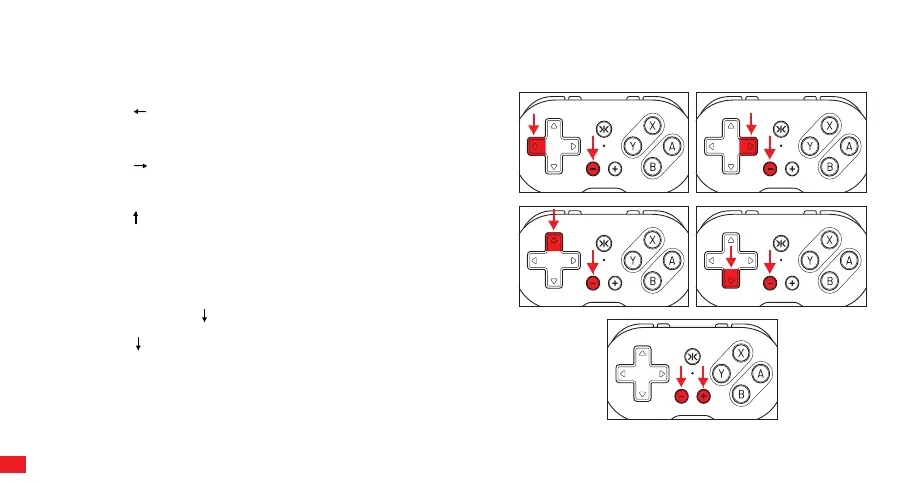
RESET DPAD FUNCTION BACK TO DEFAULT
Press and hold Dpad and Minus Button (-) for 5 seconds. The status
LED will blink and then turn back to solid.
CHANGE DPAD TO FUNCTION AS LEFT STICK
Press and hold Dpad and Minus Button (-) for 5 seconds. The status
LED will blink and then turn back to solid.
CHANGE DPAD TO FUNCTION AS RIGHT STICK
Press and hold Dpad and Minus Button (-) for 5 seconds. The status
LED will blink and then turn back to solid.
SWITCHING X/Y AND A/B MAPPING
When connecting ATOM as an Xinput Device, the button mappings for
X/Y and A/B will be switched. Specifically, Y will function as X, and B
will function as A, and vice versa. To switch the X/Y and A/B layout
mappings, press and hold Dpad + (-) button for 5 seconds. The
status LED will blink and and then turn back to solid. To revert back,
press and hold Dpad + “-” button for 5 seconds.
NOTE: Any special function settings will reset back to default after any
power-cycle.
SCREEN CAPTURE
Press (-) and (+) for screen capture function on Switch.



 To Next Page