CONNECTING TO MULTIPLE DEVICES
The ATOM can be connected to multiple devices.
1) Connect ATOM to an initial device (Refer to SETUP sections). 2) Press
and hold the HOME (CRKD) button for 10 seconds to power OFF the
ATOM. 3) Connect ATOM to another device using a dierent method.
NOTE: Refer to SETUP sections on how to connect the ATOM to
compatible devices. Power OFF the ATOM before connecting it to
another device. ATOM cannot be connected to multiple devices using the
same method.
SWITCHING BETWEEN DEVICES
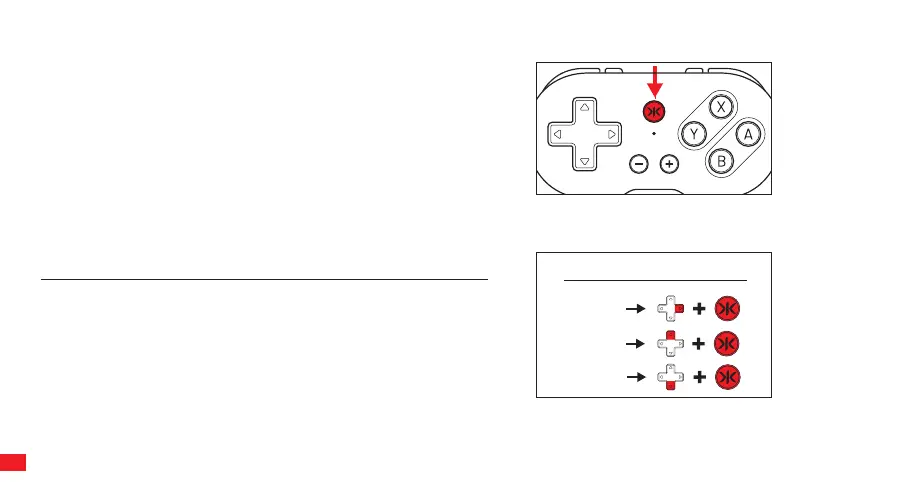
If the ATOM is paired to multiple devices, it can be switched between devices seamlessly using dierent button combinations.
NOTE: The device that the ATOM is switched to will make it the main device. Pressing the Home (CRKD)
button will wake up the ATOM to the main device from OFF status.
SWITCH
MODE
XINPUT
ANDROID
Press dpad right and Home (CRKD) button to switch main device to
Switch (Pro Controller)
Press dpad up and Home (CRKD) button to switch main device to Xinput
device (PC / iOS / macOS)
Press dpad down and Home (CRKD) button to switch main device to
Android.
Make sure the ATOM has already been connected to multiple devices. The
ATOM has to be powered OFF before switching between devices.
06


 To Next Page