
 Need help?
Do you have a question about the Crock-Pot MyTime SCCPVFC630-S-BR and is the answer not in the manual?
Explanation of the polarized plug design for reducing electric shock risk.
Details on the purpose and safety of the short power-supply cord.
Important notes regarding countertop protection and initial appliance use.
Detailed diagram and labels for the slow cooker's control panel and buttons.
Tips for achieving best results when cooking pasta and rice.
Guidance on preparing and cooking beans for slow cookers.
Advice on slow cooking vegetables and placement within the stoneware.
Recommendations for using herbs and spices in slow cooking.
Guidance on when to add milk, cream, or sour cream.
Tips for adding liquid and ingredients to soup recipes.
Advice on preparing and cooking various types of meat.
Guidance on when to add fish to slow cooker recipes.
Ensuring adequate liquid for cooking to prevent drying or burning.
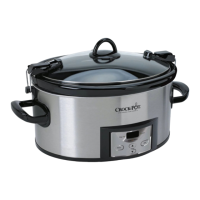
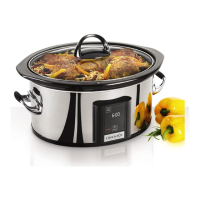
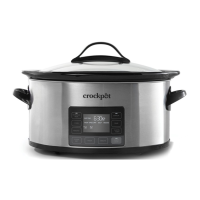
The Crockpot™ 6-Quart MyTime™ Slow Cooker is an appliance designed for convenient and efficient slow cooking, offering both automated and manual cooking options. Its primary function is to cook meals slowly over an extended period, tenderizing ingredients and enhancing flavors. The MyTime™ technology allows users to schedule meals to be ready at a specific time, while the manual function provides traditional control over temperature and cooking duration.
The slow cooker operates by gently heating food over several hours, making it ideal for stews, roasts, soups, and other dishes that benefit from long, slow cooking. The core of its functionality lies in its heating base, which evenly distributes heat to the removable stoneware pot. The glass lid helps to retain moisture and heat, ensuring that food cooks thoroughly and remains tender.
The MyTime™ technology is a key feature, allowing users to set a desired meal completion time. Based on the selected food type (Meat, Poultry, Soup, or Veggies) and the amount of food being cooked, the appliance automatically calculates the appropriate heat setting and cooking duration to ensure the meal is ready by the specified end time. This eliminates the guesswork often associated with slow cooking, as the system determines the optimal cooking parameters. For instance, if you select "Meat" and "0-2 LBS" with an end time of 8:00 PM, the slow cooker will automatically adjust its cooking cycle to meet that deadline. The "Earliest End Timer" displayed on the screen indicates the earliest possible time the meal can be ready, providing a reference for scheduling.
In addition to the MyTime™ function, the slow cooker offers a "Manual" mode for users who prefer to set the temperature (HIGH, LOW, or KEEP WARM) and cooking time themselves. This mode is useful for recipes that require specific settings not covered by the MyTime™ presets or for experienced slow cooker users. The "KEEP WARM" setting is designed to maintain the food's temperature after cooking is complete, ensuring it stays warm until serving. However, it is important to note that the "KEEP WARM" setting is not intended for cooking food and should not be used for more than 4 hours.
The control panel is intuitive, featuring buttons for "SCHEDULE MEAL," "FOOD," "AMOUNT," "MANUAL," "TEMP," "CANCEL TIMER," "CLOCK SET," "HOUR," "MINUTE," and "START/STOP." Indicator lights accompany "SCHEDULE MEAL" and "MANUAL" to show which mode is active. The digital display shows the current time, scheduled end time, and remaining cooking time.
Before initial use, all packaging components should be removed, and the lid and stoneware should be washed in warm, soapy water. The appliance includes a coin cell battery that powers the clock, which is activated by removing an orange pull tab from the bottom of the unit. The clock can then be set using the "HOUR" and "MINUTE" buttons, followed by "CLOCK SET."
To use the MyTime™ technology:
The MyTime™ function will not cook food for more than 12 hours from the cook-start time. Once the scheduled meal time passes, the slow cooker automatically switches to "KEEP WARM." The technology ensures food is kept at a safe temperature, assuming no power outage.
To use the Manual function:
General usage notes:
Cleaning the Crockpot™ slow cooker is straightforward:
In case of a power outage, the display and lights will blink once power is restored, and all settings will be cleared. In such instances, the food may be unsafe to eat, and it is recommended to discard it if the duration of the outage is unknown.
The coin cell battery (CR2025) for the clock can be replaced by unplugging the unit, removing the battery cover on the bottom, pressing the silver tab to dislodge the old battery, and then replacing it with a new one. Proper disposal of the old battery is important.
Overall, the Crockpot™ 6-Quart MyTime™ Slow Cooker is designed for ease of use, offering both advanced scheduling capabilities and traditional manual control, with simple maintenance procedures to ensure its longevity.
 General
| Brand | Crock-Pot |
|---|---|
| Model | SCCPVFC630-S-BR |
| Type | Slow Cooker |
| Capacity | 6 Quart |
| Material | Stainless Steel |
| Programmable | Yes |
| Shape | Oval |
| Number of Settings | 3 |
| Color | Stainless Steel/Black |
| Temperature Settings | High, Low, Warm |
| Warranty | 1 Year |



 To Next Page