Operation Instructions
23 / 55
not exceed the factory default maximum power;
Note: If the Auto Power Adjust is checked, platemaking exposure is automatically adjusted
according to Light Sensitivity value entered. It is strongly recommended to choose this option.
Exposure drum speed selection, in accordance with the actual production settings. Maximum
exposure speed is determined by the plate sensitivity, maximum laser power and drum speed
limit.
S series= maximum setting 0-31, H series= maximum setting 0-47.
The platemaking energy is determined by the plate characteristics, provided by the plate
supplier or by measurement.
Thisis an option selective component, only valid for devices with main exposure structure.
The output position can be adjusted during actual production. By default you may leave it
without any value adjustment.
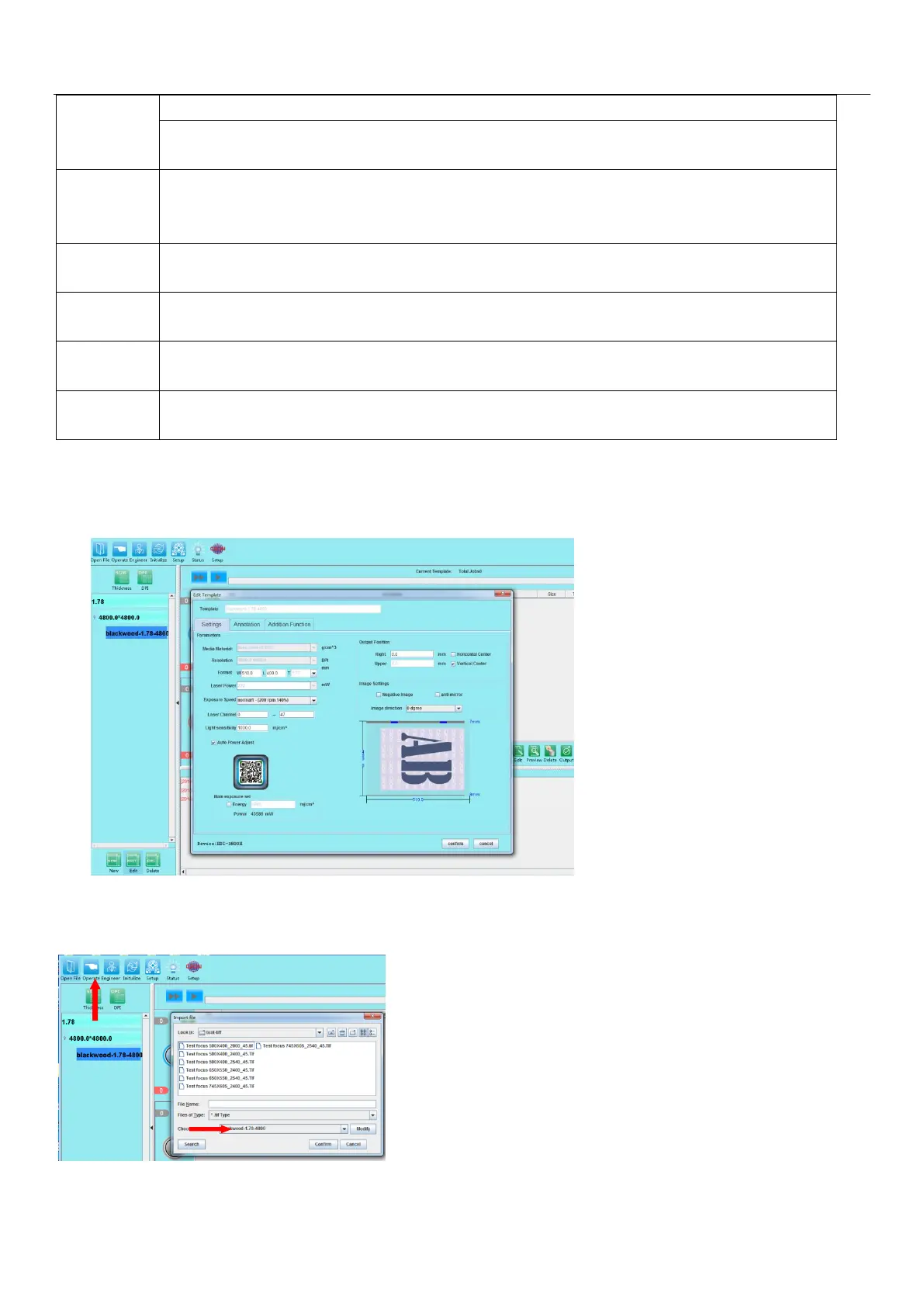
5.4.2 Editing a working template: After the working template is setup, you can edit the template again for
changes. When editing a template, the Template name, Media material, Resolution parameters arenot
allowed for changes.Other parameters are allowed for changes or adjustment.
5.4.2 Adding a TIFF file job: Click the "Open File" button, select the * .Tiff and * .PPG file jobs in the
corresponding directory, select the file to be used and the corresponding template below (ensure that the
parameters are the same).After confirmation, the file appears in the output list of the software.


 To Next Page