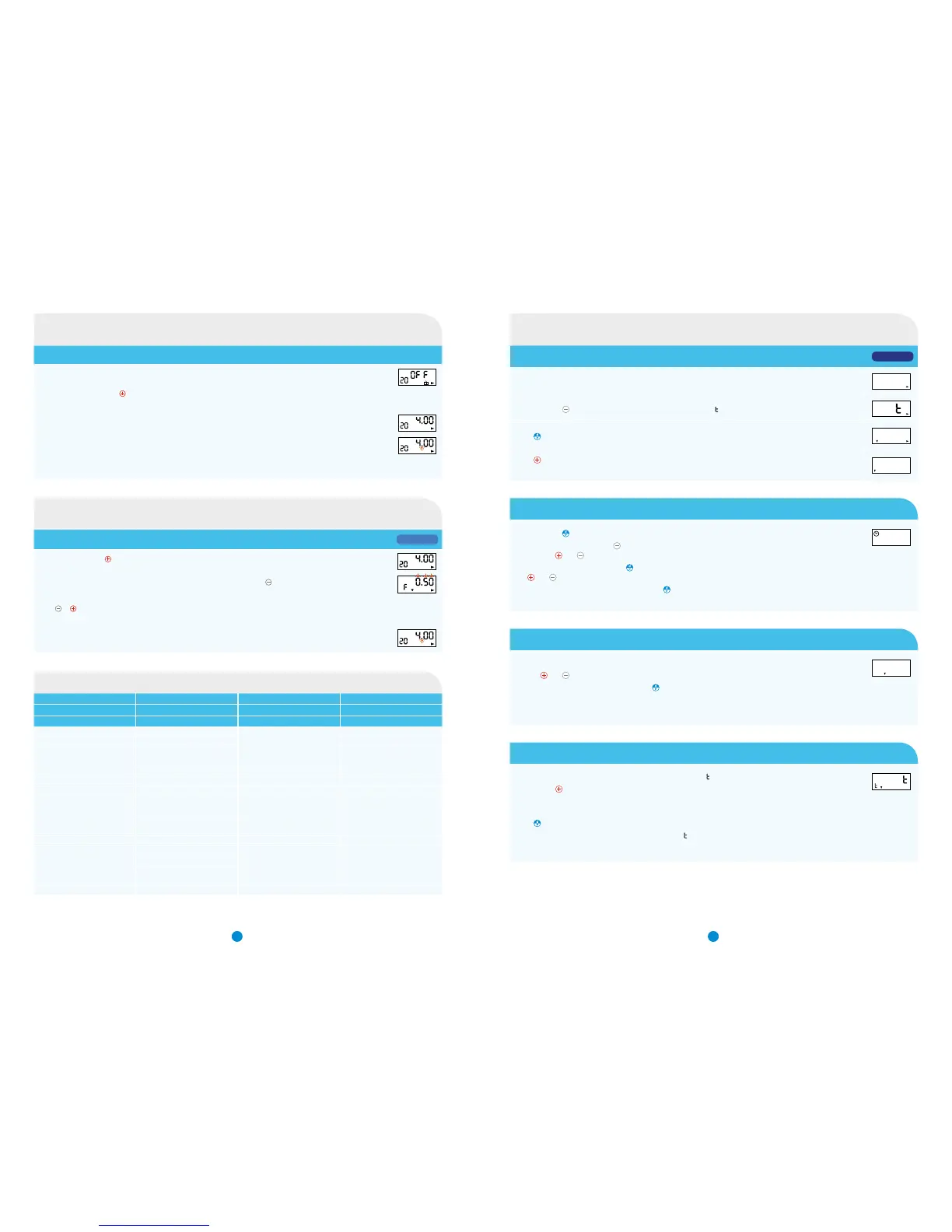
Pump set to OFF
The ON/OFF button is the red
button, press and hold until you hear a beep - then release
Display will scroll through the bolus/priming dose (and beep), flow rate (and beep), length of infusion in hours (and beep)
EITHER
If no further action taken - a final beep sounds as the infusion starts - the ‘drop’ icon will start flashing and the display
shows time of infusion remaining
OR
See “Setting the flow rate” to programme the infusion flow rate
Pump set to ‘ON’ (Press ) and unlocked (L0)
With the display showing duration of infusion (hours and minutes), press and hold
until you hear a long beep - then
release. Flow rate flashes with F symbol
Press
or to decrease or increase the flow rate to the desired level
NOTE: Make any changes within 5 seconds otherwise the infusion will start
When desired rate is entered, wait 5 seconds - a beep will sound as the display returns to show revised time of infusion
remaining. The ‘drop’ icon will start flashing
Settings between 0.05ml/hr to 5.00ml/hr are available.
Values shown here are 0.4ml/hr to 2.0ml/hr. Solution used = 5mg/ml strength (i.e. APO-go Pre-filled syringe).
20ml syringe 20ml syringe with spacer
Flow rate value to set on PUMP 20ml setting (i.e. 100mg APO-go) 10ml setting (i.e. 50mg APO-go)
mg per hour ml per hour Hours/minutes running time Hours/minutes running time
2.0 0.40 25.00
2.5 0.50 20.00
3.0 0.60 16.41
3.5 0.70 14.17
4.0 0.80 24.59 12.30
4.5 0.90 22.13 11.07
5.0 1.00 20.00 10.00
5.5 1.10 18.10 9.05
6.0 1.20 16.40 8.20
6.5 1.30 15.22 7.41
7.0 1.40 14.17 7.09
7.5 1.50 13.20 6.40
8.0 1.60 12.30 6.15
8.5 1.70 11.46 5.53
9.0 1.80 11.07 5.34
9.5 1.90 10.31 5.16
10.0 2.00 10.00 5.00
Step 1: Entering set up mode
Ensure the PUMP says OFF, is unlocked and on the 20ml setting.
20
OFF
Press and hold
(for up to 10 seconds) until the screen says SE .
SE
Press until the screen shows APo1.
APo1
Press until the screen shows APo3.
Leave the PUMP to revert to the original OFF position.
APo3
Step 2: Setting the time
Press and hold until the screen displays the time.
To set the time, press and hold
until the hours begin to flash. Adjust the hour by
pressing the and
buttons.
Adjust the minutes by pressing the
button until the minutes begin to flash,
use and
to adjust appropriately.
When you have reached the correct time press
.
Note: Ensure time is set to current time and ensure to change the time when the clocks go forward or back
13:27
h
Step 3: Setting the bolus dose
Once the correct time has been set on the PUMP, the screen will display the bolus dose.
Use the
and
buttons to adjust the prime dose to the desired dose.
When finished setting the bolus dose press
.
Note: Refer to Bolus/priming conversion chart on Page 2
0.15
d
Step 4: Setting the bolus dose lockout time
Once the bolus dose has been set the screen will display no.L , this setting controls the bolus dose.
Pressing the
locks the bolus dose for a set time.
For example, setting this figure to 5 minutes means that once bolus dose has been
pressed, there is a 5 minute delay before it can be pressed again.
Press
to progress.
Note: If this setting is not required, leave it saying
no.L
no.L
i
Switching the APO-go PUMP on
Setting the flow rate in APo1 mode
Dosage to flow rate conversion table
43
Programming variable flow rate in APo3 mode
APo1 MODE
APo3 MODE


 To Next Page