14
6) Adding additional speakers
The D4 Digital Amplifier has 4 independent outputs, configured as 2 stereo pairs.
2 outputs are used to drive the Jukebox’s internal speakers (Shown on amplifier as
Channel 1) leaving 2 outputs (left and right) free for the connection of additional
speakers (Shown on amplifier as Channel 3).
Please note that if you have a D2 Amplifier Channels 3/4 are unavailable.
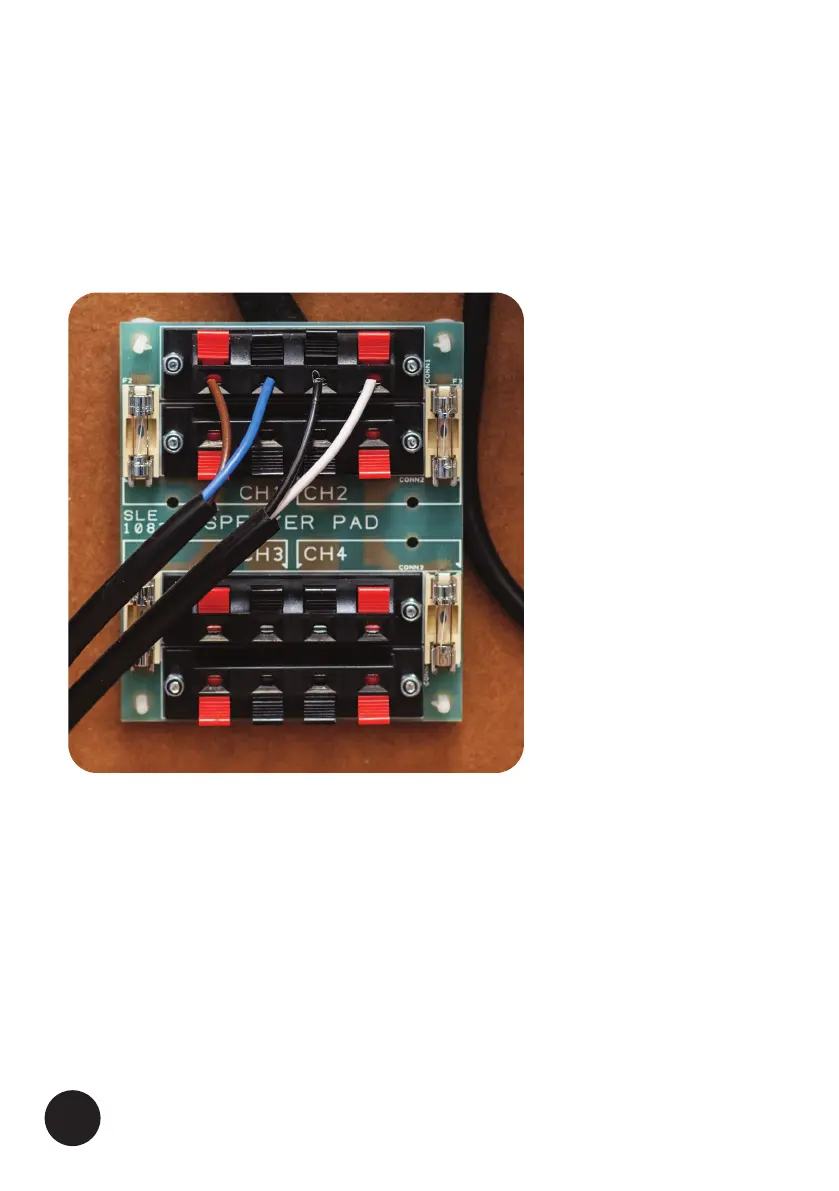
In the rear of the Jukebox is the ‘Speaker Matching Pad’ (Fig 10 above) Additional
speakers should ideally be set-up in a stereo configuration where the left speaker is
connected to CH3 and the right speaker is connected to CH4.
The volume for these speakers is controlled using the VOL 2 keys on the remote
control.
The additional speakers should not present a load lower than 4 Ohms to each amplifier
channel, please contact Crosley Brands if you are unsure which speakers are suitable or
would like a different speaker set-up to the one described above.
FIG 10. (Shown with internal speakers connected)





 To Next Page