83
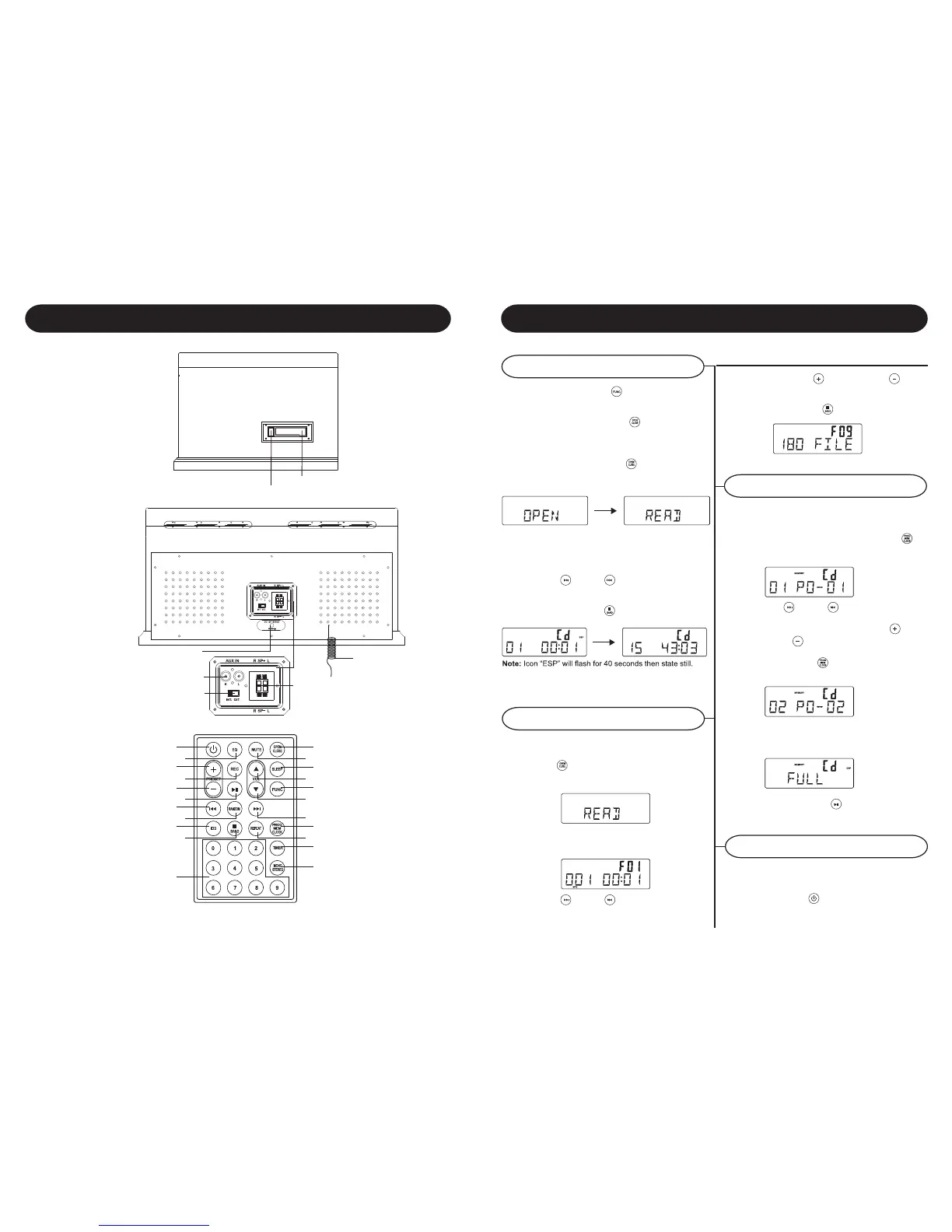
CD Operation
Playing a CD
Programming Tracks
CD-MP3 disc playback
Control Locators
AC ADAPTOR JACK
EJECT /F.F.
CASSETTE DOOR
POWER / STAND BY
EQ
PRESET +
REC
PRESET -
PLAY/PAUSE
SKIP BACKWARD -
RANDOM
ID3
STOP / BAND
0-9
CD OPEN / CLOSE
MUTE
SLEEP
VOLUME +
FUNCTION
VOLUME -
SKIP FORWARD +
PROGRAM
REPEAT
TIMER
MONO/STEREO
EXTERNAL
ANTENNA
SPEAKER JACK
AUX IN JACK
INTERNAL / EXTERNAL
SPEAKER SWITCH(INT. /EXT)
1 Press the FUNCTION / to set the unit to CD
mode.
2 Press CD OPEN / CLOSE / to open the CD
compartment
3 Insert a disc with the printed side facing up.
Press CD OPEN / CLOSE/ . again to close
the compartment, READ is displayed as the CD
player scans the contents of a disc.
4 Track no. 1 will be playback automatically after
finish the reading CD disc contents.
5 Press FF/
or FB / once or repeatedly
until the desired track number appears in display.
6 Press STOP/BAND / to stop playback.
1 Insert CD-MP3 format disc. Press CD OPEN /
CLOSE / again to close the compartment.
READ is displayed as the CD player scans the
contents of a disc.
2 Track no. 1 of root folder (Folder 1) will be
playback automatically after finish reading CD-
MP3 disc contents.
3 Press FF/
or FB / once or repeatedly
until the desired track number appears in display.
4 Press PRESET + / or PRESET / to
select desired album.
5 Press STOP/BAND /
to stop playback.
Erasing the program
You may store up to 20 tracks in the desired
sequence.
1 In the stop position, press PROGRAM /
to
start programming. Icon MEMORY and P0-
01 start flashing.
2 Press FF/
or FB / once or repeatedly
until the desired track number appears in the
display. For MP3: press PRESET + / or
PRESET / to select the desired album.
3 Press PROGRAM /
to confirm, display shown
stored track no. and next store position.
4 Repeat step 2-3 to select and store all desired
tracks. FULL is displayed if you attempt to
program more than 20 tracks
5 Press PLAY/PAUSE / to play the program.
You can erase the contents of the memory by:
- once if in stop position, twice during
playback;
- Press POWER /
- Select another sound source
- Open the CD door




 To Next Page