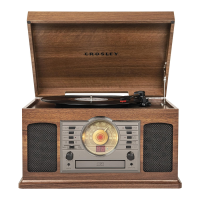
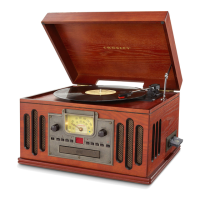
The Crosley CR7016A Rhapsody Entertainment Center is a versatile audio device designed to play music from various sources, including vinyl records, CDs, radio, Bluetooth-enabled devices, and external audio players via an auxiliary input. This comprehensive system combines classic and modern audio functionalities in a single, stylish unit.
Function Description
The core function of the CR7016A is to provide a multi-source audio playback experience. It features a built-in turntable for playing vinyl records, a CD player for compact discs, an AM/FM radio tuner for broadcast stations, and Bluetooth connectivity for wireless streaming from compatible devices. Additionally, an auxiliary input allows for wired connection of other audio sources. The unit is equipped with integrated speakers, making it a self-contained entertainment system.
Usage Features
Initial Setup:
Before operation, the unit should be placed on a flat, stable, and vibration-free surface. Any tie-wraps securing the tonearm must be removed, and the power cord should be plugged into a power outlet.
Stereo System Connection (RCA Jacks):
The CR7016A includes RCA Jacks that output analog line-level signals. These can be connected to a pair of active/powered speakers or to the appropriate input of an existing stereo system. The Red plug corresponds to the Right channel, and the White plug to the Left channel. It's important to note that these jacks are not designed for direct connection to passive/unpowered speakers, as this would result in very low volume.
For connecting external audio devices, the unit features an Aux In Jack. A 3.5mm auxiliary cable can be used to link an audio device to the CR7016A, allowing its speakers to play music from the connected source. The auxiliary input has the highest priority among all functions; when an auxiliary cable is plugged in, it automatically overrides Bluetooth, turntable, CD, or radio playback. To resume other features, the auxiliary cable must be unplugged.
Bluetooth Operation:
To use the Bluetooth function, the Function Knob should be set to the Bluetooth position. An activation sound will confirm the mode selection. Users then need to enable Bluetooth on their audio device, search for "CROSLEY CR7016A," and pair with the unit. A short confirmation sound will indicate successful pairing, after which music can be streamed wirelessly from the device to the CR7016A. The Bluetooth version supported is 5.0.
Turntable Operation:
- Power On: Rotate the On/Off Volume Knob to turn on the power.
- Select Mode: Set the Function Knob to the PHONO position.
- Speed Selection: Adjust the Speed Switch according to the record's speed (33⅓, 45, or 78 RPM).
- Record Placement: Place the vinyl record on the turntable platter. If playing a 45 RPM record, use the included 45 RPM adapter.
- Stylus Protection: Remove the stylus protector from the stylus assembly. It's crucial to keep the stylus guard in place when moving or cleaning the turntable to prevent damage.
- Tonearm Release: Release the tonearm Hold Down Clip. Remember to lock it back when the turntable is not in use.
- Lift Tonearm: Use the Tonearm Lever to gently lift the tonearm.
- Position Tonearm: Carefully move the tonearm over the desired starting point on the record.
- Lower Tonearm: Set the Tonearm Lever back to the down position. The tonearm will slowly descend onto the record, initiating playback.
- End of Playback/Pause: Once the record finishes playing, or to suspend playback, use the Tonearm Lever to raise the tonearm and return it to the Tonearm Rest. Release the lever to allow the tonearm to sit back at rest.
- Secure Tonearm: Lock the Hold Down Clip to secure the tonearm when not in use.
Platter Auto-stop:
The turntable features an Auto-stop Switch. When set to the ON position, the platter will automatically stop spinning once the record reaches its end. If the turntable stops playing prematurely, setting the switch to the OFF position may resolve the issue.
Radio Operation:
- Select Mode: Set the Function Knob to either the AM or FM position.
- Tune Station: Rotate the Tuning Knob to find the desired radio station.
The unit has a built-in FM wire antenna; moving this wire around can improve FM reception by reducing interferences. No additional antenna should be connected. The AM antenna is internal; rotating the entire unit may improve AM reception if it's poor.
CD Playback Operation:
- Select Mode: Set the Function Knob to the CD position.
- Open Tray: Press the Open/Close button to open the CD tray.
- Load CD: Place the CD in the tray with the labeled side facing up.
- Close Tray: Press the Open/Close button again to close the tray. The LED display will show "--" briefly, then the total number of tracks on the CD. If a blank or unrecognizable CD is inserted, it will display "00." Note that the CD player cannot read MP3 or similar digital audio files.
- Start Playback: Press the Play/Pause button to begin playback. The Play Indicator will light up.
- Pause/Resume: During playback, pressing the Play/Pause button will pause the music, and the Play Indicator will flash. Pressing it again will resume playback.
- Skip Tracks: Use the Forward Skip or Backward Skip buttons to navigate to the next or previous track.
- Fast Forward/Backward: Press and hold the Forward Skip or Backward Skip buttons to search rapidly through the track. Release the button to resume playback at the desired time.
- Stop Playback: Press the Stop button to completely end CD playback.
Maintenance Features
Needle Replacement:
- Removing Needle: Gently pull down the front edge of the needle, then pull it forward and out to remove.
- Installing Needle: Position the new needle with its tip facing down. Align the back of the needle with the cartridge. Insert the needle with its front end at a downward angle, then gently lift the front of the needle upward until it snaps into place.
Turntable Maintenance:
- Stylus Care: Avoid touching the stylus tip with fingers or bumping it against the turntable mat or record edge. Clean the stylus regularly with a soft brush, using a back-to-front motion only.
- Record Cleaning: Clean records to remove dust or grease using a record cleaning brush and solution.
- Unit Cleaning: Clean the turntable lid and cabinet with a slightly damped microfiber cloth. Do not use cleansers containing alcohol, benzene, or other harsh chemicals, as these can damage the paint and finish. Crosley offers a range of cleaning accessories, available through retailers or their website.
Troubleshooting:
The manual provides guidance for common issues:
- No Power: Check the power outlet. If the unit complies with ERP energy-saving standards, it may automatically cut off after 20 minutes of no audio input. To restore power, turn the main power switch off and then on again.
- Platter Not Turning (Power On): Ensure turntable mode is selected, check if the drive belt has slipped off, and confirm that an aux-in cable is not plugged into the aux-in jack (unplug it if it is).
- No Sound/Low Sound (Platter Spinning): Verify that the stylus protector is removed and that the tonearm is not lifted by the lever.
- CD Not Playing: Check if the function mode is set to CD, if the CD is blank, if the CD is placed incorrectly (label side down), if the CD contains unsupported digital audio files (like MP3), or if the CD is scratched or dirty.

 Need help?
 General



 To Next Page