EasyManua.ls Logo

Crystal DBH034PK - User Manual

Crystal DBH034PK
18 pages
Print Icon
To Next Page IconTo Next Page
Loading...
!! !!!!!!!User!Manual!
!
!!!!!DBH034PK!–!80!Channel!0.5!Watt!UHF!Hand!held!!
!
Question and Answer IconNeed help?

Do you have a question about the Crystal DBH034PK and is the answer not in the manual?

Summary

INTRODUCTION

BOX CONTENTS

Lists the items included in the package.

Information on Safe Operation

Details licensing requirements for UHF radio operation in Australia and NZ.

Radio Antenna

Instructions regarding the proper use and care of the radio antenna.

Safety and General Use in Vehicle

Advises on safe radio operation within a vehicle.

Vehicle Airbag Safety

Warns about placing the radio near airbag deployment zones.

SAFETY INFORMATION AND WARNINGS

Battery Handling Precautions

Precautions for handling and charging batteries to prevent damage or injury.

Explosive Atmospheres Safety

Safety guidelines for using the radio in areas with explosive potential.

Blasting Caps and Areas Advisory

Advice on avoiding interference with blasting operations.

Radio Frequency Energy Exposure

Information on complying with RF exposure guidelines during use.

Transmit and Receive Procedure

Outlines the correct procedure for transmitting and receiving.

Radio Operation and EME Exposure

Further guidance on safe radio operation and electromagnetic exposure.

SAFETY AND ENVIRONMENTAL PRECAUTIONS

Electromagnetic Interference;Compatibility

Discusses potential interference with other electronic devices.

Aircraft Usage Guidelines

Instructions for radio use while on an aircraft.

Pacemaker Safety Recommendations

Safety recommendations for users with pacemakers.

Hearing Aid Interference

Notes potential interference with hearing aids.

Other Medical Device Safety

Advice for users with other personal medical devices.

General Safety Warnings

General safety advice, including avoiding thunderstorms and keeping away from children.

INSTALLING THE BATTERY & BELT CLIP

Belt Clip Installation

Instructions on how to attach and detach the belt clip.

Battery Installation Guide

Step-by-step guide for inserting batteries into the radio.

RADIO LAYOUT

Radio Components Overview

Identifies and describes the various parts of the radio.

LCD Display Icons Explained

Explains the meaning of icons displayed on the radio's LCD screen.

RADIO OPERATION

Powering the Unit On;Off

Detailed steps for powering the radio on and off.

Adjusting and Saving Volume

How to change and save the volume level.

Channel Selection Procedure

Procedure for selecting and confirming communication channels.

Channel Scanning Feature

Instructions on how to use the channel scanning feature.

RADIO OPERATION

Transmitting Speech

Steps for transmitting voice signals using the PTT button.

Squelch Control Operation

Explanation and operation of the squelch control feature.

Low Battery Indicator

How to interpret the battery level indicator.

Main Menu Navigation

How to access and navigate the radio's main menu.

RADIO OPERATION

CTCSS Function Setup

How to set and use the CTCSS (Continuous Tone-Coded Squelch System).

VOX Feature Explained

Explanation and setting of the Voice Operated Exchange (VOX) feature.

Call Tone Function

Information and use of the call tone feature.

RADIO OPERATION

Setting the Call Tone

Steps to select and set a specific call tone.

Key Tone (TO) Feature

How to enable or disable the key tone feature.

Roger Beep Function

Explanation and setting of the roger beep feature.

Repeat Function (Duplex)

Explanation and selection of the repeat (Duplex) function.

Duplex Operation via Repeaters

Turning Duplex On;Off

Guide to enabling and disabling Duplex mode for repeater communication.

Channel Usage and Notes

Lists channels for simplex, repeater, and emergency use, with important notes.

Using the UHF Radio

Transmit and Receive Procedure

Detailed steps for transmitting and receiving signals.

Transmitting Range Factors

Factors affecting the radio's transmission range and duplex use.

UHF Channels and Frequencies

Channel and Frequency Table (Australia 80 CHS)

Table listing UHF channels and their corresponding transmit/receive frequencies.

UHF Channels and Frequencies

Channel and Frequency Table Continuation

Continues the table of UHF channels and frequencies.

Important Usage Notes

Clarifies usage conditions, offsets, and inhibited channels.

UHF Channels and Frequencies

38 CTCSS Code List

A list of CTCSS codes and their corresponding frequencies.

Technical Assistance Contact

Contact information for customer support and manual downloads.

Warranty Against Defects

Consumer Guarantee Rights

Details consumer rights regarding product defects and failures.

Warranty Terms and Conditions

Outlines the warranty terms and conditions for the product.

Warranty Against Defects

Warranty Claims and Exclusions

Procedures for making a warranty claim and what is not covered.

Warranty Period Details

Specifies the duration of the product's warranty.

Overview

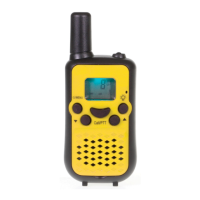
The Crystal DBH034PK is an 80-channel, 0.5 Watt UHF handheld radio designed for two-way communication. It operates on the Citizen Band Radio Stations license in Australia (ACMA) and the General User Radio License for Citizen Band Radio in New Zealand (MED).

Function Description:

The DBH034PK functions as a simplex (one-way at a time) UHF radio, allowing users to transmit and receive voice communications on designated channels. It includes features to enhance communication range, privacy, and ease of use. The radio is equipped with a transmitter and receiver, and its operation is subject to local government rules and regulations regarding UHF radio use.
Important Technical Specifications:

  • Channels: 80 UHF channels. Channels 05 and 35 are reserved for emergency use only and do not support CTCSS or DCS. Channels 22 and 23 are for Telemetry and Telecommand use, with voice communications prohibited by law. Channels 1-8 and 41-48 are used for mobile reception, while channels 31-38 and 71-78 are for mobile transmission in repeater mode.
  • Power Output: 0.5 Watt.
  • Battery: Requires 3 x AAA batteries (not supplied). The radio features a low battery meter indicator.
  • Frequency Range: UHF (specific frequencies for each channel are detailed in the manual, ranging from 476.4250 MHz to 477.4125 MHz).
  • CTCSS (Continuous Tone-Coded Squelch System): Supports 38 CTCSS codes (67.0 Hz to 250.3 Hz) plus an "OFF" setting. This allows multiple users to share a channel without interference from others not using the same sub-channel.
  • VOX (Voice Operated Exchange): Adjustable sensitivity levels (OFF, 1, 2, 3) for hands-free transmission.
  • Call Tones: 10 selectable call tone options.
  • Roger Beep: A short beep emitted after transmission to indicate completion.
  • Duplex/Repeater Mode: Available on channels 1-8 and 41-48, allowing the radio to access local repeater stations to extend transmission range. When in duplex mode, the radio transmits on a different frequency (e.g., channel 32 for reception on channel 2).
  • Speaker Volume: 8 preset levels, adjustable via UP/DOWN buttons.
  • Display: LCD screen showing channel number, volume level, battery level, TX/RX icons, VOX indicator, Key Lock indicator, scanning indicator, CTCSS code, and menu options.

Usage Features:

  • Turning On/Off: Press and hold the POWER/On/Off button until a beep sounds and the display lights up/turns off.
  • Adjusting Volume: Use the UP and DOWN buttons to select one of 8 preset volume levels. The selected volume is saved automatically.
  • Changing Channels: Press the MENU button, then use UP/DOWN buttons to scroll through channels. Press the PTT button to confirm and save the selected channel.
  • Scanning: Press and hold the DOWN button for 3 seconds to initiate scanning through all 80 channels. The "SCAN" word appears on the display. Scan direction can be changed with UP/DOWN buttons. Press PTT to stop scanning.
  • Transmitting (Sending Speech): Press and hold the PTT button, speak into the microphone (5 cm away from the mouth) in a normal tone, and release PTT when finished. The TX icon will display during transmission.
  • Receiving Calls: The radio is continuously in receive mode when not transmitting. The RX icon will display when a signal is received.
  • Squelch Control: Automatic squelch control silences background noise. To open squelch (turn off automatic control), press and hold the UP button; the RX symbol will appear, and static noise will be heard, allowing all signals to be heard.
  • Setting CTCSS: Press the MENU/PWR button twice, then use UP/DOWN buttons to select a CTCSS code (1-38) or "00" to turn it off. Press MENU to save.
  • Setting VOX Mode: Press the MENU button three times, then use UP/DOWN buttons to select a sensitivity level (OFF, 1, 2, 3). Press PTT to save. The "VOX" icon will display when active.
  • Transmitting Call Tone: Quickly press the PTT button to send a 2-second call tone.
  • Setting Call Tone: Press the MENU button four times, then use UP/DOWN buttons to select a call tone (1-10). Press PTT to save. Note: Call tone can only be used once per minute.
  • Setting Key Tone (Beep): Press the MENU button five times, then use UP/DOWN buttons to turn the key tone on or off. Press PTT to save.
  • Setting Roger Beep: Press the MENU button six times, then use UP/DOWN buttons to turn the roger beep on or off. Press PTT to save.
  • Selecting Repeat (Duplex Mode): Press the MENU button seven times, then use UP/DOWN buttons to turn repeat on or off. Press PTT to save. The "RPT" icon will display when active.
  • Menu Navigation: Press the MENU button repeatedly to cycle through options. Use UP/DOWN buttons to make changes. Press PTT to exit and save, or wait 8 seconds for automatic exit and save.

Maintenance Features:

  • Battery Installation: Slide down the battery compartment cover, insert 3 x AAA batteries according to polarity markings, and replace the cover.
  • Belt Clip Installation/Removal: The belt clip slides into the back of the radio and locks. To remove, lift the top tab and slide the clip up.
  • Antenna Care: Do not use a radio with a damaged antenna. Do not hold the antenna when the radio is "IN USE" as it reduces range and may cause harm. Do not change or modify the antenna.
  • General Care: Keep the radio out of reach of babies and young children. Avoid using outdoors during thunderstorms.
  • Warranty: The product comes with a 1-year warranty from the date of purchase against manufacturing defects. Repairs outside the warranty period are warranted for three months.
  • Technical Assistance: Contact CRYSTAL Support in Australia at TEL: 03-8587 8898 or FAX: 03-8587 8866 (Mon-Fri 9am - 5pm AEST). Digital manuals and software are available on the http://crystalm.com.au/ website.

Crystal DBH034PK Specifications

General IconGeneral
BrandCrystal
ModelDBH034PK
CategoryRadio
LanguageEnglish

Related product manuals