18
Automatic Connection
After logging your device into your network once, it is auto-
matically reconnected after each net separation. The LED
will blink on the device during the automatic connection. If the
login was successful, you will hear “Wi-Fi CONNECTED” and
the LED is illuminated. Start the MUZO Player App now.
Connection without Router
When using a connection without router, the range may be
limited according to the device used. The transmitted data
rate also depends on the physical distance. The bigger the
distance between the devices is, the less range of data trans-
mission is possible.
1. Install the MUZO Player App on your smartphone or
tablet-PC.
2. Turn the device on and choose the WiFi mode.
3. Open the WiFi menu on your smartphone or tablet-PC. Add
the WLAN speaker as WiFi network. Please refer to the
instruction manual of your smartphone or tablet-PC for this.
NOTE:
Depending on the smartphone or tablet-PC, the devices
may not connect automatically. If this is the case, follow
the instructions in section “Log Device into Home Net-
work“
“Settings in the MUZO Player App“.
4. Start the MUZO Player App.
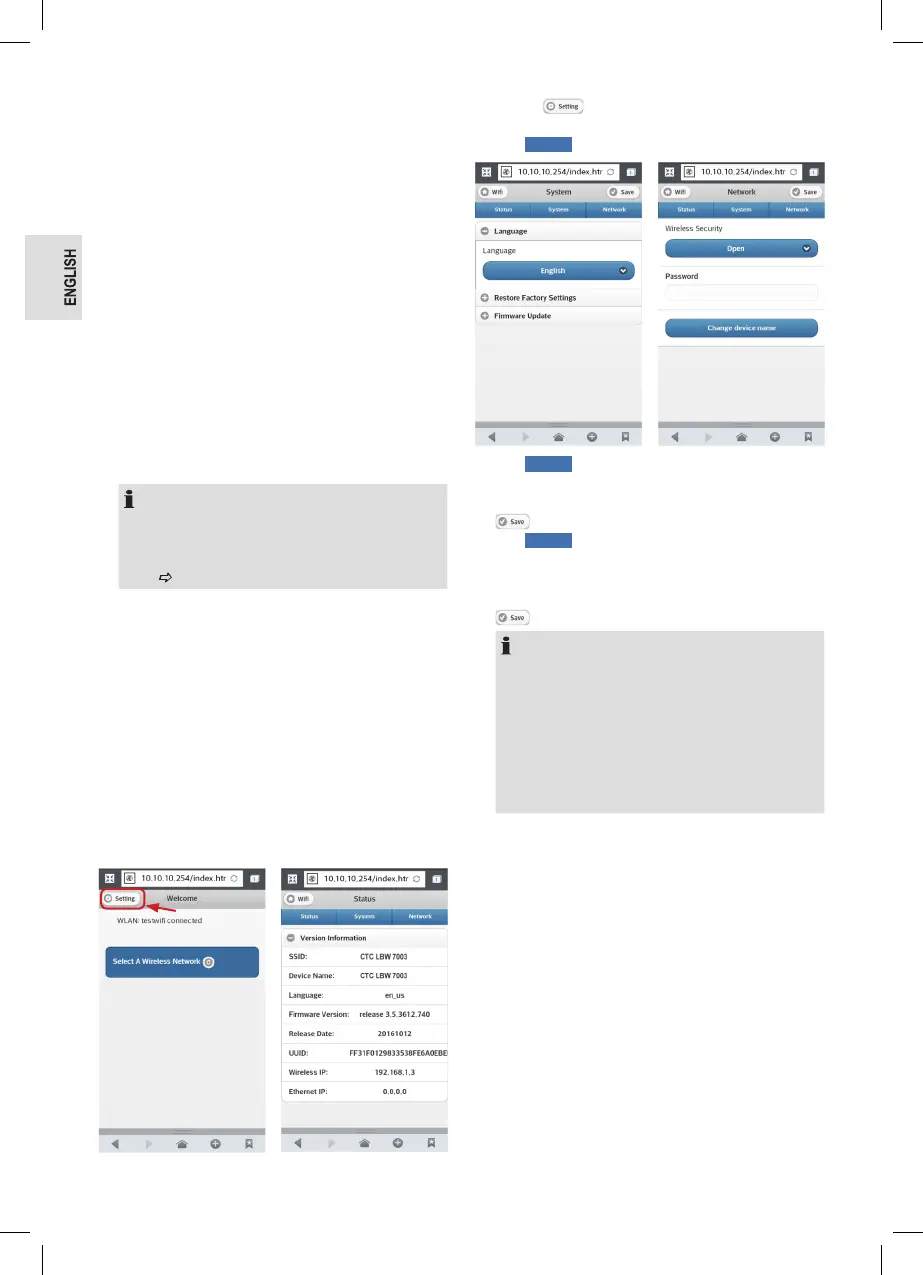
Change Speaker Settings via Browser
After you have logged the speaker into a smartphone or
tablet-PC or PC with WiFi, you can carry out various settings
via browser.
1. Turn the device on and choose the WiFi mode.
2. Open the WiFi menu on your smartphone or tablet-PC.
Add the WLAN speaker as WiFi network. Please refer to
the instruction manual of your smartphone or tablet-PC
for this.
3. Enter this address into the browser: http://10.10.10.254
4. The WiFi-network page is opened.
5. Choose to get to the setting page for the speak-
ers.
6. With
Status
the version information are displayed.
7. With
System
you can change the display language of
the speaker setting page, set the device back to factory
settings or perform a necessary rmware-update. Press
after each change.
8. With
Network
you can change the WIFI security from
open (Open) to coded (WPA PSK). The password for cod-
ing must have at least 8 characters. You can also change
the device name (SSID – Service Set Identier). Press
after each change.
NOTE:
• If the Wi-Fi-security, the password or the device
name is changed, the device must be logged in to
the Wi-Fi menu of your smartphone or tablet-PC
again.
• If you forgot your password, you can reset the device
to the factory settings. Press and hold the WPS
button on the device for approx. 10 seconds. You will
hear “RESTORE TO FACTORY SETTINGS“.
Playing Back Music Files
You have ve options to play back your own music les: via
WLAN, from PC via UPnP, via cable, wireless via Bluetooth
or via USB jack.



 To Next Page