5
Quick Instructions
Make sure the counter is properly set-up and adjusted to your requirements.
Switch on. The power switch is on the backside, close to the power cord
connector. If you receive an error message, refer to the trouble shooting section.
Press the clear button (CLR).
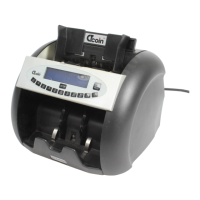
Place a stack of bank notes flat into the hopper on top of the machine. The
machine works best with the guides in the hopper adjusted to the width of the
largest note in the stack. Don’t have it wider than necessary. In automatic setting
the machine will start counting, otherwise press the START / RESET button.
The machine will start counting, stopping for dubious notes while displaying a
message about the reject. The top note on the lower stack is the offending one.
After all notes are counted, the total of accepted notes is displayed on the display
.
Features
The more specialised this machine is, there more it is adapted to country
specific currencies. With less detection features, it is more suitable for a
wider range of currencies, but less efficient in detecting counterfeit money.
Other currencies and documents (cheques) can be counted by turning off
certain detection features. The installed features can be seen from the keypad
where the abbreviations have the following meaning:
UV detection of excessive UV light reflection from the note indicating fake
notes printed on standard paper instead of special bank note paper, notes
washed with bleach or otherwise heavily soiled notes.
MG detection that finds the magnetic ink on bank notes. Go into SETUP
and press the MG key to turn the MG function on or off.
IR detection that finds areas on the bank note that are printed with special
Infra-Red ink, not visible to the human eye. Go into SETUP and press the
IR key to turn the IR function on or off.
MT detection that looks for magnetic ink spread over the whole width of the
note, a magnetic thread, a code on the magnetic thread, a currency specific
code on the thread or a denomination specific code on the thread. Go into
SETUP to turn the MT function on or off. On some machines, the MT
function is required in certain modes. A Euro note counter needs the MT
feature to positively identify the euro notes. In such a case MT is turned on
automatically when € is turned on and cannot be deselected. When turning of


 To Next Page
 Loading...