9
Remote Control
●
●
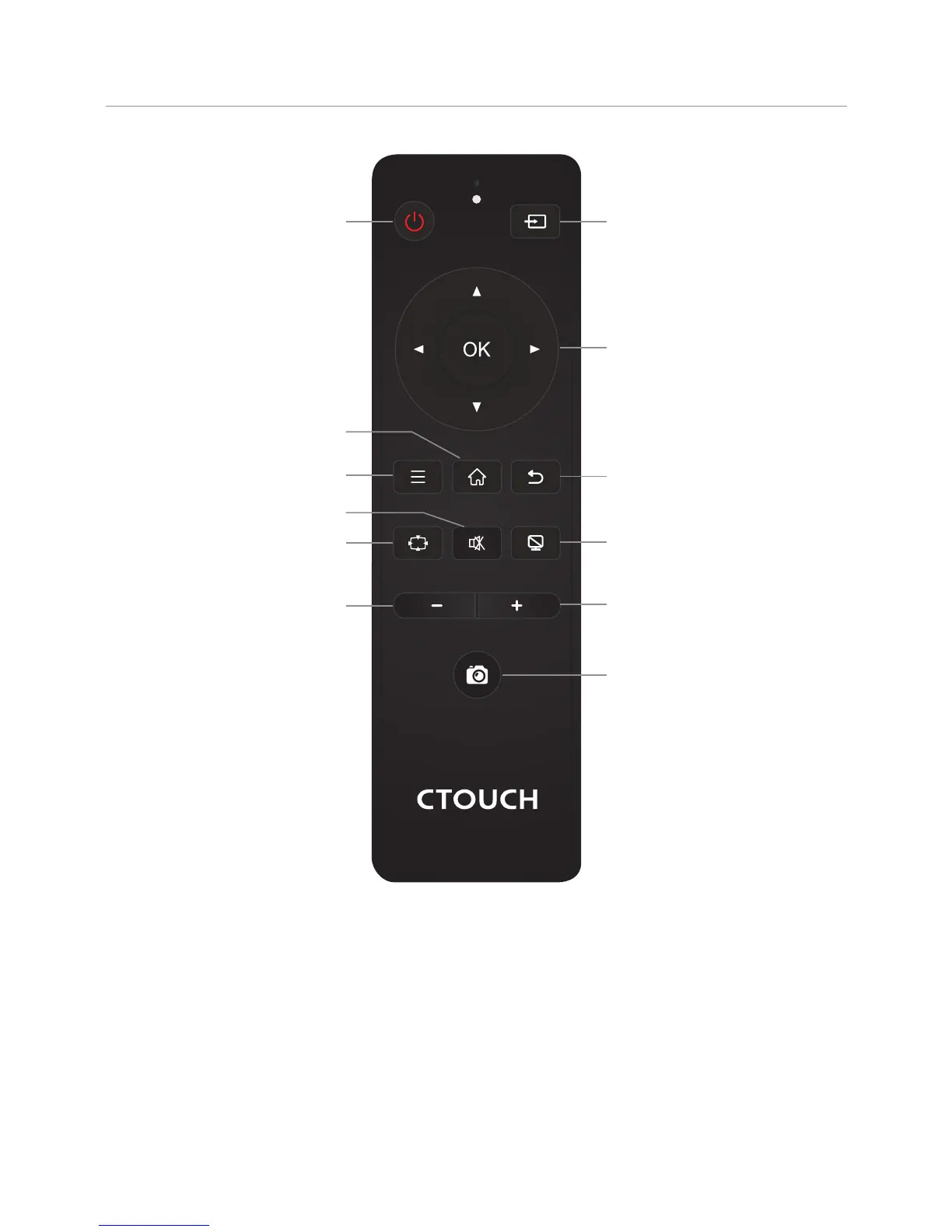
This operation manual provides a description based on operating functions with the remote control.
In different mode, some buttons may have different function.
Notes:
Switch the CTOUCH interactive display
power on or off
Display or exit input source menu
To confirm or enter a sub-menu or
toggle between options during MENU
operation.
Use Arrow buttons to navigate in on-
screen menu.
Display desktop (Home page)on the screen
Display or exit the setting menu screen
Return to previous menu
or exit the on-screen menu
VOLUME DOWN
VOLUME UP
Mute the sound
To freeze the current picture
Take screenshot and store the data
onto
take screenshot and
store the data onto
or USB Drive.
your connected USB storage
device.
If USB storage device is not
connected ,
built-in SDcard.
Folder's Location: go to ES File
Explorer
Turn off the picture on your monitor
and listen to the program audio only.



 To Next Page