Using USB Multi Media Player
You can connect a USB storage device to your to view compatible photo, movie on the
large screen of the or play compatible music so that the sound can be output from the
’s speaker.
To use USB multi media player, please go to USB source by pressing USB button. Or you can press Home button to
display Home Page and then select USB Drive icon to access.
CTOUCH interactive display
CTOUCH CTOUCH interactive
display
Notes:
· CTOUCH interactive display
·
·
·
·
· CTOUCH interactive display
Never remove the USB storage device or turn off the while using the USB storage
device.
It is recommended that you back up your USB device data.
The USB menu may vary in different situation.
If you want to pull out the USB device, please exit USB mode first. For instructions on using your USB device,
refer to the user’s manual of your USB device.
Please name your files in . Otherwise the file names can not be shown correctly.
Certain types of USB device may not be compatible with this .
Latin alphabet
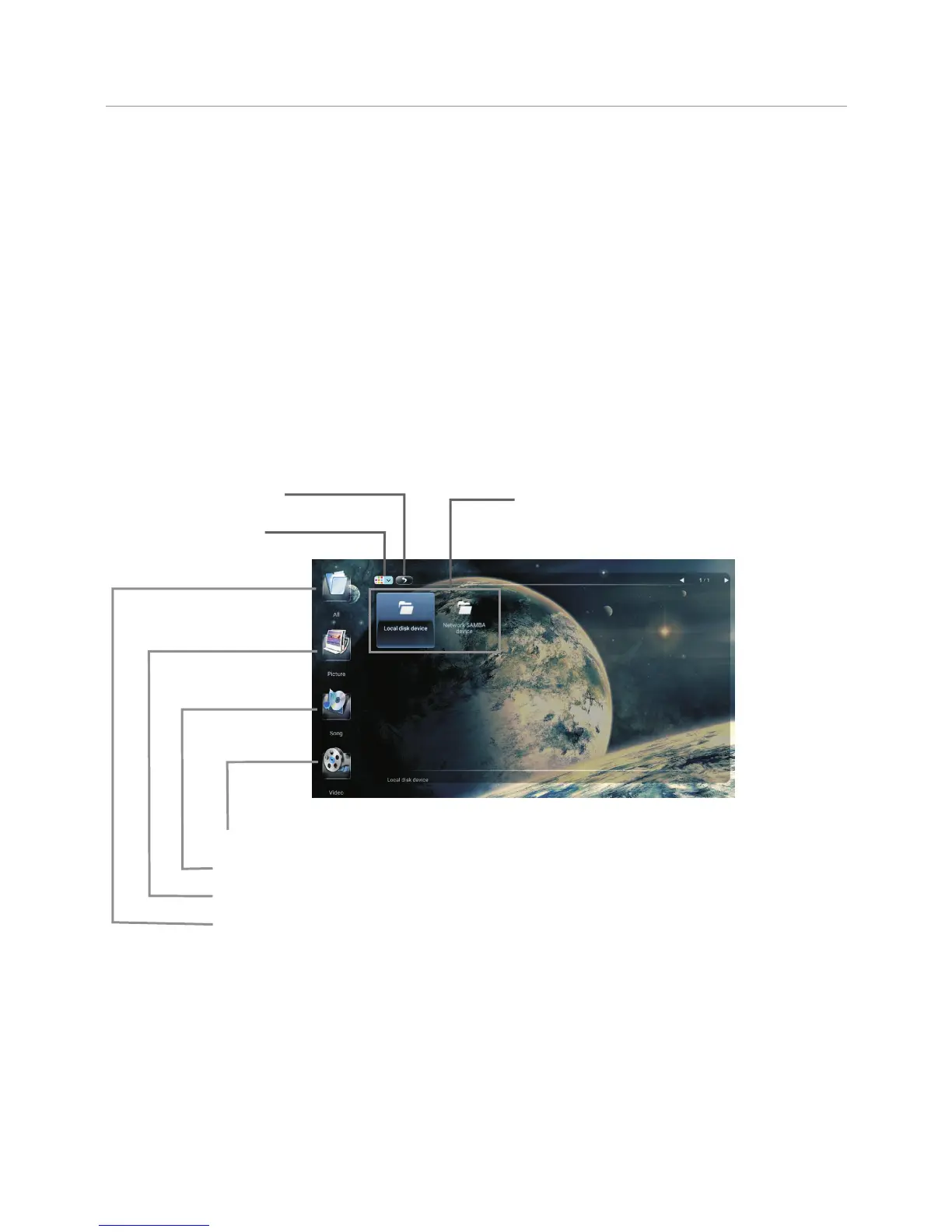
USB multi media interface introduction
24
Video: Select to play compatible movie.
Music: Select to play compatible music.
Picture: Select to view compatible photos.
All: Select to show all files so that you can easily select any file to play.
To select and play files from different sources.
(you can select from local disk device (USB device),
network SAMBA device)
Exit USB multi media
Select browse format



 To Next Page