12
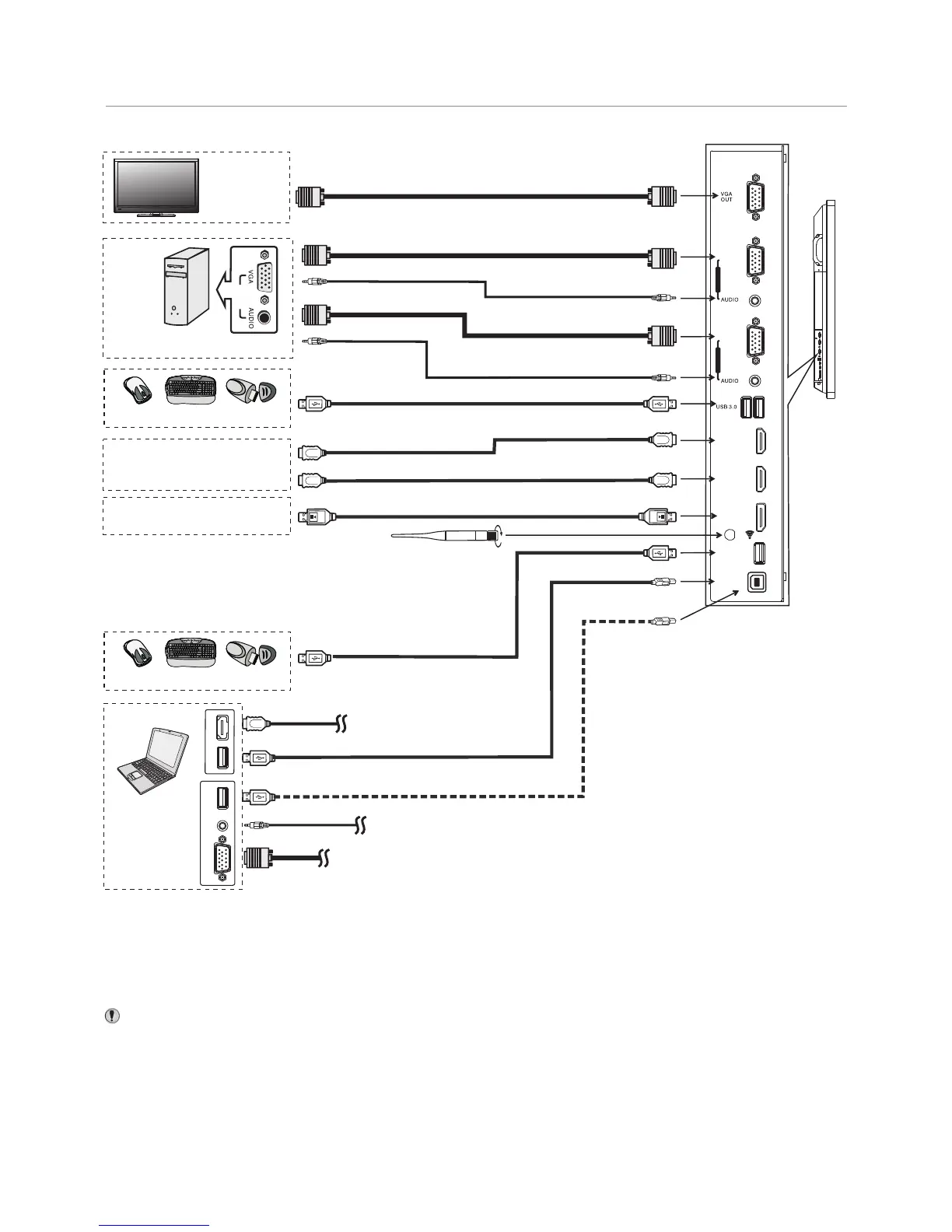
Connections
HDMI cable
USB cable
USB devices
3.0
PC OUT
VGA cable
Audio cable
VGA cable
HDMI devices
PC, etc.
VGA devices
Monitor
Audio cable
VGA cable
2.0
VGA OUT
AUDIO
OUT
USB
Computer
USB
HDMI
DP devices
USB cable
USB devices
Connect TOUCH OUT with USB cable to PC USB port.
Connect PC with VGA cable or HDMI cable. Please choose the proper
method of connection based on your device.
HDMI cable
DP cable
USB cable
USB cable
Note: After installation of the driver, it can control the external
computer by native touch control. (Only for PC、HDMI signal)
TOUCH OUT 2 takes precedence over TOUCH OUT 1 in
default. You can define it to in Lock menu
Tighten the WiFi antenna in clockwise direction. The WiFi
antenna is able to access WiFi network.
Inside AP. When network cable is plugged in WAN port,
the antenna will generate WiFi network.
Notes: 1.The is multiple USB port designed(3.0, 2.0), when connect with USB device,
please select the appropriate port.
2.The VGA output is signal of what has been currently selected from PC1/2/3.
CTOUCH interactive display
HDMI 1
(MHL)
HDMI 2
(ARC)
VGA 1
PC IN 1
VGA 2
PC IN 2
DP IN
USB 2.0
TOUCH
OUT 1



 To Next Page