Need help?
Do you have a question about the CTS HES-3106-PLUS Series and is the answer not in the manual?
Provides an overview of the managed switch's capabilities, features, ports, and standards.
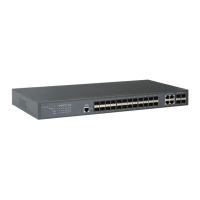
Details the physical appearance and layout of the switch's front panel, including controls and ports.
Outlines the necessary environmental conditions and prerequisites for installing the managed switch.
Lists the items expected in the standard package for verification upon delivery.
Provides guidelines for safely placing and installing the switch, avoiding damage and ensuring ventilation.
Describes the procedure for connecting the power adapter and powering on the switch.
Explains how to connect the switch to the network using RJ-45 and fiber optic ports.
Explains the meaning of various LED indicators on the switch for status monitoring.
Details methods for diagnosing problems by checking LED status and network connections.
Warns against opening the unit and states there are no user-serviceable parts.
Explains that firmware can be upgraded and directs users to the Network Management User's Manual.
The HES-3106-PLUS Series is a managed Ethernet switch designed to provide high performance and efficient network management in environments requiring multiple copper ports. This device serves as a central hub for connecting various network devices, facilitating data flow and offering advanced control over network operations.
The primary function of the HES-3106-PLUS Series is to act as a managed Ethernet switch, enabling the connection and management of multiple network devices. It supports both copper and fiber optic connections, making it versatile for different network topologies. The switch is capable of handling data at various speeds, ensuring compatibility with a wide range of devices and network infrastructures. Its managed capabilities allow for detailed configuration and monitoring of network traffic, enhancing control and security. The device is designed to be plug-and-play compliant, simplifying initial setup and operation.
The HES-3106-PLUS Series offers several features that enhance its usability and performance in a network environment.
The switch provides multiple 10/100/1000Mbps RJ-45 ports for connecting devices via standard Ethernet cables. These ports support auto-negotiation, automatically detecting the speed and duplex mode of connected devices, and MDI/MDIX auto-crossover, eliminating the need for specific cable types (straight-through or crossover). This simplifies cable management and reduces potential connection errors. Additionally, the switch includes a fiber optic uplink port, which can be configured for different speeds and fiber types, offering flexible options for connecting to a wider network or for longer-distance connections. An optional CATV RF output is also available, suggesting potential integration into cable television distribution systems.
A key aspect of the HES-3106-PLUS Series is its comprehensive management capabilities. Users can configure, control, and monitor the system through various interfaces, including Telnet, SSH, SNMP, and a web interface. This allows for remote management, providing flexibility and convenience for network administrators. The switch supports advanced features such as Storm Control, which helps prevent network congestion caused by excessive broadcast, multicast, or unknown unicast traffic. DHCP Client and DHCP Auto-Provisioning features streamline IP address assignment and device deployment. The inclusion of Text Based Config allows for script-based configuration, which can be useful for automated deployments or complex setups. SFF-8472 support provides digital diagnostic monitoring for SFP transceivers, offering real-time information about the optical module's performance. A Power Down Trap feature can alert administrators in case of power loss.
To ensure efficient data flow and prioritize critical traffic, the switch incorporates several traffic management features. It utilizes a store-and-forward switching mechanism, which checks for errors before forwarding packets, enhancing data integrity. The device supports VLANs (Virtual Local Area Networks), allowing network administrators to segment the network into smaller, isolated broadcast domains. This improves security and network performance by reducing unnecessary traffic. Support for Tag VLAN and Q-in-Q VLAN provides advanced VLAN capabilities for more complex network designs. IGMP Snooping V1 and V2 support optimizes multicast traffic delivery, preventing it from flooding the entire network. Bandwidth Control allows administrators to manage and allocate network resources effectively, ensuring fair usage and preventing any single user or application from monopolizing bandwidth. QoS features, including 802.1p and ToS Classification, enable the prioritization of different types of network traffic, such as voice or video, over less time-sensitive data. The switch is equipped with four priority queues to handle prioritized traffic effectively.
The device features a user-friendly physical interface. The front panel includes RJ-45 ports and a "Smart Lighting Control" button. This button allows users to turn off the System Status LED and Port Link LEDs, leaving only the Power LED on, which can be useful in environments where bright indicators are undesirable. The top panel features a set of LED indicators that provide real-time operational status, including power, system status, and link/activity status for each port. These indicators are crucial for quick visual diagnostics. The rear panel houses the fiber optic F/O port and an optional CATV Fiber Input. The left panel contains the power jack connector, while the right panel features a reset button.
The HES-3106-PLUS Series is designed for ease of maintenance, with features aimed at simplifying fault identification and system management.
The switch provides clear methods for identifying faults, which can significantly reduce troubleshooting time. Local checks can be performed by observing the LED indicators on the top panel. For instance, if the entire system fails, checking the Power LED status and power connection, followed by a power reset, is recommended. If a specific network link fails, users can locate the corresponding port, check its Port Link Status LED, verify the cable connection, and perform a power reset if necessary. For more advanced diagnostics, the switch supports remote checks through an SNMP manager, allowing administrators to monitor the device's status and performance from a centralized location.
The device is designed with a focus on user safety and product integrity. It contains no user-serviceable parts, and users are explicitly warned against opening the device to attempt repairs, as this could lead to personal injury, electrical shock, and void the warranty. This emphasizes that any hardware issues should be addressed by qualified personnel or through replacement. The switch also supports firmware upgrades, allowing the device's software to be updated with new features, bug fixes, or performance enhancements. New firmware versions can be obtained from sales representatives, and detailed upgrade procedures are provided in the Network Management User's Manual. This ensures that the device can remain up-to-date and adapt to evolving network requirements.
 General
| Series | HES-3106-PLUS |
|---|---|
| Number of Ports | 6 |
| Operating Temperature | -40°C to 75°C (-40°F to 167°F) |
| Power over Ethernet | Yes |
| PoE Standard | IEEE 802.3af/at |
| MAC Address Table | 8K |
| Ports | RJ45, SFP Slot |
| Fiber Port Type | SFP Slot |
| Storage Temperature | -40°C to 85°C (-40°F to 185°F) |
| Humidity | 5%~95% (Non-condensing) |


 To Next Page