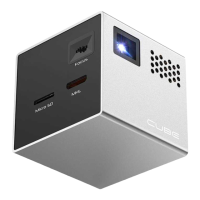
Need help?
Do you have a question about the Cube RIF 6 and is the answer not in the manual?
Provides essential safety instructions and precautions for operating the Cube projector to prevent damage or injury.
Lists supported video file formats and encoding recommendations for optimal playback quality.
Specifies supported image file formats and the maximum recommended resolution for display.
Indicates the area on the back of the Cube to point the remote for signal reception.
Instructions on how to open the remote's battery compartment and details on the battery type.
Instructions for connecting phones, tablets, or laptops via HDMI/MHL and selecting the input source.
Guide to navigating and playing movie files stored on an SD card using the remote controls.
Steps for viewing photo files from an SD card, including navigation and slideshow functionality.
Instructions for viewing plain text files (.txt) on the Cube, including page and file navigation.
Guide to selecting and playing music files from an SD card using the remote controls.
Steps required to update the Cube's firmware using a Micro SD card.
Answers to common questions regarding charging, device compatibility, and warranty information.
Troubleshooting tips for remote control issues and recommendations for the best SD card to use.

 To Next Page
 General