The document describes the Cubic Validator 3, an operations manual for a device designed for fare payment in transit systems.
Function Description
The Validator 3 serves as a contactless media reader for fare payment on vehicles or in subway systems. Travelers pay their fare by presenting contactless media (smart cards, NFC phones, smart wearables) to the device. The validator reads the media, performs authentication and local validation, calculates the required fare, deducts the correct amount, and re-encodes the remaining value or usage information on the card. It stores transaction records and transmits them to a Back Office system. The device provides immediate visual and audio feedback to the traveler regarding the transaction status.
The validator contains a Point of Interaction (POI) device, which is a highly secure Level 1/Level 2 compliant contactless payment reader. It processes open-loop contactless payment media and closed-loop proximity smart cards.
Important Technical Specifications
Physical Design:
- Dimensions: Width 6.88 inches, height 9.05 inches, depth (validator only) 3.9 inches.
- Weight: 3.3 lbs (the pole mount weighs 1.1 lbs).
Components:
- Liquid Crystal Display (LCD)
- Fast, low-power Central Processing Unit (CPU)
- Synchronous Dynamic Random-Access Memory (SDRAM)
- Flash memory
- Serial input/output (I/O) port
- Battery (2 super-capacitors for safe shutdown, lithium coin cell for Real Time Clock (RTC) power)
- Audio and speaker module
- Universal Serial Bus (USB) interfaces
- Ethernet port interface
- Bluetooth® interface
Processor:
Memory and Storage:
- RAM: 2 gigabytes
- Storage: 32 gigabytes (16 gigabytes available at a time for A/B side)
- Expansion Memory: Expansion port 2 USB 2.0 (not available while pole mounted), Serial RS232/RS485 (software selectable), Micro SD card for additional memory capacity.
Power Management:
- Power Source: Derived from the onboard power system of the bus battery.
- Voltage Range: 8 to 36 Volts, direct current (VDC) nominally, with transient handling up to 60V during ignition or cold start.
- Power Loss Protection: Supercapacitors hold power for 5 seconds, allowing for safe shutdown within 5 seconds after main power loss.
- RTC Battery Monitoring: Monitors coin cell battery voltage and generates a low event warning if replacement is needed.
Operating System:
Communications:
- Ethernet: RJ-45 connection for 10/100/1000 Base-T Ethernet, routed through the Personality Module to the POI device.
- Bluetooth: Bluetooth 5 and Bluetooth Low Energy (BLE) for configuration and diagnostics.
- Serial: RS-485 serial output.
- USB: Two internal USB 2.0 connectors for setup and maintenance (not available when pole mounted).
Supported Media Types (ISO 14443 compliant):
- EMV approved contactless payment cards
- MasterCard® M/Chip
- Visa® Contactless Payment Specification (VCPS)
- American Express® ExpressPay
- Discover® Network (D-PAS)
- MIFARE DESFire™ EV1, EV2
- MIFARE Classic™
- MIFARE Ultralight C™, MIFARE Ultralight™
- MIFARE Plus™
- NFC phones and smart wearables
Environmental Specifications:
- Humidity Range: 10 to 97 percent, non-condensing relative humidity.
- Temperature Range: -16.6 °F to 149 °F operating with solar load from direct sunlight through bus window, and -22 °F to 176 °F storage.
Reliability:
- Design Life: 12 years or greater.
- Mean Cycles Between Failures (MCBF): No less than 75,000 (if maintenance guidelines are followed; excludes mishandling, vandalism, misuse).
- Mean Time to Remove and Replace (MTTR): Less than 7 minutes.
Security and PCI Compliance:
- Capable of being certified as a component of Payment Card Industry PIN Transaction Security (PCI PTS) - POI 5.0.
- External interface compliant with PCI PTS for transaction encryption and key management.
- Remotely applies operating system patches.
- Destroys Contactless Smart Card (CSC) keys when the reader enclosure (POI device) is opened.
- Prevents unauthorized access to transaction data.
- Does not store/transmit/display/print sensitive data (e.g., personal account numbers).
- Only installs software from the Back Office with verified Message Authentication Code (MAC).
- Secure Reading and Exchange of Data (SRED) compliant with POI security standard.
- Certified to PCI PTS standard for POI devices.
- Keys stored in a tamper-resistant area of the POI device reader, injected in a secure facility.
- Data securely retained in the validator; locked to pole-mount by a high-security Medeco lock.
- Critical transaction data duplicated on a Secure Digital (SD) card.
Entry Validation Transaction Time:
- Less than 500 microseconds from properly presented media to display response.
Usage Features
User Interface:
- Display: 5-inch full-color, sunlight-readable LCD.
- Visible in all lighting conditions (day and night).
- Visual indicator for presentation area and transaction results.
- Displays messages (e.g., valid tap, low account balance).
- Transmissive mode, viewable from 0 to 45 degrees.
- Variable brightness and backlighting controlled by software, using ambient light sensor data.
- Capable of displaying video files.
- Audio Output: One weather-resistant speaker below the display.
- Plays audio tones or voice instructions using wav resource files.
- Tone frequency and duration are software configurable.
- Audio volume is software adjustable, capable of 70dB at maximum from 1 meter away.
- Provides "Good," "Bad," or "Warning" tones based on transaction results.
Operating Screens:
- In Service Screen: Black background with white "Tap below" text (or a card graphic if EMV processing is unavailable).
- Out of Service Screen: Black screen with a red "X" and "Out of service" text (no tone).
- Fare Paid Screen: Checkmark and "good" tone, displaying fare and remaining balance.
- Denied Screens (with "bad" tone):
- Not Accepted Screen: Red "X" and "Not accepted" text for invalid media.
- Card Expired Screen: Red "X" and "Card has expired" text for expired media.
- Invalid Card Screen: Red "X" and "Invalid card" text for invalid agency cards.
- Insufficient Balance Screen: Red "X" and "Insufficient balance" text when fare media has insufficient funds.
- Warning Screens (with "warning" tone):
- Tap Again Screen: Red "X" and "Please try again" text for read errors.
- Present One Card Screen: Red "X" and "Present one card" text when multiple media are detected.
- Card Already Read Screen: Checkmark and "Card already read" text if the same media is presented again within a configurable time (unless Passback features are set).
Software Features:
- Implements business rules, Back Office connectivity, user interface, and configuration.
- Calculates and deducts fares, re-encodes card values.
- Validates transit passes and re-encodes usage.
- Stores transaction records in non-volatile flash until uploaded to the Back Office.
- Receives date/time synchronization and software configurations from the Back Office.
- Software and configuration updates have version numbers and effective dates/times; devices verify package integrity before upgrade.
Maintenance Features
Preventive Maintenance Schedule (Suggested Intervals):
- As needed:
- Visually inspect exterior of the Validator.
- Clean the exterior of the Validator.
- Every 3 months:
- Verify no visible damage to Validator housing, mount, and screen.
- Verify Validator mount is tight and secure.
- Verify Validator ID Label is present and readable.
- Remove foreign substances from Validator housing.
- Verify no visible damage to Antenna housing.
- Verify antenna mount is tight and secure.
- Remove foreign substances from antenna housing.
- Verify function of Validator by tapping an AFC 2.0 card to the reader.
- Every 6 months:
- LED test.
- Speaker test.
- Card reader test.
- Verify all connections at PDBs are secure.
- Verify PDBs are mounted securely.
- Change lithium coin cell battery (every 6 years).
Cleaning Procedures:
- Visual Inspection: Daily check for grease, grime, dirt, wear, vandalism, damage, and structural integrity. Clean if needed.
- Cleaning Materials (Table 4-1):
- Lint-free clean cloths: For general cleaning.
- Mild Detergent and Water (1/30 ratio solution of water and sodium lauryl sulfate/sodium laurate sulfate, e.g., Dawn in a spray bottle): For general exterior cleaning.
- Windex: For screen cleaning (use on glass only).
- Cleaning Steps:
- Dampen a lint-free cloth with detergent solution and wipe surfaces to remove dirt/grime (use sparingly).
- Remove surplus cleaner with a clean, damp (water only), lint-free cloth.
- Dampen a lint-free cloth with Windex and wipe the validator front glass.
- Caution: Do not use abrasive or metallic scrub pads. Only use clean, lint-free cloths dampened as described. Cleaning solutions may contain chemicals dangerous to health.

 Need help?
 General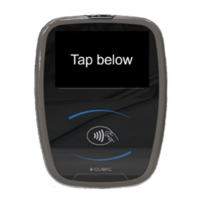

 To Next Page