9
III. Using Your Cubii JR2
Adjusting the Resistance
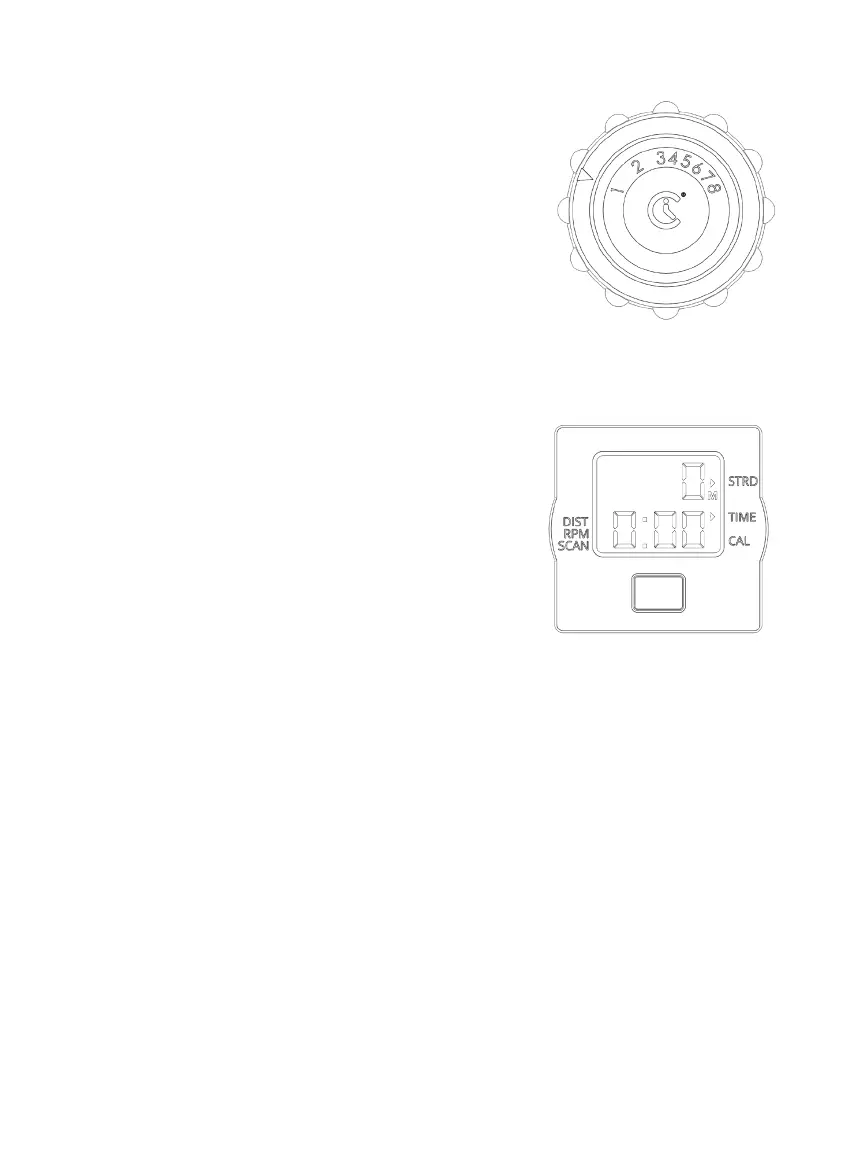
Cubii JR2 has 8 resistance levels. Adjust
your workout intensity by turning the
resistance control knob. Level 1 is the
lowest intensity and level 8 is the highest.
We recommend you begin at Level 1 and
increase the intensity gradually over time.
LCD Display Monitor
You can track your workout using the LCD Display Monitor
It tracks the stats listed below:
1. Strides (0-9999)
2. Calories (0-999.9 kcal)
3. Distance (0-999.9 mi or km)
4. Time (0:00-99:59 hour:min)
5. RPM (0-999 strides/min)
• Press the silver button to switch
between stats. Select scan to alternate automatically.
• Screen turns on when the silver button is pressed or when you
start pedaling. Screen turns off after 4 minutes of inactivity.
• To reset stats, press and hold the silver button until all
segments turn black (about 3 seconds), then let go. Replacing
the battery will also reset the stats. When the stats reach
maximum values, they will reset to zero.
• To switch from Miles (M) to Kilometers (K), press and hold the
silver button for at least 6 seconds. All segments will turn
black twice during this time. After the second ash of black
segments, release the button. When displaying distance,
you will see the M is now showing a K, or vice versa.


 To Next Page