CUSTOMIzED TEMPERATURE CONTROL
20
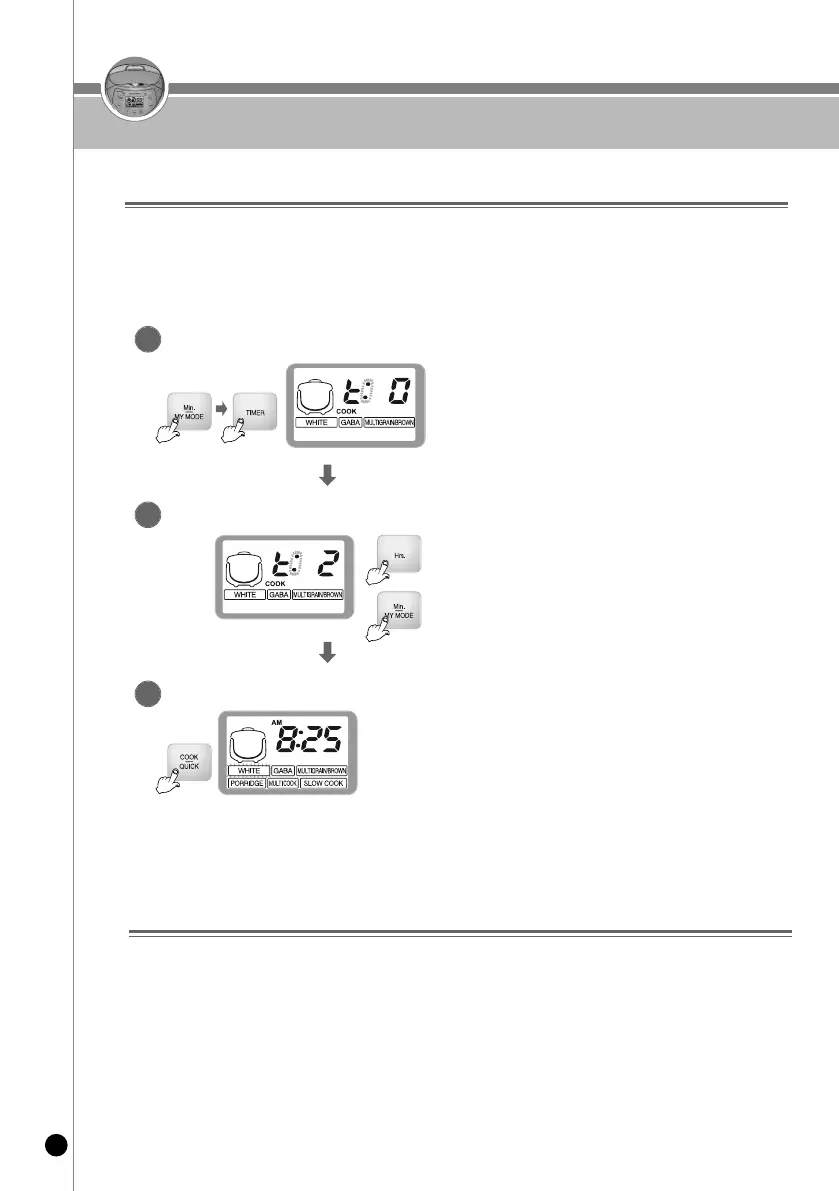
While the rice cooker is in standby mode, press the
Min./MY MODE button and then the TIMER button
to enter into temperature control.
Entering into temperature control
1
After selecting your desired temperature level,
press the Cook/Quick button to save you
temperature setting.
Saving your Temperature Level
3
Press the Hrs button to increase temperature level.
*Please note that maximum temperature level is 2.
Press the Min./MY MODE button to decrease the
temperature level.
*Please note that minimum temperature level is -2.
Adjusting the Temperature Level
2
reset function (Customization/function)
1. This function is used to reset all setting values such as customized rice taste, customized cooking,
customized warming and keep warm during sleep.
2. Press the Cancel button for 5 seconds in standby mode.
3. The current time is initialized at 12:00. For the setting of the current time, refer to Page 13.
▶ You can adjust the cooking temperature level on your rice cooker according to your preference.
- High Temperature Levels : for cereals, old rice and soft-boiled rice.
- Low Temperature Levels : for newly harvested rice.
▶ To adjust the temperature level, please follow the steps below:
Customized temperature Control



 To Next Page