17
Neighbors. IfanadjacentlandownerisusingCuddeLink
youmustbeondifferentchannels.Todetermineifa
neighborisusingCuddeLinkturnoffyourHomecamera
andusetheRFLEVELonaRemotecameratolistenfor
radiotraffic.Ifanumericalsignalisdisplayedyoumust
selectadifferentchannel.With16channelsavailable
youshouldbeabletofindaclearchannel.
More than 16 cameras.AsingleCuddeLinknetworkis
limitedto16cameras.Ifyourequiremorethan16
camerasyoucandeployaddionalnetworks.Each
networkmustbeassignedauniqueCLCHANNEL.
CL LEVEL (Remote only).CLLEVELisasignalstrength
meter.Therangeis10(poor)to99(best).Alevel
above20issufficientforreliableimagetransmission.
Wehavesuccessfullydeployednetworkswithsignal
levelaslowas10,however,forbestperformancetryto
keepthelevelsat20andabove.
Adisplayof‐‐‐‐indicatesnosignalisreceived.
Itmaytakeupto2minutesfortheCLLEVELto
detectasignal.Ifasignalisnotreceivedwithina
fewminutesyoumustmoveclosertothenearest
acvecamera.
ItisgoodpraccetoenableCLLEVELwhilenexttoa
deployedcameraandthenmoveawayfromthat
camerawiththeCLLEVELdisplayed.Thisallowsyou
tomonitorthelevelasyoumovefurtherfromthe
deployedcamera.
CLLEVELwillvaryandyoumayseethelevel
fluctuateasyouareobservingandfromdaytoday.
18
Ifasignalcannotbereceivedyouwillneedtomove
closertoaconnectedcamera.Ifyouneverreceivea
signalverifytheHOMEcameraisARMedandtheCL
CHANissettothesamenumberonallcameras.
CL INFO (Home only) displaysthestatusofnodesonthe
CuddeLinknetwork.Thiswaspreviouslydiscussedinthe
Geng Startedsecon.
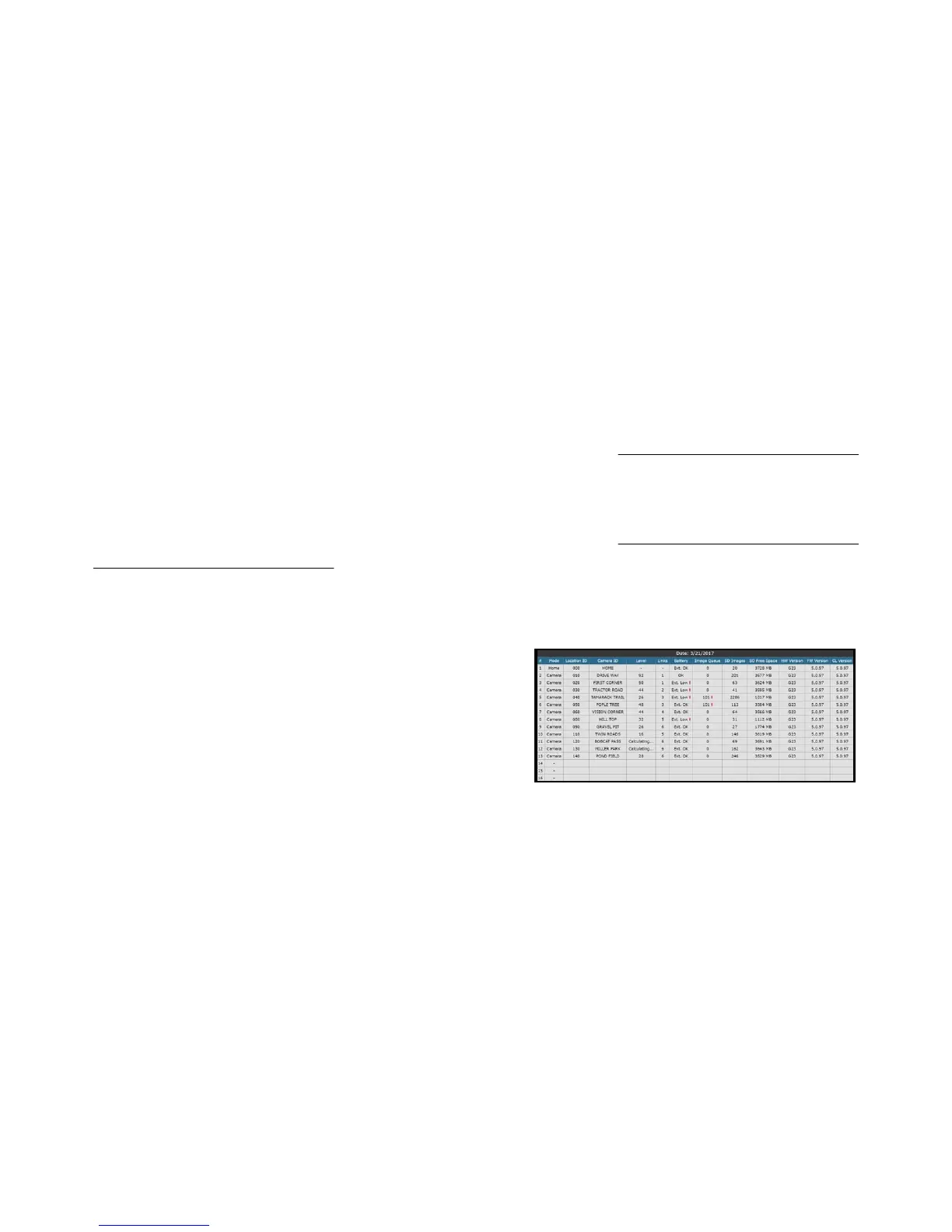
CL INFO file.Adetailedstatusreportisavailableonthe
Homecamera’sSDcard.ClickthefileCuddelink.htmlin
theDCIM\400CUDDYfolder.Yourcomputer’sweb
browserwilldisplayareportthatshowsdetailedstatusof
allcamerasonthenetwork.
Lookforred&yellow!symbolsonthechart.Thosearewarningsfor
signalstrength,baeryorSDcardpotenalissues.Calculang…
indicatesthatthesignallevelisnotknownyet.
Links indicateshow
manyothercamerastheimagesroutetogetHome.



 To Next Page