7
OPERATING INSTRUCTIONS
Setting the Clock
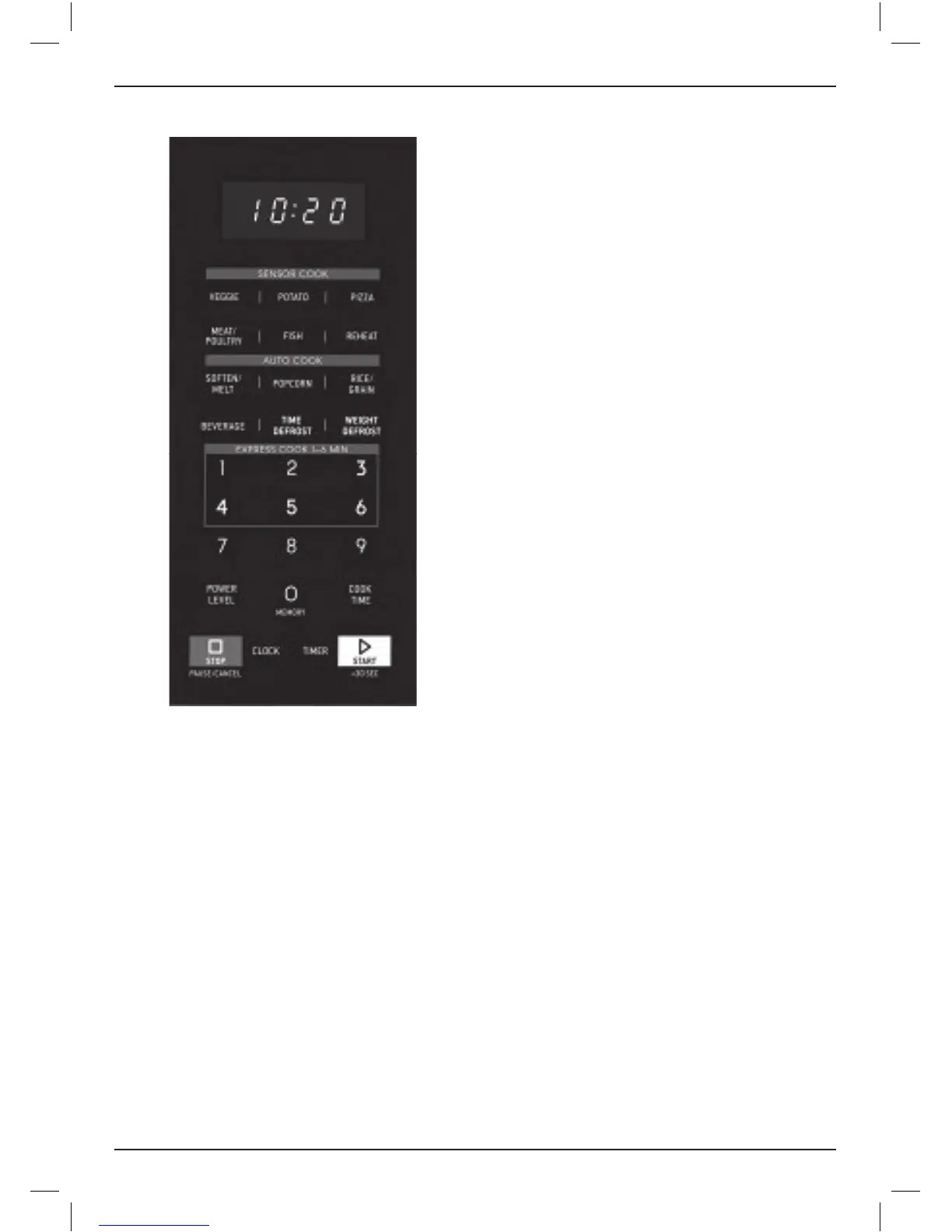
1. Press CLOCK once, the display will show
“00:00” or the previously set time. The first digit
will flash.
2. Press the number buttons to set time. Example:
To set 12:30, press 1–2–3–0.
NOTE: This is a 12-hour clock. Time will
display from 01:00–12:59.
3. Once time is selected, press CLOCK
to set, [:] will flash in display.
NOTE: While setting the clock, if the
STOP PAUSE/CANCEL button is pressed or if
nothing is selected for more than 1 minute,
the clock will go back to the previous setting.
Setting the Timer
1. Press TIMER once, the display will show
“00:00.”
Press the number buttons to set the timer.
Example: To set 12 minutes and 15 seconds,
press 1–2–1–5.
NOTE: Timer can be set for up to 99 minutes
and 99 seconds, 99:99.
2. Press START +30 SEC to confirm the setting.
Time will begin to count down on the display.
3. When time has elapsed, the tone will beep
5 times.
NOTE: When the kitchen timer is engaged, the
oven will not start with any program and the
oven light will not light.
Stop Pause/Cancel
Press the STOP PAUSE/CANCEL button to:
• Start over if you make a mistake while
programming.
• Cancel the timer.
• Stop the oven during operation.
(Press START +30SEC to resume.)
• Cancel a program during operation
(press twice).
COOKING OPTIONS
Cooking with Inverter Technology
Most microwaves cycle on and off, adjusting
power to maintain the level selected. An Inverter
delivers a steady stream of power at the specific
level you set. This cooks food more evenly for
superior flavor and texture, and reduces cooked
edges when defrosting. This precision microwave
technology delivers superior results.
Manual Cook
You can manually program your desired cooking
time and power level.
1. Press COOK TIME once, the screen will display
“00:00.”
2. Use the number buttons to input desired
cooking time, up to 99 minutes and 99
seconds.
3. Select power level from the chart on page 8.
Press POWER LEVEL, the screen will display
PL10 (default power level: 100%). To select
a different power level, press a number button,
1 through 9.
4. Once cook time and power level are
programmed, press START +30SEC to start
cooking. Time will begin to count down in
the display.


 To Next Page