13
C. USING THE PRODUCT
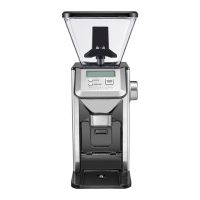
1. Remove the lid from the bean hopper.
2. Fill this hopper ensuring that the lid can close
securely without forcing. The maximum capacity
is 250 g. Nevertheless, make sure you add enough
beans to obtain the desired amount of coffee.
3. Plug the lead into the mains.
4. Select the grind setting by turning the hopper to the
desired setting. The higher the number, the coarser
the grind. Use 1-6 for espresso, 7-12 for a classic filter
coffee machine and 13-18 for a French press. Your
selection will be displayed on the LCD screen.
5. Select the cup setting: Press the cup selector
repeatedly until the desired number appears on
the LCD screen. You can choose between 1 and 14
cups. Keep the button pressed to scroll through the
numbers more quickly.
6. Press the “Start/Stop” button to start grinding.
Notes:
• A safety locking system prevents the appliance from
starting when the hopper and grind chamber are not
properly secured.
• If the grind chamber is too full, the grind might block
the chute. If this is the case, the unit will not work and
the LCD screen will flash. To clear the chute, clean it
using a brush specifically designed for this purpose.
• If the grinder stops during a cycle and “ HHH ” appears
on the LCD screen, it is likely that the motor has
overheated. Allow the unit to cool for 30 minutes.
Check that “ HHH ” is no longer displayed on the LCD
screen and start the unit again.
7. The grinder will stop automatically when the amount
of coffee beans selected is ground.
8. Pull the grind chamber toward you to remove from
the unit.
D. PAUSE OR CANCEL GRINDING
a. To pause the grinding, press “ Start/Stop ”. The grinder
will stop and the countdown timer will start to flash.
Press “ Start/Stop ” again to resume.
Note: The unit will stay in pause for up to 5 minutes
before cancelling the grind.
b. To cancel the grind, hold “ Start/Stop ” for 2 to 3
seconds.
E. MANUAL GRIND
After selecting your grind setting, you can also opt to
control how much coffee the unit will grind. To do so,
follow steps 1 to 4 in section 3C, then press and hold
the manual button until the desired amount of coffee
has been ground. The LCD screen will display “ M ”.
NOTE: To prevent overflow when using the manual
feature, the grinder will automatically stop grinding
when the maximum capacity has been reached.


 To Next Page