2
1
3
3
4
8 9765
6
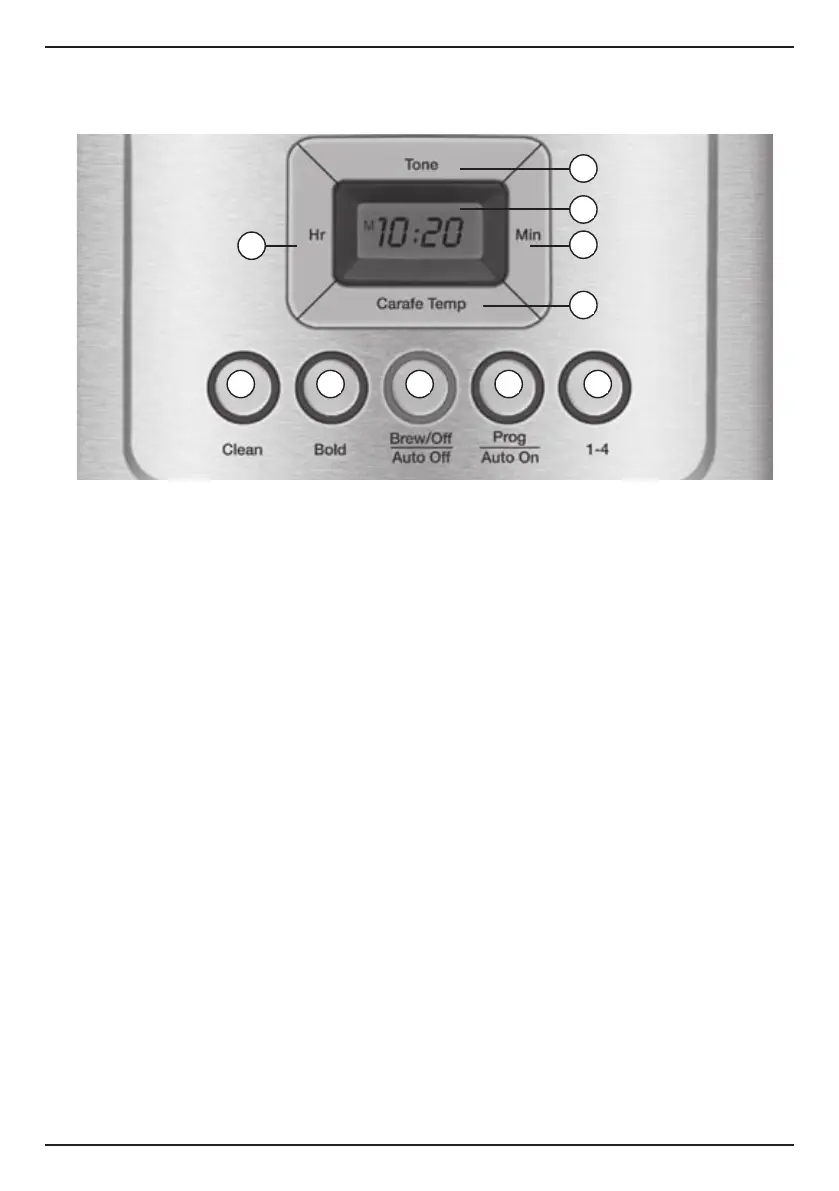
1. Ready Tone Button
Lets you turn an audible “Brew Cycle
Finished” alert on or off.
2. Blue Backlit Display
Displays time of day, Auto On and Auto
Off times.
A. Low, Medium and High (L,M,H)
warming plate indicators.
B. Ready Tone off icon appears when
Ready Tone is off.
3. Hour and Minute Buttons
Use to set hours and minutes for time of
day, Auto On and Auto Off times.
4. Carafe Temperature Button
Adjusts warming plate temperature to
Low, Medium or High to keep freshly
brewed coffee at the temperature you
prefer.
5. Clean Button
Red indicator appears when it is time to
decalcify your coffeemaker.
6. Bold Flavor Strength Button
Lets you choose bold or regular coffee
flavor; blue indicator appears when bold
is selected.
7. Brew/Off & Auto Off Button
Turns coffeemaker on and off. Use the
Auto Off feature to program the time you
want the coffeemaker to shut off – from 0
to 4 hours after brew cycle is finished.
8. Prog/Auto On Button
Lets you program coffeemaker to
automatically begin brewing up to 24
hours in advance.
9. 1–4 Cup Button
Adjusts brew process to maximize coffee
flavor when brewing fewer than 5 cups.
Blue indicator appears when function is
selected.
GETTING TO KNOW YOUR CONTROL PANEL
Detailed programming and use instructions are on pages 7 and 8.





 To Next Page