8
CHARCOAL
WATER FILTER
INSERTING THE WATER FILTER
1. Remove the lter from the polybag and soak,
fully immersed, in cold tap water for 15 min-
utes.
2. Lift the water lter holder out of the water
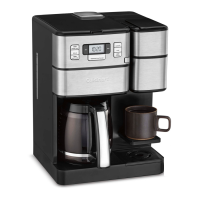
reservoir of the 12-cup coffeemaker side.
3. Press down on the lter compartment and pull
toward you to open.
4. Place lter into the holder and snap closed.
Be careful – improper placement can tear the
lter skin.
5. Flush lter by running cold tap water
through holes in bottom of compartment
for 10 seconds.
6. Allow the filter to drain completely.
7. Slide the water lter holder back into
the channel in the water reservoir,
pushing down to the base of the unit.
NOTE: Repeat steps 1–7 above on
the single-serve side.
NOTE: We recommend changing the water
filter every 60 days or after 60 uses,
and more often if you have hard water.
Replacement filters can be purchased in stores,
by calling Cuisinart Consumer Service, or at
www.cuisinart.ca
SETTING UP YOUR
12-CUP COFFEEMAKER
INITIAL CLEANING
Perform an initial cleaning before making your
first beverage. Follow these instructions, without
adding coffee.
1. Insert charcoal water lter. Follow directions for
the preparation and insertion of the charcoal water
lter on the left.
2. Fill water reservoir.
3. Make sure carafe is in place.
4. If you haven’t already, plug the power cord into
an independent outlet. When the coffeemaker
is plugged in, the unit will automatically turn on.
5. Press the Carafe button once to enter Carafe
Brew Mode. Press the Grind Off button to
deactivate the grinder.
6. Press the Brew/Off/Auto Off button once and
allow the brew cycle to run until it is complete.
7. The one-time cleaning process is complete.
Discard hot water. Your coffeemaker is ready
to use.
PROGRAMMING YOUR
12-CUP COFFEEMAKER
SETTING THE CLOCK
When the coffeemaker is plugged in, 12:00 will flash
in the display for 10 seconds, indicating the unit is in
Time Set mode. If 12:00 stops flashing, simply press
and hold Hour or Minute button to return to flashing
Time Set mode. Hold buttons down to scroll through
the digits, or press and release to advance one digit
at a time. When scrolling, the numbers will advance
slowly and then speed up. When the number displayed
approaches the desired time, press and release to
advance one digit at a time. Be sure the PM indicator
is on if a PM time is desired.


 To Next Page
 Loading...