3534
• What’s in the Box of CUlight FR 36N?
1. Flash unit 2. Mini stand 3. Protection case 4. Diffuser 5. Instruc-
tion manual
• Separately Sold Accessories
The product can be used in combination with the following
separately sold accessories:
1. CUlight 2.4 GHz Trigger Kit RT 500N & RR 500N
2. CUlight 2.4 GHz Transmitter RT 500N
3. CUlight 2.4 GHz Receiver RR 500N
4. CUlight Softbox Kit with Flashgun Holder SB 40-40 Kit
5. CUlight Softbox Kit with Flashgun Holder SB 60-60 Kit
6. CUlight Light Stand LS 2000 (216 cm)
7. CUlight Light Stand LS 2500 (308 cm)
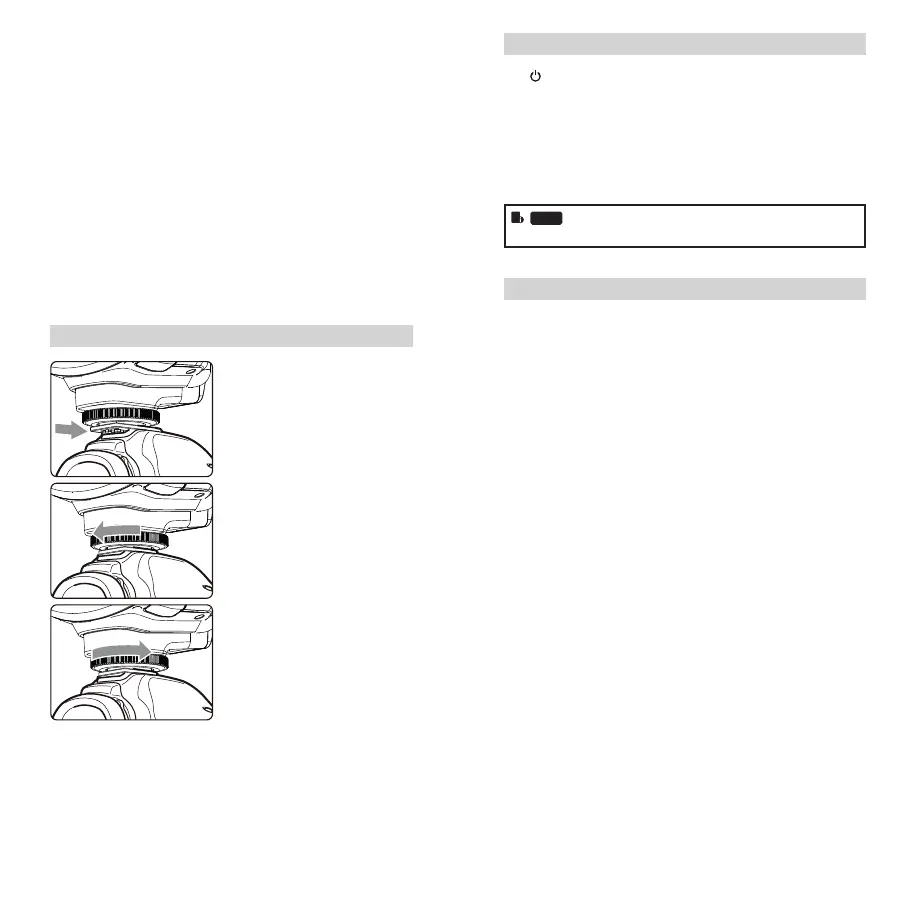
Attaching to a Camera
1
Attach the Camera Flash.
• Slip the camera ash’s
mounting foot into the
camera’s hotshoe all the
way.
2
Secure the Camera Flash.
• Rotate the lock ring on
the mounting foot until it
locks up.
3
Detach the Camera Flash.
• Rotate the lock ring on the
mounting foot until it is
loosened.
Power Management
Use Power Switch to power the ash unit on (Long press
the button for one second) or off. Turn off if it will not be used
for an extended period of time. Setting as a master ash, it will
turn the power off automatically after a certain period (approx.
90 seconds) of idle use. Pressing the camera shutter halfway
or pressing any ash button will wake up the ash unit. Setting
as a slave ash, it will enter sleep mode after a certain period
(adjustable, 60 minutes by default) of idle use. Pressing any ash
button will wake it up.
Disabling Auto Power Off function is recommended
when the ash is used off camera. (C.Fn-ST, Page 46)
Flash Mode: TTL Autoash
This ash has three ash modes: TTL, Manual (M), and Multi
(Stroboscopic). In TTL mode, the camera and the ash will work
together to calculate the correct exposure for the subject and the
background. In this mode, multiple TTL functions are available:
FEC, HSS, second curtain sync, etc.
* Press < MODE > Mode Selection Button and three ash modes
will display on the LCD panel one by one with each pressing.
TTL Mode
Press < MODE > Mode Selection Button to enter TTL mode. The
LCD panel will display < TTL >.
• Press the camera release button halfway to focus.
• When the shutter button is fully pressed, the ash will re a
preash that the camera will use to calculate exposure and ash
output the instant before the photo is taken.
Display “HI”: When the ash output value is up to the maximum
value, “HI” will be displayed and blinking for 3 seconds. Adjust
the camera’s parameters if underexposure appears.
Display “Lo”: When the ash output value is up to the minimum
value, “Lo” will be displayed and blinking for 3 seconds. Adjust
the camera’s parameters if overexposure appears.
FR36_BDA_Nikon 171005.indd 34-35 06.10.2017 15:10:48



 To Next Page