3736
FEC: Flash Exposure Compensation
With FEC function, this ash can adjust from -3 to +3 in 1/3rd
stops. It is useful in situations where minor adjusting of the TTL
system is needed based on the environment.
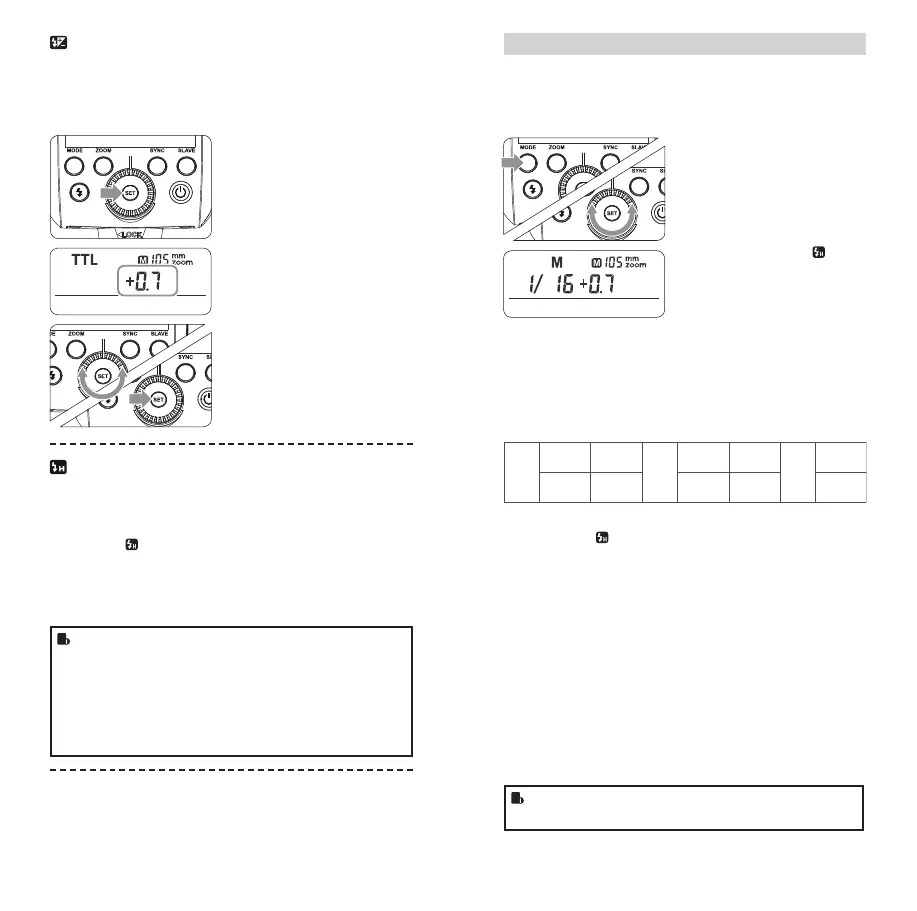
Setting FEC:
1
Press the SET Button
and the ash exposure
compensation amount will
be highlighted on the LCD
panel.
2
Turn the Select Dial to set
the amount.
• “0.3”means 1/3 step,
“0.7”means 2/3 step.
• To cancel the ash expo-
sure compensation, set
the amount to “+0”.
3
Press < SET > button again
to conrm the setting.
High-Speed Sync
High Speed Sync (FP ash) enables the ash to synchronize with
all camera shutter speeds. This is convenient when you want to
use aperture priority for ll-ash portraits.
Choose the <
> button:
1. Press the <SYNC> button to turn on high-speed sync function.
2. Set the Nikon camera high-speed sync to 1/320s (auto FP) or
1/250s (auto FP).
• With high-speed sync, the faster the shutter speed, the
shorter the effective ash range.
• Multi ash mode cannot be set in high-speed sync mode.
• Over-temperature protection may be activated after 15
consecutive high-speed sync ashes.
• Try to avoid using high-speed sync ash, which will cut
short ash tube’s lifetime.
Second-Curtain Sync
With a slow shutter speed, you can create a light train following
the subject. The ash res right before the shutter closes.
• Set Nikon camera to Rear mode.
M: Manual Flash
The ash output is adjustable from 1/1 full power to 1/128th
power in 1/3rd stop increments. To obtain a correct ash expo-
sure, use a hand-held ash meter to determine the required ash
output.
1
Press < MODE > button so
that < M > is displayed.
2
Turn the Select Dial to
choose a desired ash
output amount. In
high-speed sync mode, the
adjustable ash range is
1/16~1/1.
Flash Output Range
The following table makes it easier to see how the stop changes
in terms of f/stop when you increase or decrease the ash output.
For example, when you decrease the ash output to 1/2, 1/2-0.3,
or 1/2- 0.7, and then increase the ash output to more than 1/2,
1/2+0.3, 1/2+0.7, and 1/1 will be displayed.
Figures displayed when reducing ash output level
1/41/2
1/1
1/1-0.3
1/2+0.7
1/1-0.7
1/2+0.3
1/2-0.3
1/4+0.7
1/2-0.7
1/4+0.3
······
······
Figures displayed when increasing ash output level
In the M mode,
high-speed sync and second curtain sync
functions can be achieved.
Optical S1 Secondary Unit Setting
In M manual ash mode, press the < SLAVE > button so that
this ash can function as an optic S1 secondary ash with optic
sensor. With this function, the ash will re synchronously when
the main ash res, the same effect as that by the use of radio
triggers. This helps create multiple lighting effects.
Optical S2 Secondary Unit Setting
Press the < SLAVE > button so that this ash can also function as
an optic S2 secondary ash with optic sensor in M manual ash
mode. This is useful when cameras have pre-ash function. With
this function, the ash will ignore a single “preash” from the
main ash and will only re in response to the second, actual ash
from the main unit.
• S1 and S2 optic triggering and off camera high-speed
mode are only available in M manual ash mode.
FR36_BDA_Nikon 171005.indd 36-37 06.10.2017 15:10:49



 To Next Page