EasyManua.ls Logo

Curtis KCR2609 - User Manual

Curtis KCR2609
14 pages
Print Icon
To Next Page IconTo Next Page
Loading...
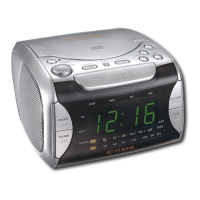
UNDERCOUNTER CD CLOCK RADIO
MODEL NO. KCR2609
OWNER'S MANUAL
PLEASE READ BEFORE OPERATING THIS EQUIPMENT
TIMER
IR
MHz
FM
J AZ Z
S LE E P

Questions and Answers

  • L
    Laura AcevedoJul 29, 2025
    Why is there no sound coming from my Curtis KCR2609?
    • D
      Dylan ClarkJul 29, 2025
      If you cannot hear any sound from your Curtis Clock Radio, ensure that the power is on by pressing the POWER button. Also, check that the VOLUME control isn't set to the minimum and that the mute function is off (press Mute on the remote). Another possible reason is that the station has not been tuned properly, so tune it correctly. The FM reception might be weak, so extend the FM cord. Finally, make sure that the correct function is selected by pressing the FUNCTION button to the radio position.
  • S
    Sandra AlexanderAug 14, 2025
    What to do if my Curtis KCR2609 CD won't play?
    • R
      Roger StarkAug 14, 2025
      If your Curtis Clock Radio CD isn't playing, first, check that the CD is placed correctly in the tray with the label side up and that the CD compartment door is closed. If the issue persists, the CD might be scratched, dirty, or warped; try another CD or clean the CD with a soft cloth. Also, make sure that the function switch is set to CD. Finally, condensation may have formed inside the CD player; remove the CD and leave the CD tray open for about one hour to let the CD player dry out.

Summary

SAFETY PRECAUTIONS

Electric Shock and Laser Hazards

Addresses risks of electric shock from internal components and hazards from laser radiation.

RADIO SETUP AND INITIAL OPERATION

Setting up your radio

Instructions for mounting the radio and checking AM reception for optimal performance.

Installing the backup batteries

Guide to installing two AAA backup batteries to ensure settings are stored correctly.

RADIO OPERATING MODES

Using your radio

Steps to turn on the radio by plugging in the AC power cord and pressing the POWER button.

Setting the time

Procedure to set the clock to 12-hour or 24-hour format and enter the current hour and minute.

Setting the kitchen timer

Instructions for using the kitchen timer, adjusting duration, and silencing alarms.

Activating sleep function

How to set the sleep timer to automatically turn off the unit after a specified period.

RADIO RECEPTION AND PRESET MANAGEMENT

Listening to your radio

Steps to turn on the radio, select AM/FM, tune stations, and adjust volume for listening.

TUNING, EQUALIZER, AND CD PLAYBACK

CD PLAYLIST FUNCTIONS

EXTERNAL AUDIO AND MAINTENANCE

CD LENS CLEANING

TROUBLESHOOTING GUIDE

Curtis KCR2609 Specifications

General IconGeneral
BrandCurtis
ModelKCR2609
CategoryClock Radio
TypeDigital
DisplayLED
Snooze FunctionYes
Wake up toRadio or Buzzer
Alarm FunctionYes
Radio TypeAM/FM
Power SourceAC Power
Battery BackupYes

Related product manuals