INTRODUCTION
11
INTRODUCTION
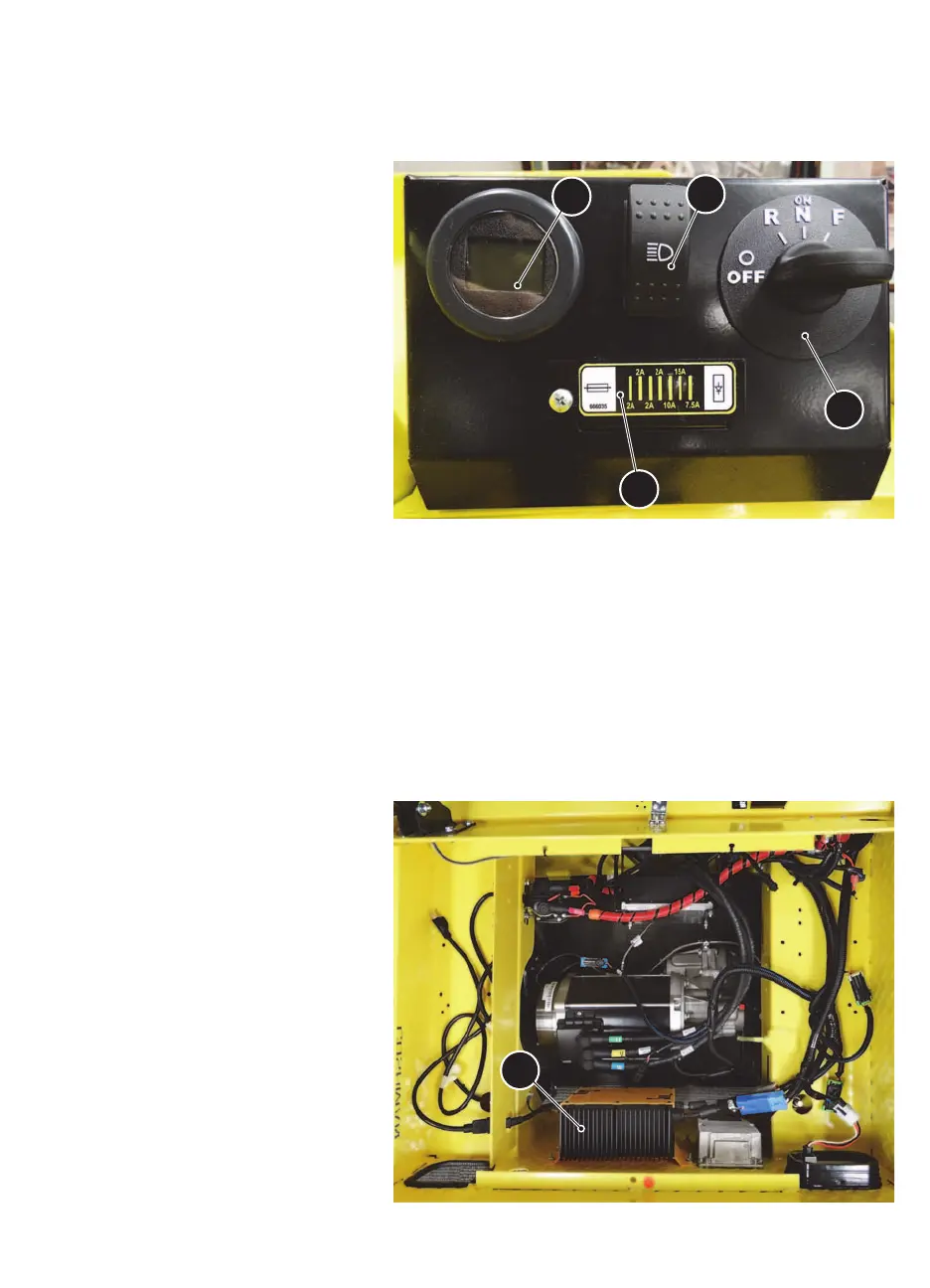
OPERATOR CONTROLS AND FEATURES
1. Key Switch/Direction
Selector
Located on the control panel, this switch
enables the basic electrical system of the
vehicle to be turned on and off by turning
the key.
This switch also permits the selection of
either Forward, Reverse or Neutral/ON.
Vehicle should be left in the OFF position
and the key removed when unattended.
• OFF position
• Reverse position
• Neutral (ON) position
• Forward position
2. Light Switch
Located next to the key switch, this switch
will turn the headlight (if equipped) and tail-
light on or off.
3. Multi-functional Gauge
The vehicle is equipped with a multi-functional gauge located in the control panel. The multi-functional gauge displays
information for:
• Hour Meter
• State of Charge
• Fault Codes
• Speedometer
4. Fuse Panel
To access the vehicle fuses, loosen the Phillips head screw and pivot door open. Always replace a blown fuse with the
size specified on the fuse door decal.
5. On-Board Charger
The on-board charger is located under the
cargo bed panel. Refer to the On-Board
Charger section in the Operating Proce-
dures section of this manual. There is a cord
storage area next to the on-board charger
for the AC power cord.


 To Next Page