9
Innovating SMART Hose Assembly Solutions Since 1979
TEST PROCEDURE
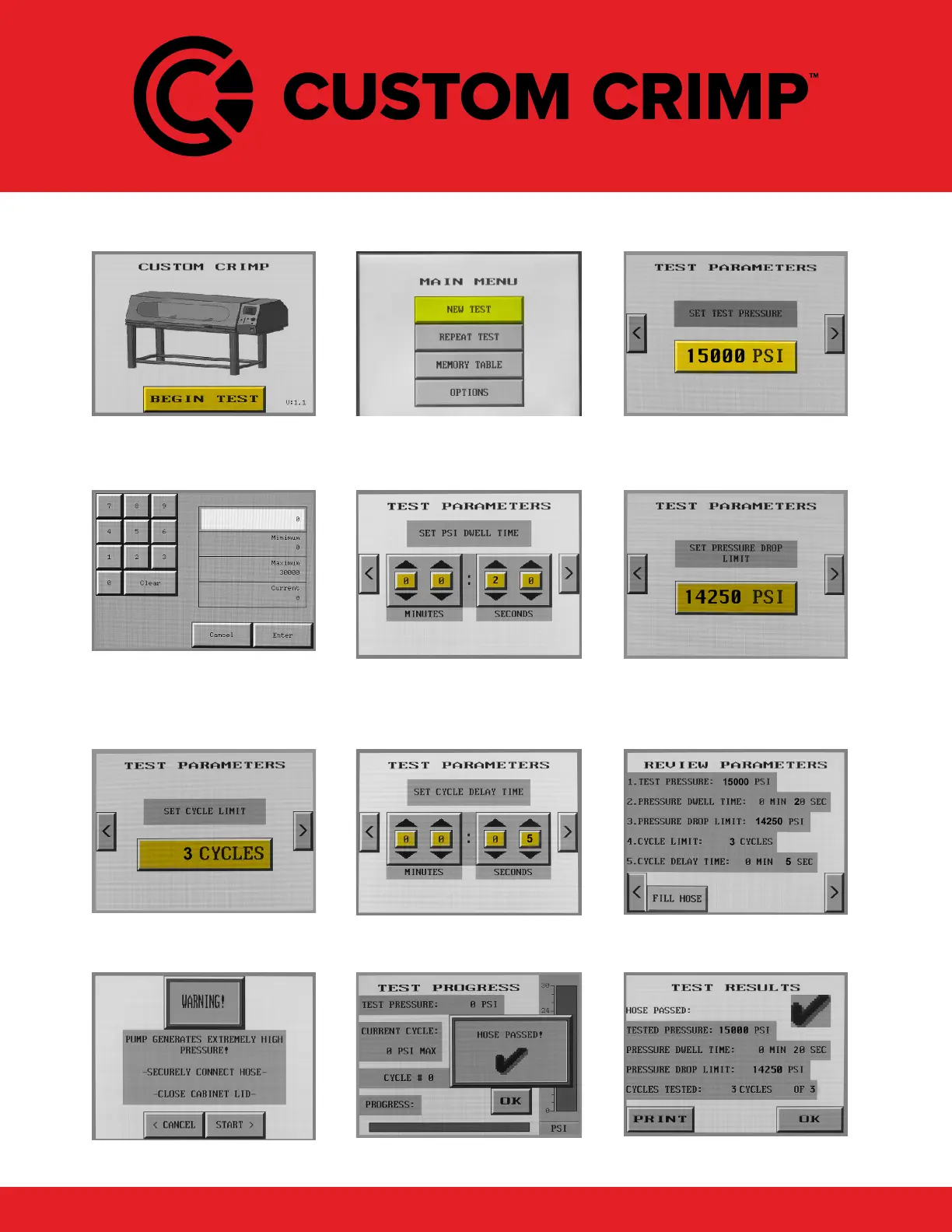
After the system initializes and
loads, the “Begin Test” screen
will appear.
Press New Test to initiate a test
or Repeat Test to repeat the
previous test.
Press the pressure button to
bring up the pressure adjust-
ment keypad screen.
Enter the max test pressure.
Keypads will pop up for set-
tings not indicated by arrows as
shown on the next screen.
Set the time for the hose to be
held at test pressure.
Enter the minimum pressure
allowed during the test cycle.
Enter the number of times that
the test is to be run.
Enter the delay time between
test cycles.
Review test parameters prior to
running test.
If test parameters and test
setup is correct, start test.
Test progress is shown. Test results are shown and the
print option is available.



 To Next Page