Installation Instructions - Page 2
Questions? Call us at: 1 (800) 382-1388 M-TH 8:30AM-5:30PM / FR 9:30AM-5:30PM EST
10-2017
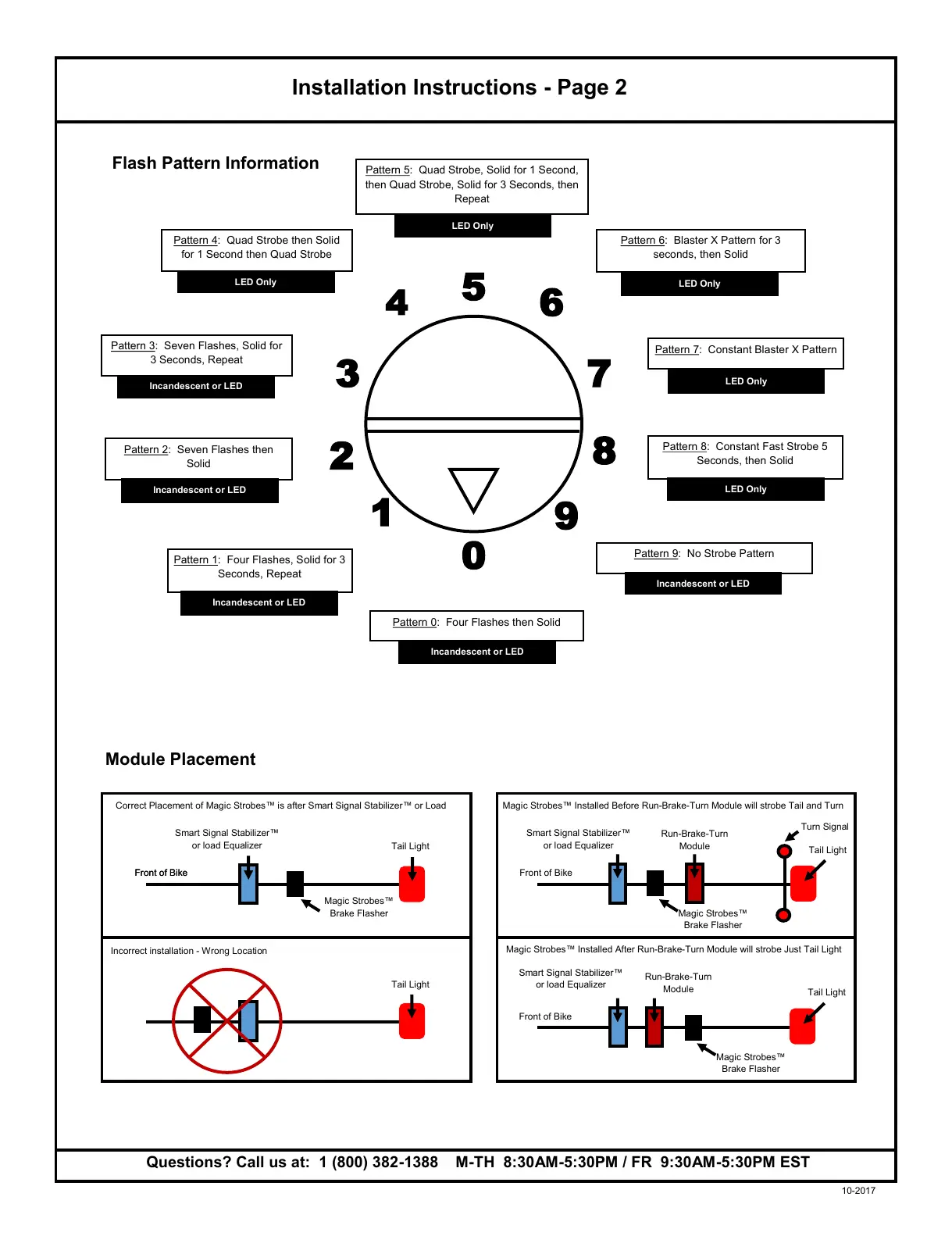
Flash Pattern Information
8
0
1
9
2
4
3
6
5
7
Pattern 0: Four Flashes then Solid
Pattern 1: Four Flashes, Solid for 3
Seconds, Repeat
Pattern 2: Seven Flashes then
Solid
Pattern 3: Seven Flashes, Solid for
3 Seconds, Repeat
Pattern 4: Quad Strobe then Solid
for 1 Second then Quad Strobe
Pattern 5: Quad Strobe, Solid for 1 Second,
then Quad Strobe, Solid for 3 Seconds, then
Repeat
Pattern 6: Blaster X Pattern for 3
seconds, then Solid
Pattern 7: Constant Blaster X Pattern
Pattern 8: Constant Fast Strobe 5
Seconds, then Solid
Pattern 9: No Strobe Pattern
Incandescent or LED
Incandescent or LED
Incandescent or LED
Incandescent or LED
LED Only
LED Only
LED Only
LED Only
LED Only
Incandescent or LED
Module Placement
Smart Signal Stabilizer™
or load Equalizer
Tail Light
Smart Signal Stabilizer™
or load Equalizer
Magic Strobes™
Brake Flasher
Front of Bike
Correct Placement of Magic Strobes™ is after Smart Signal Stabilizer™ or Load
Incorrect installation - Wrong Location
Tail Light
Tail Light
Smart Signal Stabilizer™
or load Equalizer
Magic Strobes™
Brake Flasher
Run-Brake-Turn
Module
Magic Strobes™
Brake Flasher
Run-Brake-Turn
Module
Tail Light
Magic Strobes™ Installed Before Run-Brake-Turn Module will strobe Tail and Turn
Magic Strobes™ Installed After Run-Brake-Turn Module will strobe Just Tail Light
Turn Signal
Front of Bike
Front of Bike
Front of Bike


 To Previous Page